BK Web API/App CD | dev-web-01
BK Web API/App CD : dev-web-01
Create new CD Pipeline
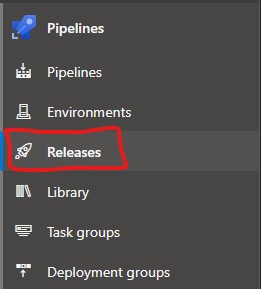
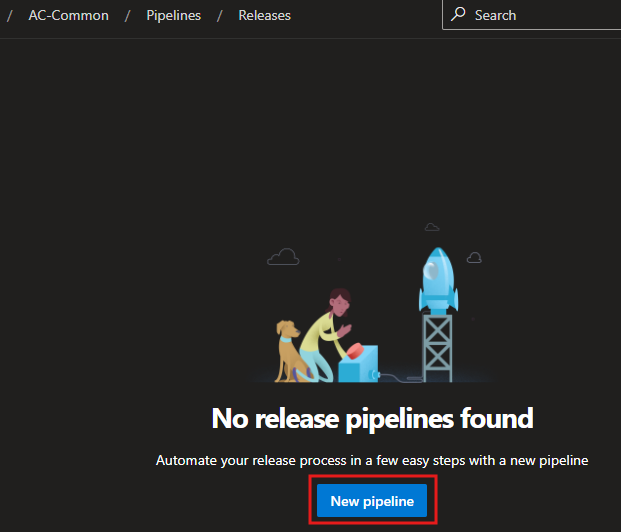
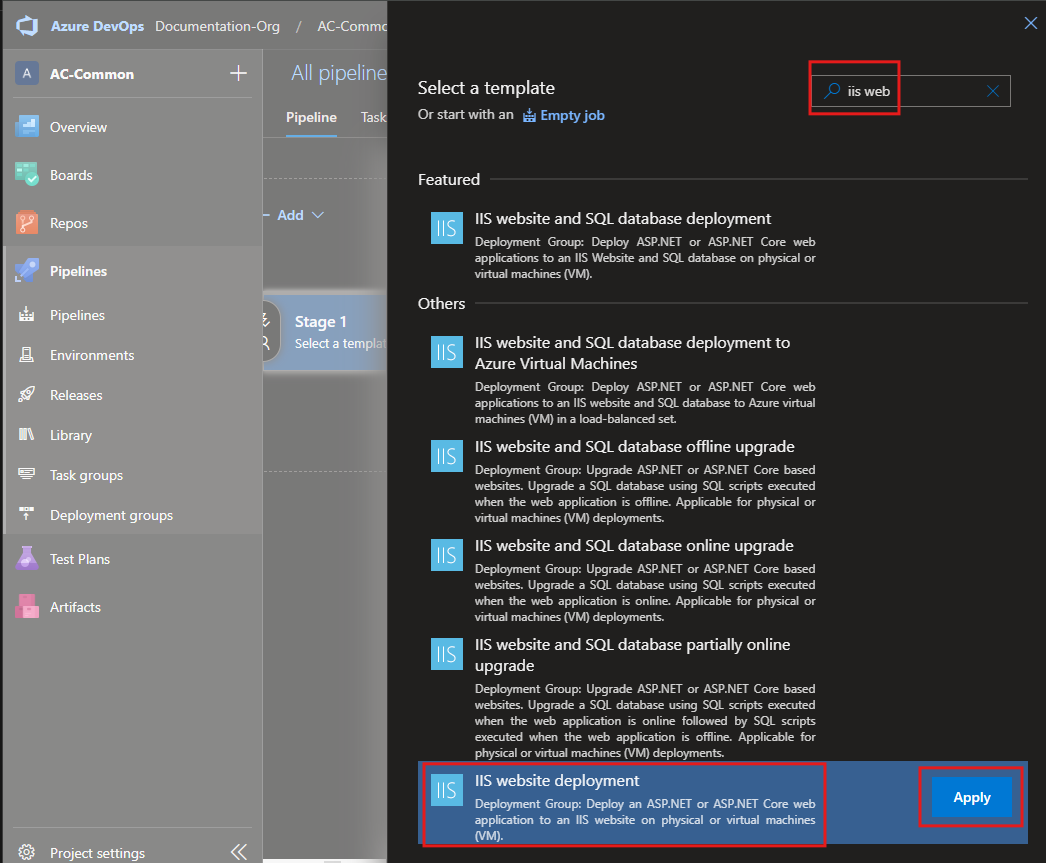
CD Template Selection
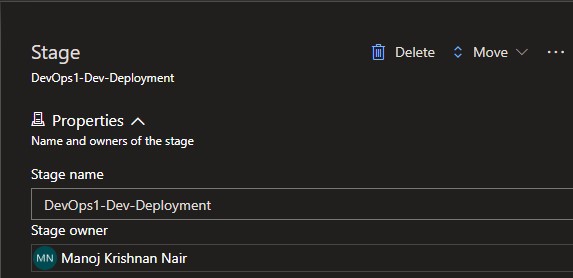
Naming the Stage
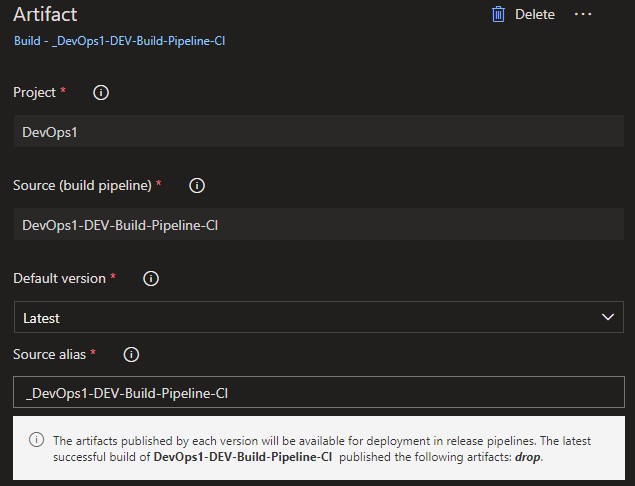
Linking the CI Pipeline

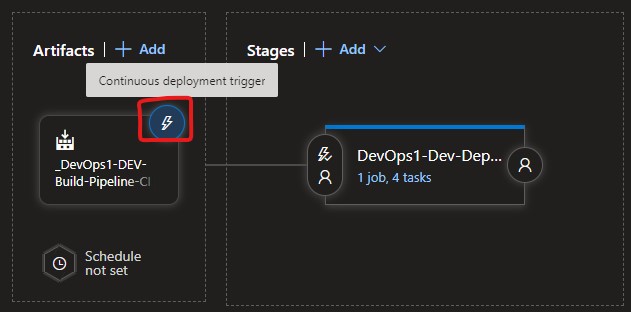
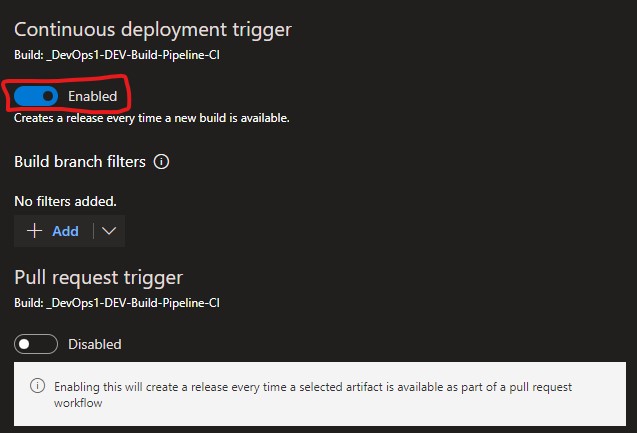
CD Trigger
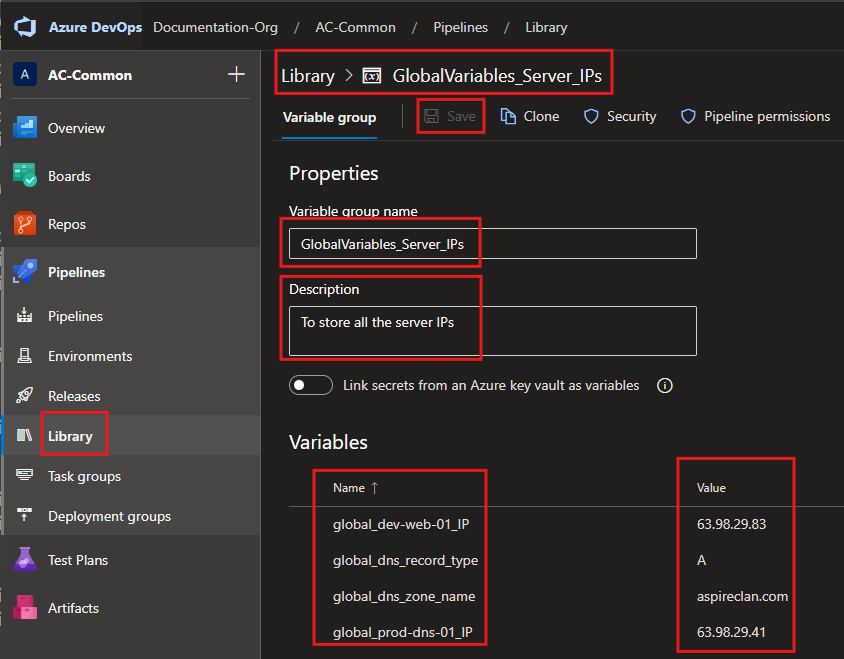
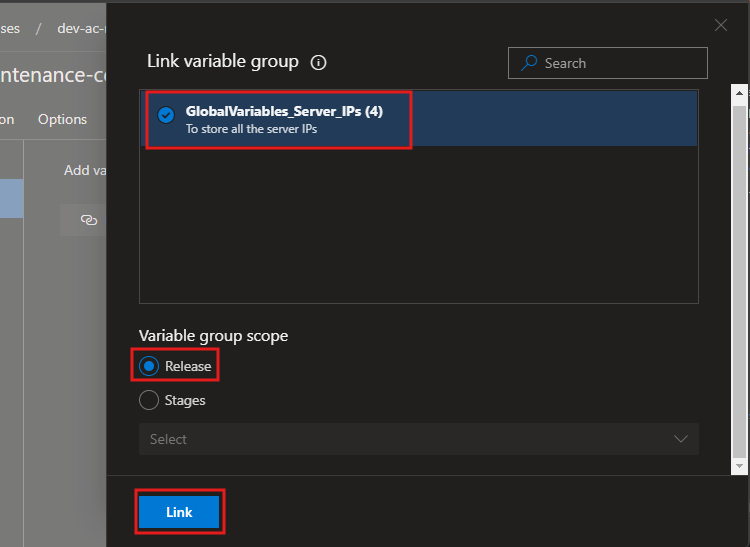
Gloval Pipeline Variables
Local Pipeline Variables
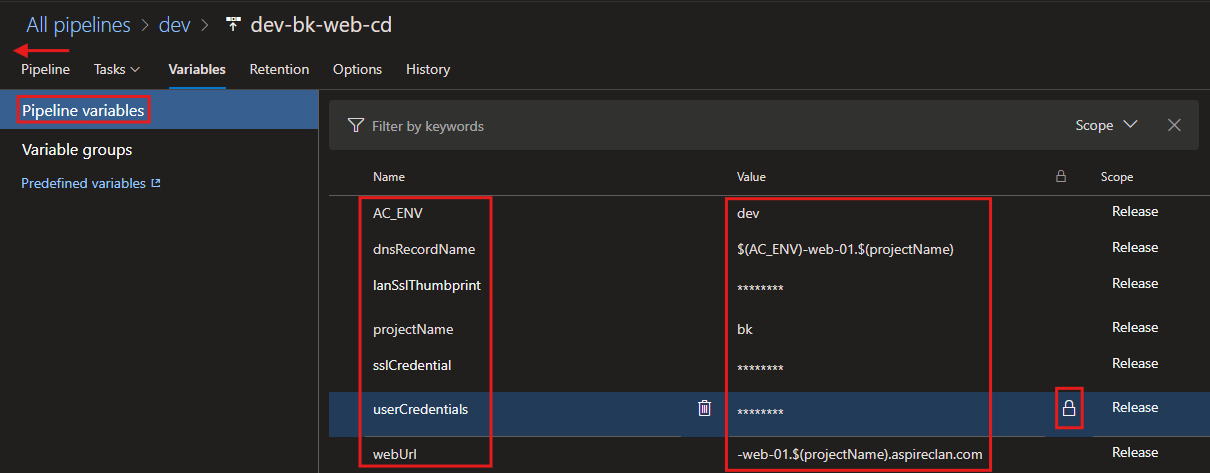
AC_ENV|devdnsRecordName|$(AC_ENV)-web-01.$(projectName)lanSslThumbprint|c4f160f44a2d9381c5f211971aa7db644d890c9cprojectName|bksslCredential|cert@aspireclan123#userCredentials|ved_srvcacc@Bk123#webUrl|-web-01.$(projectName).aspireclan.com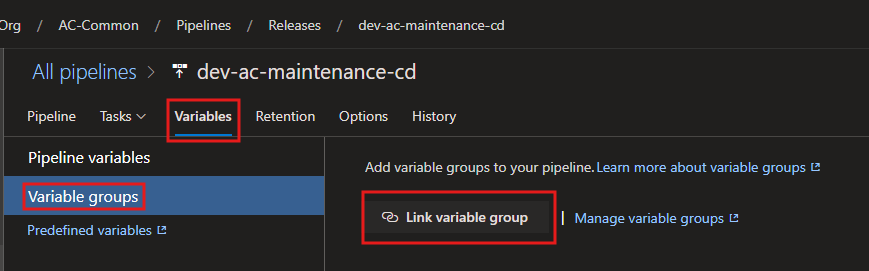
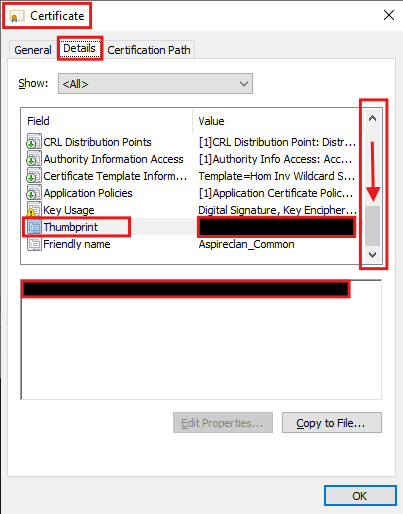
SSL Certificate Thumbprint
Pipeline Tasks
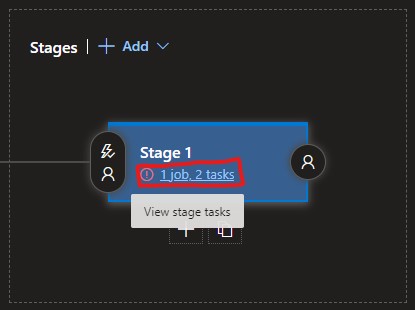
Deployment Process
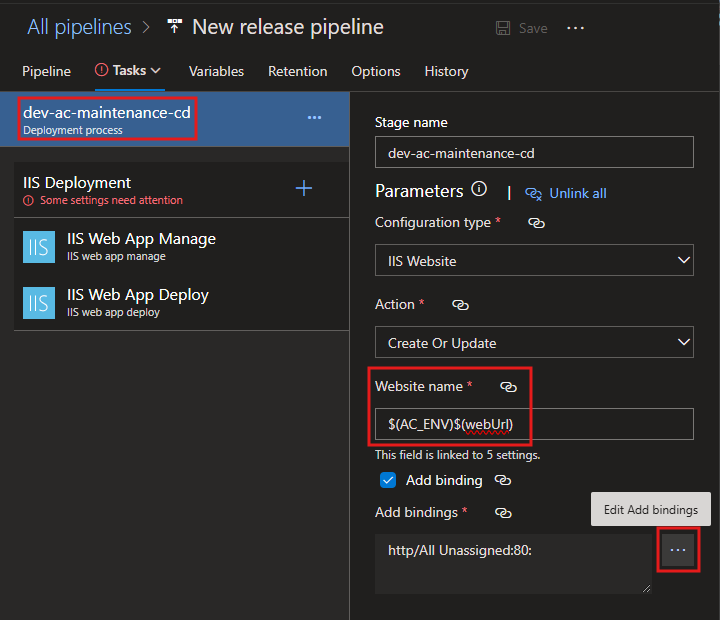
Website name:
$(AC_ENV)$(webUrl)Add Bindings
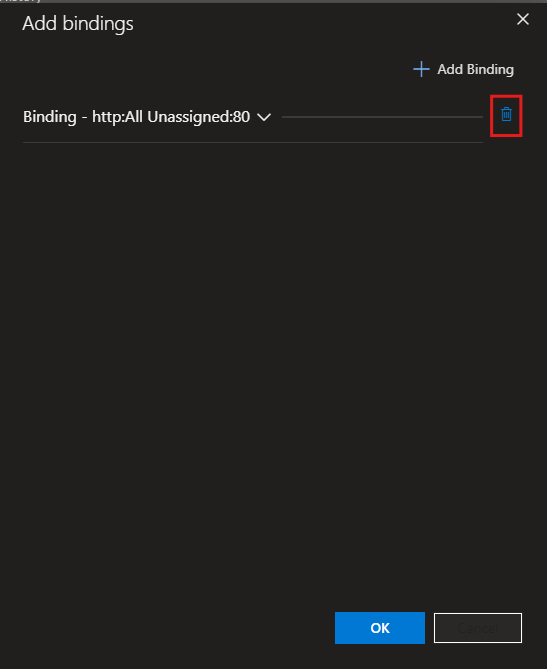
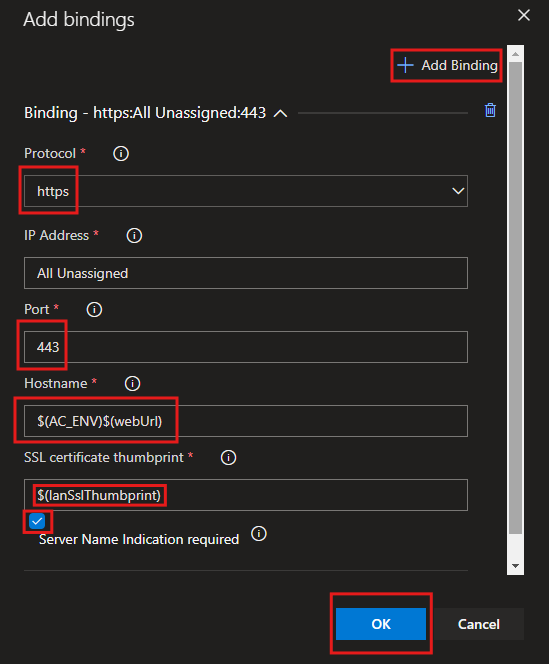
Hostname:
$(AC_ENV)$(webUrl)SSl Certificate Thumbprint:
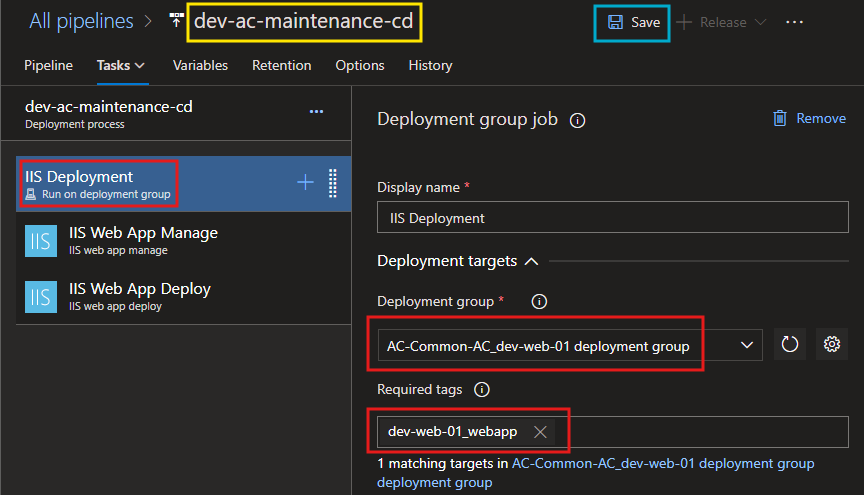
$(lanSslThumbprint)IIS Deployment
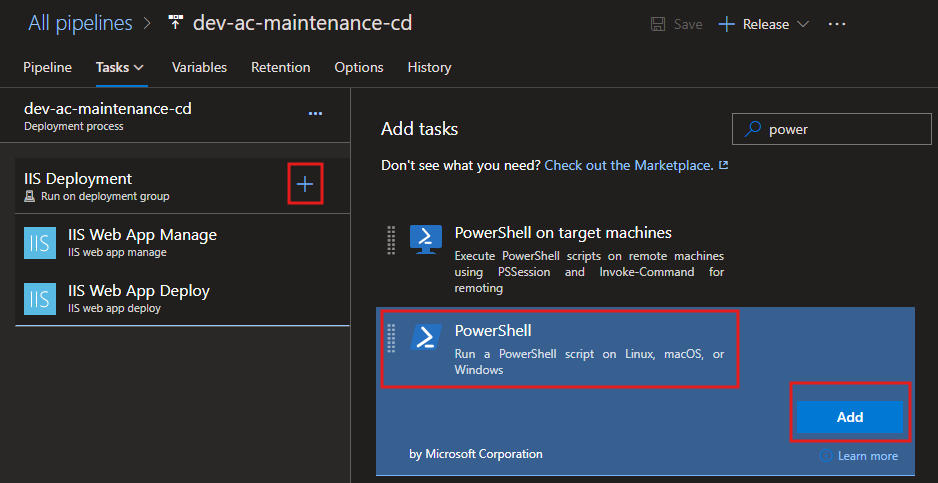
Install ssl if not installed already - Task
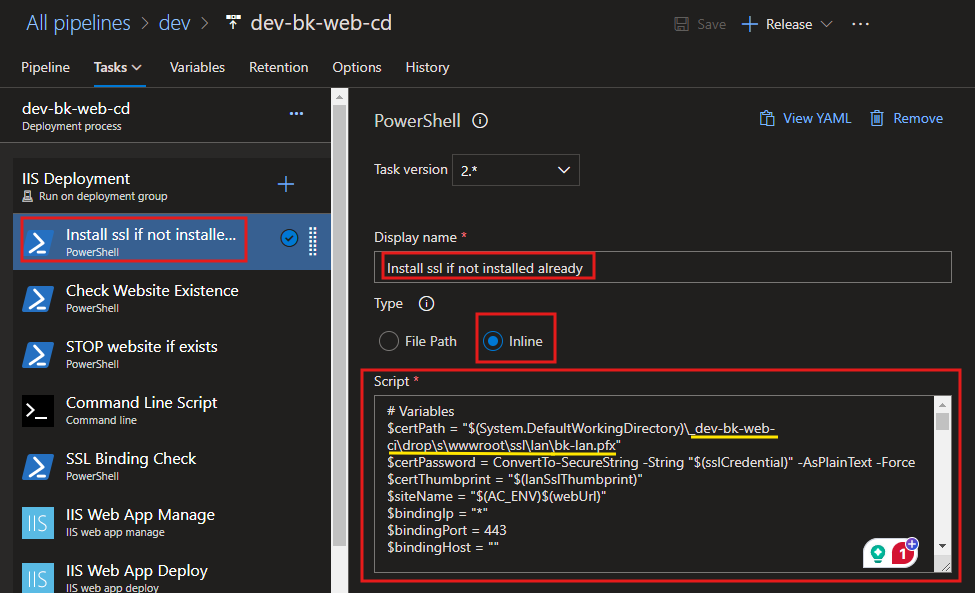
Script:
# Variables
$certPath = "$(System.DefaultWorkingDirectory)\_dev-bk-web-ci\drop\s\wwwroot\ssl\lan\bk-lan.pfx"
$certPassword = ConvertTo-SecureString -String "$(sslCredential)" -AsPlainText -Force
$certThumbprint = "$(lanSslThumbprint)"
$siteName = "$(AC_ENV)$(webUrl)"
$bindingIp = "*"
$bindingPort = 443
$bindingHost = ""

Write-Host "======================== STARTING SSL CERTIFICATE INSTALLATION ========================" -ForegroundColor Yellow

# Check if the certificate is installed
Write-Host "Checking if the certificate with thumbprint [$certThumbprint] is already installed..." -ForegroundColor Cyan
$cert = Get-ChildItem -Path Cert:\LocalMachine\My | Where-Object { $_.Thumbprint -eq $certThumbprint }

if (-not $cert) {
    Write-Host "Certificate not found. Proceeding to installation..." -ForegroundColor Red

    try {
        # Import the SSL certificate
        Write-Host "Importing the SSL certificate from path: $certPath" -ForegroundColor Yellow
        Import-PfxCertificate -FilePath $certPath -CertStoreLocation Cert:\LocalMachine\My -Password $certPassword
        Write-Host "Certificate successfully imported into the LocalMachine store." -ForegroundColor Green
    } catch {
        Write-Host "ERROR: Failed to import the certificate. Details:" -ForegroundColor Red
        Write-Error "$_"
        exit 1
    }

    # Retrieve the imported certificate with a retry mechanism
    Write-Host "Verifying the imported certificate in the LocalMachine store..." -ForegroundColor Cyan
    $retryCount = 0
    $maxRetries = 5
    $retryInterval = 2  # seconds

    while ($retryCount -lt $maxRetries) {
        $cert = Get-ChildItem -Path Cert:\LocalMachine\My | Where-Object { $_.Thumbprint -eq $certThumbprint }

        if ($cert) {
            Write-Host "SUCCESS: Certificate with thumbprint [$certThumbprint] found in the store." -ForegroundColor Green
            break
        }

        Write-Host "WARNING: Certificate not found. Retrying in $retryInterval seconds... ($($retryCount + 1)/$maxRetries)" -ForegroundColor Yellow
        Start-Sleep -Seconds $retryInterval
        $retryCount++
    }

    if (-not $cert) {
        Write-Host "ERROR: Failed to verify the imported certificate after [$maxRetries] attempts." -ForegroundColor Red
        exit 1
    }
} else {
    Write-Host "SUCCESS: Certificate with thumbprint [$certThumbprint] is already installed." -ForegroundColor Green
}

Write-Host "====================== SSL CERTIFICATE INSTALLATION COMPLETED ======================" -ForegroundColor Yellow
Write-Host "SSL Certificate check and installation process completed successfully." -ForegroundColor Green
Check Website Existence - Task
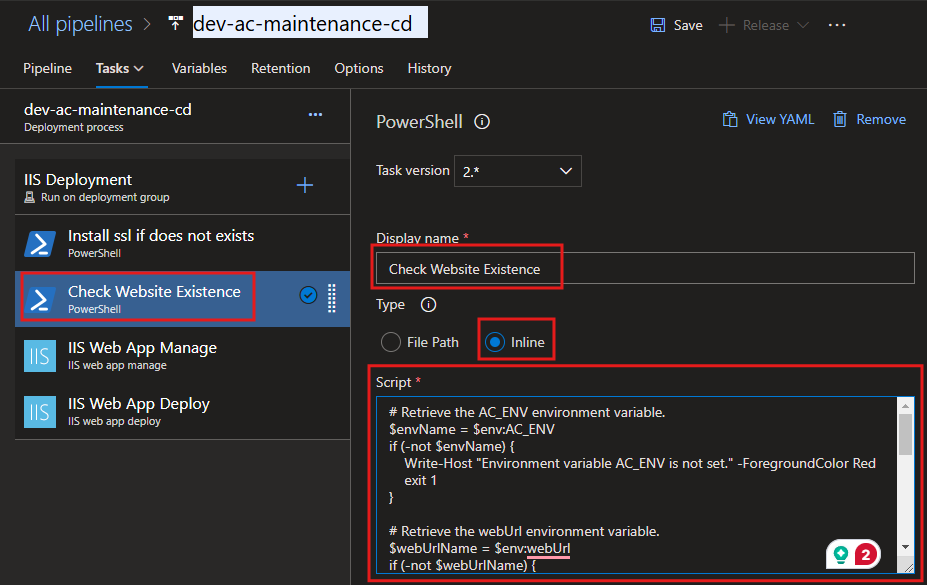
Script:
# Retrieve the AC_ENV environment variable.
$envName = $env:AC_ENV
if (-not $envName) {
    Write-Host "ERROR: Environment variable 'AC_ENV' is not set. Please ensure it is defined." -ForegroundColor Red
    exit 1
}

# Retrieve the webUrl environment variable.
$webUrlName = $env:webUrl
if (-not $webUrlName) {
    Write-Host "ERROR: Environment variable 'webUrl' is not set. Please ensure it is defined." -ForegroundColor Red
    exit 1
}

# Name of the IIS website to check
$websiteName = $envName + $webUrlName
Write-Host "Checking for IIS website: $websiteName" -ForegroundColor Cyan

# Initialize the websiteExists variable
$websiteExists = $false
Import-Module WebAdministration

try {
    # Check if the IIS website exists
    $website = Get-Website | Where-Object { $_.Name -eq $websiteName }

    if ($website -ne $null) {
        Write-Host "SUCCESS: Website '$websiteName' exists." -ForegroundColor Green
        $websiteExists = $true
    } else {
        Write-Host "WARNING: Website '$websiteName' does not exist." -ForegroundColor Yellow
    }
} catch {
    Write-Host "ERROR: Failed to check the website status. Details: $_" -ForegroundColor Red
    exit 1
}

# Set a pipeline variable to indicate whether the website exists
Write-Host "Setting pipeline variable 'websiteExists' to: $websiteExists" -ForegroundColor Cyan
"##vso[task.setvariable variable=websiteExists]$websiteExists"

Write-Host "Script execution completed." -ForegroundColor Green
STOP website if exists - Task
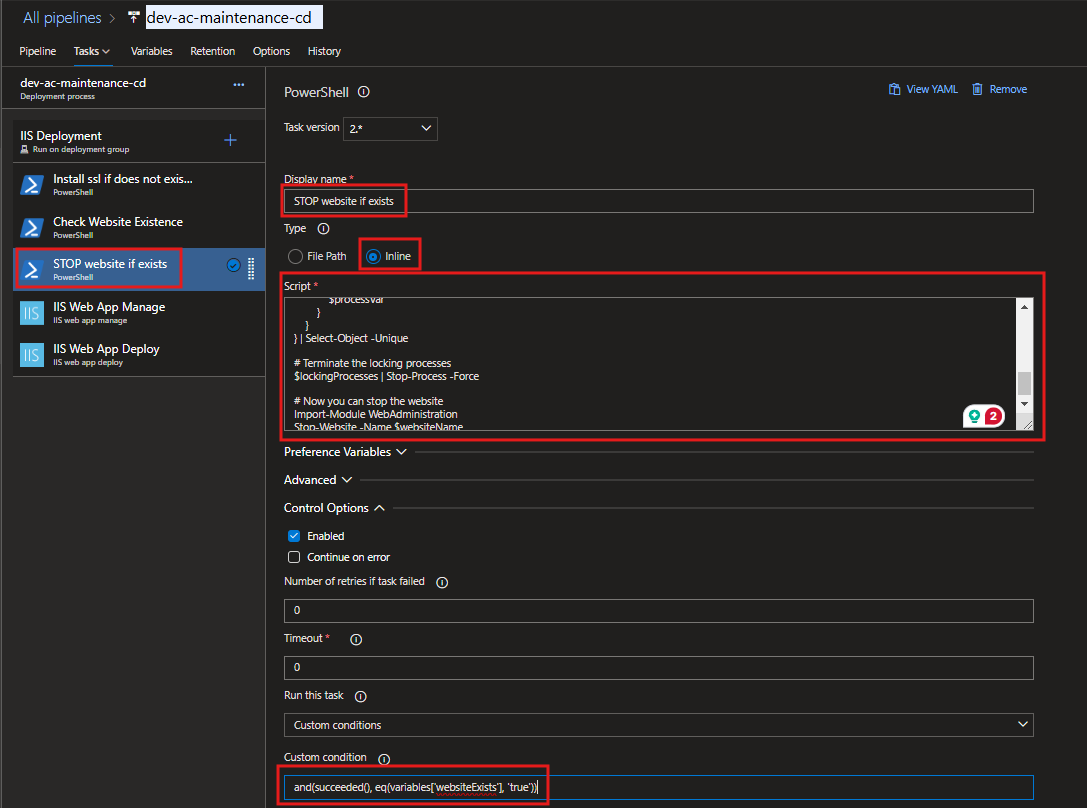
Script:
Write-Host "Checking for website: $websiteName..." -ForegroundColor Yellow

# Retrieve the AC_ENV environment variable.
$envName = $env:AC_ENV
if (-not $envName) {
    Write-Host "ERROR: Environment variable 'AC_ENV' is not set. Please ensure it is defined." -ForegroundColor Red
    exit 1
}

# Retrieve the webUrl environment variable.
$webUrlName = $env:webUrl
if (-not $webUrlName) {
    Write-Host "ERROR: Environment variable 'webUrl' is not set. Please ensure it is defined." -ForegroundColor Red
    exit 1
}

# Name of the IIS website to check
$websiteName = $envName + $webUrlName
Write-Host "Website name constructed: $websiteName" -ForegroundColor Cyan

# Define the path of the IIS website root directory based on the website name
# Update this path according to your website's directory structure
$websiteRootPath = "C:\inetpub\$(projectName)\$websiteName"
Write-Host "Website root directory path: $websiteRootPath" -ForegroundColor Cyan

# Find processes locking files in the website directory
Write-Host "Scanning for processes locking files in: $websiteRootPath..." -ForegroundColor Yellow
$lockingProcesses = Get-Process | foreach {
    $processVar = $_
    $_.Modules | foreach {
        if ($_.FileName -and $_.FileName.StartsWith($websiteRootPath)) {
            $processVar
        }
    }
} | Select-Object -Unique

if ($lockingProcesses) {
    Write-Host "The following processes are locking files in the directory:" -ForegroundColor Red
    $lockingProcesses | ForEach-Object { Write-Host " - $_.Name (PID: $($_.Id))" -ForegroundColor DarkRed }
    Write-Host "Terminating locking processes..." -ForegroundColor Yellow
    $lockingProcesses | Stop-Process -Force
    Write-Host "All locking processes terminated successfully." -ForegroundColor Green
} else {
    Write-Host "No processes are locking files in the directory. Proceeding..." -ForegroundColor Green
}

# Stop the website
Write-Host "Stopping the IIS website: $websiteName..." -ForegroundColor Yellow
Import-Module WebAdministration
try {
    Stop-Website -Name $websiteName
    Write-Host "Website '$websiteName' has been stopped successfully." -ForegroundColor Green
} catch {
    Write-Host "ERROR: Failed to stop the website '$websiteName'. Details: $_" -ForegroundColor Red
    exit 1
}

Write-Host "Script execution completed successfully." -ForegroundColor Green
Custom condition:
and(succeeded(), eq(variables['websiteExists'], 'true'))
DELETE website content if exists - Task
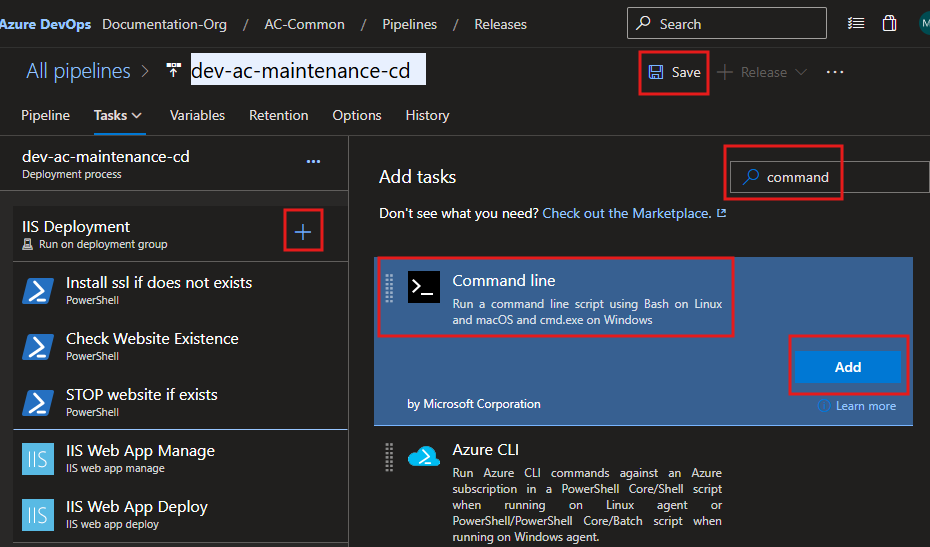
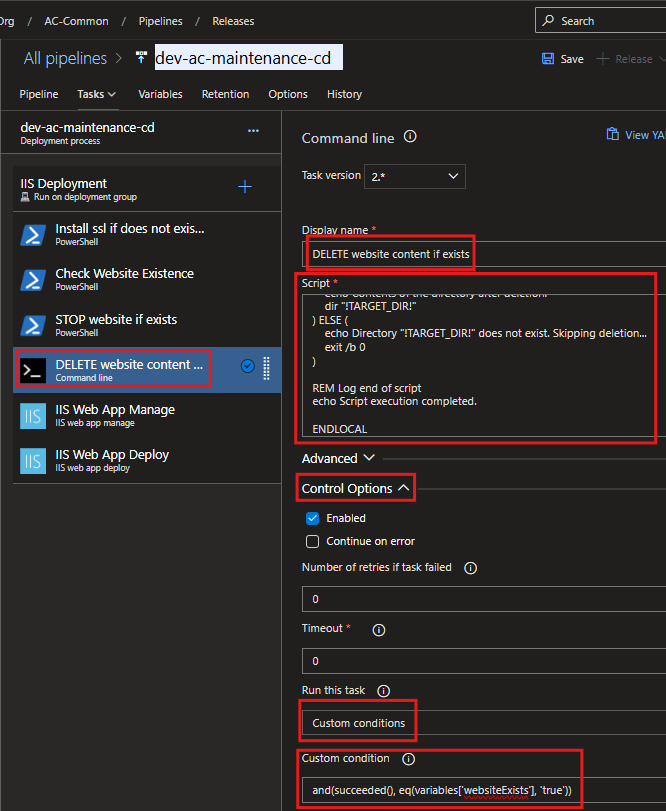
Script:
@echo off
SETLOCAL ENABLEDELAYEDEXPANSION

REM Retrieve the projectName variable
SET "PROJ_NAME=%projectName%"

REM Check if the projectName variable is set
IF "%PROJ_NAME%"=="" (
    echo ===========================================================
    echo ERROR: Environment variable "projectName" is not set.
    echo Please define "projectName" before running this script.
    echo Exiting script...
    echo ===========================================================
    exit /b 1
)

REM Retrieve the AC_ENV variable
SET "ENVIRONMENT=%AC_ENV%"

REM Check if the AC_ENV variable is set
IF "%ENVIRONMENT%"=="" (
    echo ===========================================================
    echo ERROR: Environment variable "AC_ENV" is not set.
    echo Please define "AC_ENV" before running this script.
    echo Exiting script...
    echo ===========================================================
    exit /b 1
)

REM Retrieve the webUrl variable
SET "WEB_URL=%webUrl%"

REM Check if the webUrl variable is set
IF "%WEB_URL%"=="" (
    echo ===========================================================
    echo ERROR: Environment variable "webUrl" is not set.
    echo Please define "webUrl" before running this script.
    echo Exiting script...
    echo ===========================================================
    exit /b 1
)

REM Set the directory path based on the AC_ENV and webUrl variables
SET "TARGET_DIR=C:\inetpub\%PROJ_NAME%\%ENVIRONMENT%%WEB_URL%"

REM Log start of script
echo ===========================================================
echo Starting script execution...
echo ===========================================================

REM Log the current date and time
echo Current Time: %date% %time%
echo ===========================================================

REM Check if the directory exists
IF EXIST "!TARGET_DIR!" (
    echo ===========================================================
    echo Directory "!TARGET_DIR!" found. Preparing for cleanup...
    echo ===========================================================

    REM Log the directory contents before deletion
    echo Contents of the directory before deletion:
    dir "!TARGET_DIR!"
    echo ===========================================================

    REM Attempt to remove all files and subdirectories, but not the root folder itself
    echo Attempting to remove items from "!TARGET_DIR!"...
    FOR /D %%p IN ("!TARGET_DIR!\*.*") DO rmdir "%%p" /S /Q
    del /F /Q "!TARGET_DIR!\*.*"

    REM Check if the delete command was successful
    IF !ERRORLEVEL! EQU 0 (
        echo ===========================================================
        echo SUCCESS: All items in "!TARGET_DIR!" have been deleted.
        echo ===========================================================
    ) ELSE (
        echo ===========================================================
        echo ERROR: Encountered an issue during deletion. Error code: !ERRORLEVEL!
        echo ===========================================================
    )

    REM Log the directory contents after deletion
    echo Contents of the directory after deletion:
    dir "!TARGET_DIR!"
) ELSE (
    echo ===========================================================
    echo WARNING: Directory "!TARGET_DIR!" does not exist. Skipping cleanup...
    echo ===========================================================
    exit /b 0
)

REM Log end of script
echo ===========================================================
echo Script execution completed successfully.
echo ===========================================================

ENDLOCAL
Custom condition:
and(succeeded(), eq(variables['websiteExists'], 'true'))
SSL Binding Check - Task
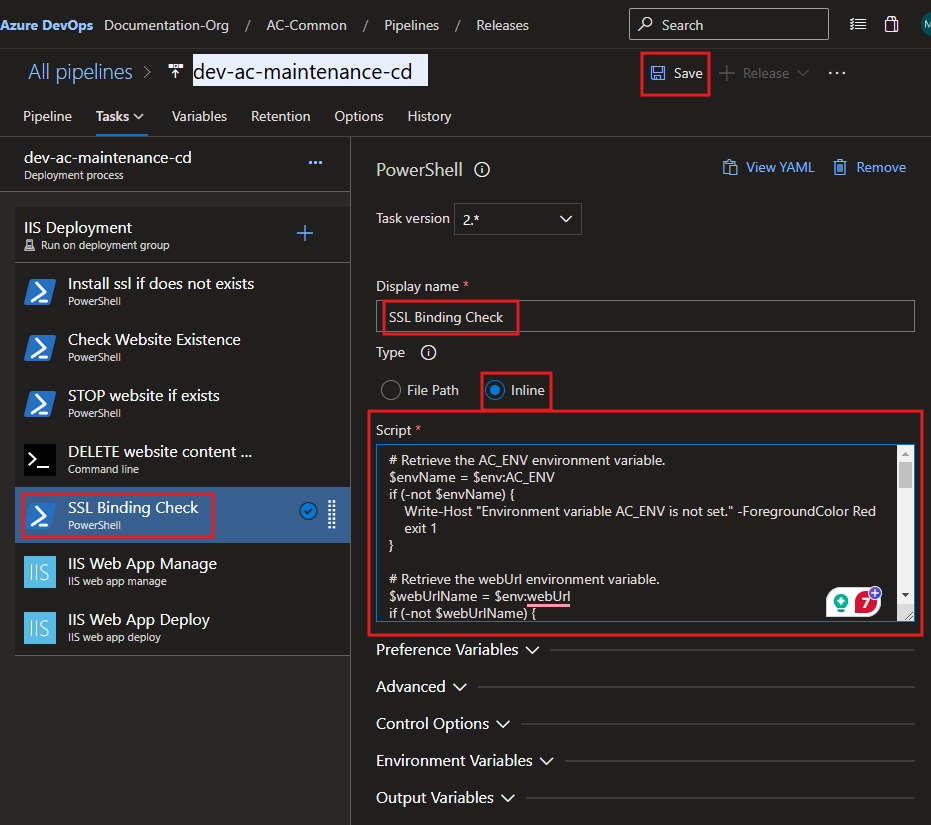
Script:
# Retrieve the AC_ENV environment variable.
$envName = $env:AC_ENV
if (-not $envName) {
    Write-Host "=================================================================" -ForegroundColor Red
    Write-Host "ERROR: Environment variable 'AC_ENV' is not set." -ForegroundColor Red
    Write-Host "Please ensure 'AC_ENV' is defined before running this script." -ForegroundColor Red
    Write-Host "================================================================="
    exit 1
}

# Retrieve the webUrl environment variable.
$webUrlName = $env:webUrl
if (-not $webUrlName) {
    Write-Host "=================================================================" -ForegroundColor Red
    Write-Host "ERROR: Environment variable 'webUrl' is not set." -ForegroundColor Red
    Write-Host "Please ensure 'webUrl' is defined before running this script." -ForegroundColor Red
    Write-Host "================================================================="
    exit 1
}

# Name of the IIS website to check
$hostname = $envName + $webUrlName
$port = "443"
$hostnamePort = "${hostname}:${port}"

Write-Host "=================================================================" -ForegroundColor Yellow
Write-Host "Checking SSL binding for hostname: $hostname and port: $port" -ForegroundColor Cyan
Write-Host "Target hostname and port combination: $hostnamePort" -ForegroundColor Cyan
Write-Host "================================================================="

# Attempt to retrieve the current SSL certificate binding
try {
    $bindingExists = & netsh http show sslcert hostnameport=$hostnamePort
    Write-Host "Checking for SSL certificate binding. Command Output:" -ForegroundColor Green
    Write-Host "-------------------------------------------------------------" -ForegroundColor Green
    Write-Host $bindingExists
    Write-Host "-------------------------------------------------------------" -ForegroundColor Green
} catch {
    Write-Host "ERROR: Failed to check SSL binding. Details:" -ForegroundColor Red
    Write-Host $_ -ForegroundColor Red
    exit 1
}

# Proceed only if the binding exists
if ($bindingExists -match "Certificate Hash") {
    Write-Host "=================================================================" -ForegroundColor Yellow
    Write-Host "SSL binding exists for $hostnamePort. Proceeding to remove it..." -ForegroundColor Green
    Write-Host "================================================================="
    try {
        # Remove the existing SSL certificate binding
        & netsh http delete sslcert hostnameport=$hostnamePort
        Write-Host "SUCCESS: SSL binding removed successfully for $hostnamePort." -ForegroundColor Green
    } catch {
        Write-Host "ERROR: Failed to remove SSL binding. Details:" -ForegroundColor Red
        Write-Host $_ -ForegroundColor Red
        exit 1
    }
} else {
    Write-Host "=================================================================" -ForegroundColor Yellow
    Write-Host "INFO: No SSL binding exists for $hostnamePort. Skipping removal." -ForegroundColor Blue
    Write-Host "================================================================="
}

# Continue with further commands or cleanup as needed
Write-Host "=================================================================" -ForegroundColor Yellow
Write-Host "SSL binding check and removal process completed." -ForegroundColor Green
Write-Host "================================================================="

# Set an explicit success exit code
exit 0
IIS Web App Manage - Task
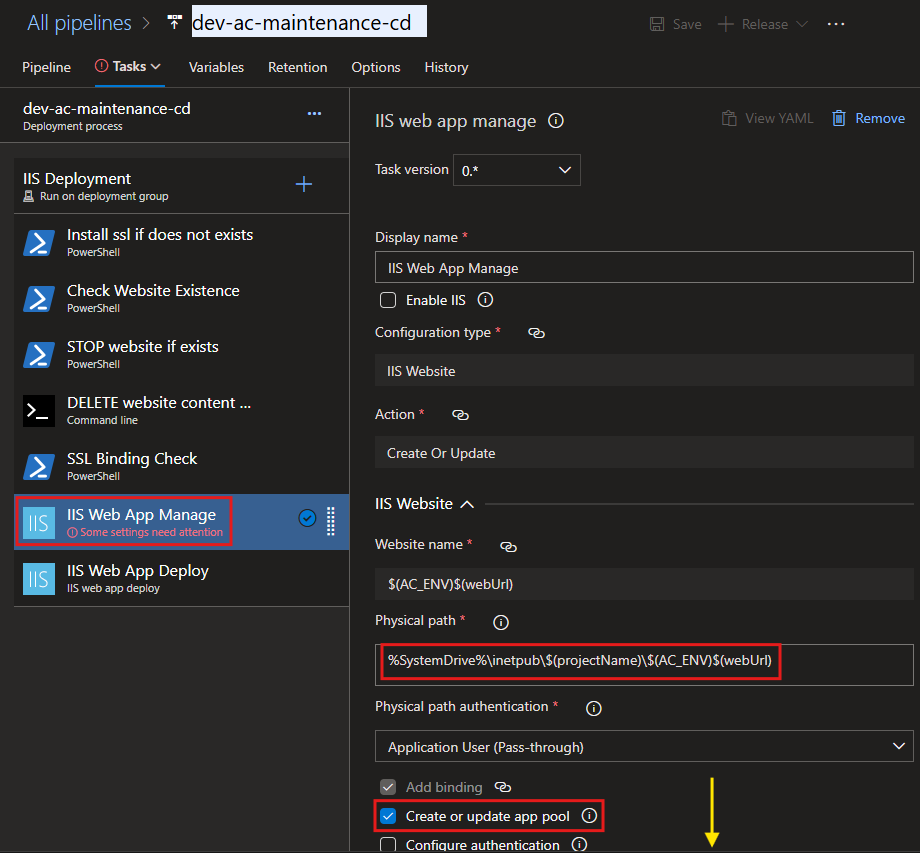
Physical path:
%SystemDrive%\inetpub\$(projectName)\$(AC_ENV)$(webUrl)
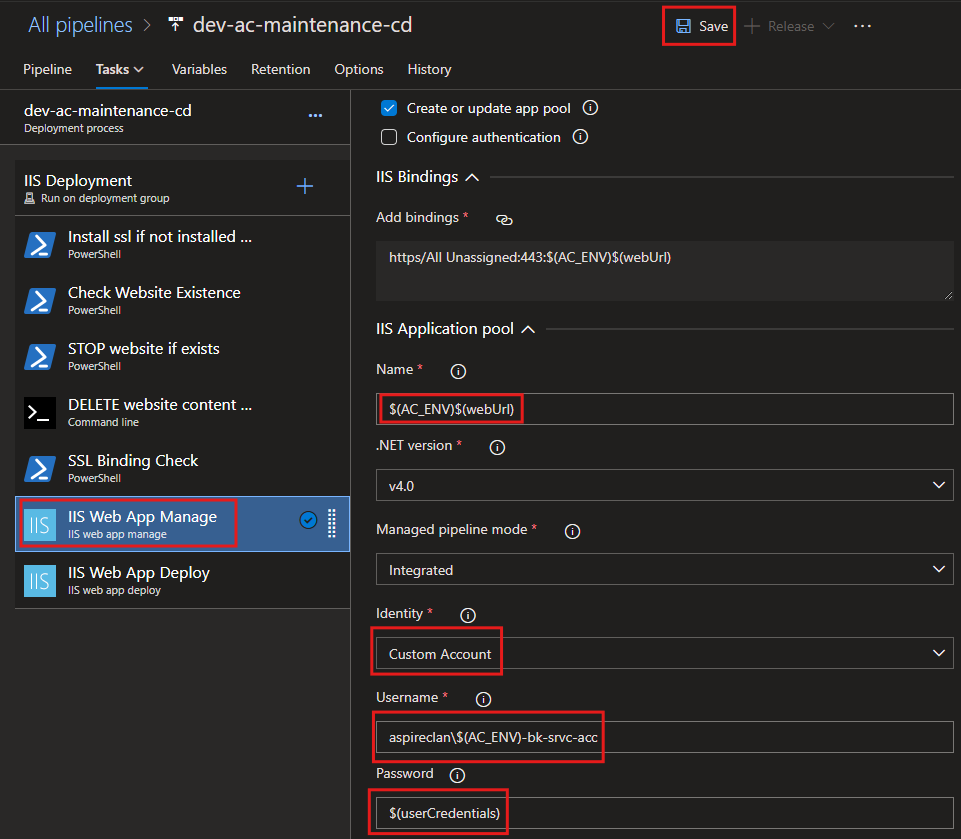
Name:
$(AC_ENV)$(webUrl)
Username:
aspireclan\$(AC_ENV)-bk-srvc-acc
Password:
$(userCredentials)
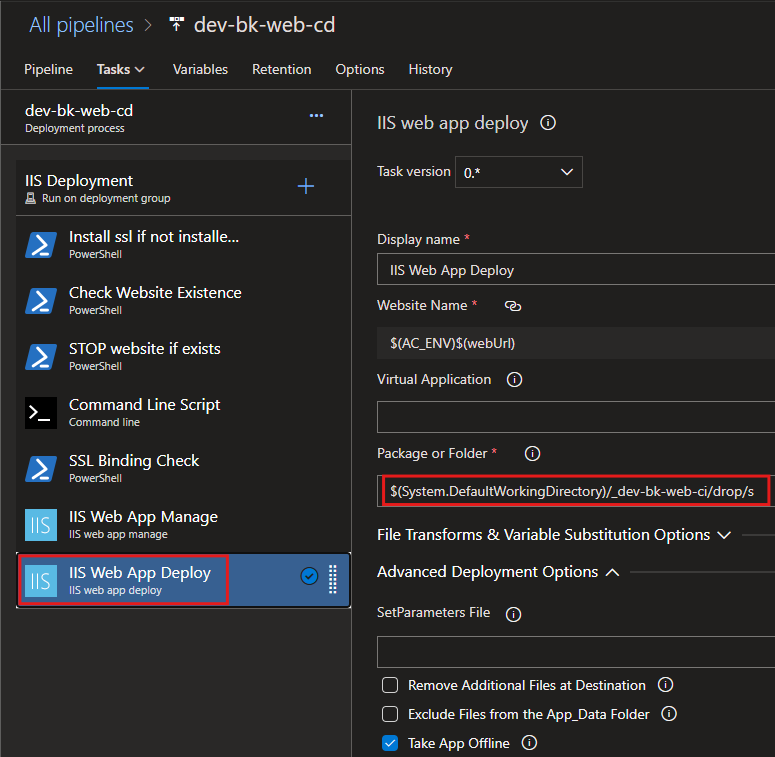
IIS Web App Deploy - Task
Create DNS entry if not exists - Task
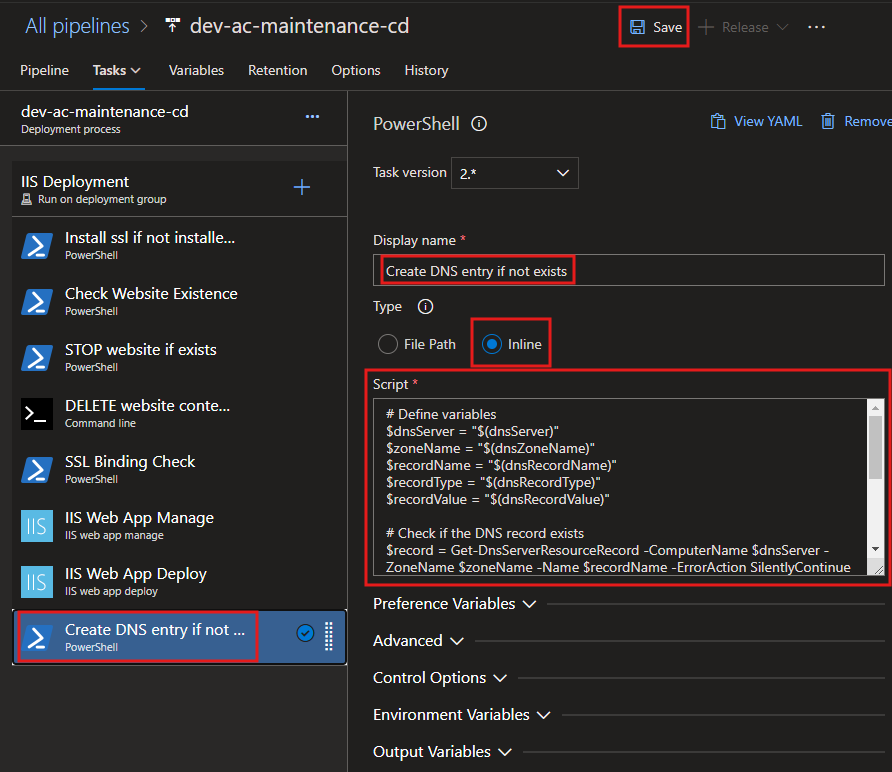
Script:
# Check if the DnsServer module is available
Write-Host "=================================================================" -ForegroundColor Yellow
Write-Host "Step 1: Checking for DnsServer module availability..." -ForegroundColor Cyan
Write-Host "================================================================="

if (-not (Get-Module -ListAvailable -Name DnsServer)) {
    Write-Host "INFO: The DnsServer module is not installed. Attempting to install..." -ForegroundColor Yellow

    # Check if the current system is a Windows Server or client OS
    if (Get-WindowsFeature -Name RSAT-DNS-Server -ErrorAction SilentlyContinue) {
        try {
            Write-Host "INFO: Installing DNS Server Tools on Windows Server..." -ForegroundColor Yellow
            Install-WindowsFeature -Name RSAT-DNS-Server -IncludeManagementTools -ErrorAction Stop
            Write-Host "SUCCESS: DNS Server Tools installed successfully on Windows Server." -ForegroundColor Green
        } catch {
            Write-Host "ERROR: Failed to install DNS Server Tools on Windows Server." -ForegroundColor Red
            Write-Error $_
            exit 1
        }
    } elseif ((Get-WindowsCapability -Name Rsat.Dns.Tools~~~~0.0.1.0 -Online).State -ne "Installed") {
        try {
            Write-Host "INFO: Installing RSAT DNS Tools on Windows 10/11..." -ForegroundColor Yellow
            Add-WindowsCapability -Online -Name Rsat.Dns.Tools~~~~0.0.1.0 -ErrorAction Stop
            Write-Host "SUCCESS: RSAT DNS Tools installed successfully on Windows 10/11." -ForegroundColor Green
        } catch {
            Write-Host "ERROR: Failed to install RSAT DNS Tools on Windows 10/11." -ForegroundColor Red
            Write-Error $_
            exit 1
        }
    } else {
        Write-Host "ERROR: Unable to detect the installation method for the DnsServer module on this system." -ForegroundColor Red
        exit 1
    }
} else {
    Write-Host "SUCCESS: The DnsServer module is already available." -ForegroundColor Green
}

Write-Host "=================================================================" -ForegroundColor Yellow
Write-Host "Step 2: Preparing to manage DNS records..." -ForegroundColor Cyan
Write-Host "================================================================="

# Define variables
$dnsServer = "$(global_prod-dns-01_IP)"
$zoneName = "$(global_dns_zone_name)"
$recordName = "$(dnsRecordName)"
$recordType = "$(global_dns_record_type)"
$recordValue = "$(global_dev-web-01_IP)"

Write-Host "INFO: Using the following DNS details:" -ForegroundColor Cyan
Write-Host "-----------------------------------------------------------------" -ForegroundColor Cyan
Write-Host "  DNS Server: $dnsServer" -ForegroundColor Green
Write-Host "  DNS Zone Name: $zoneName" -ForegroundColor Green
Write-Host "  Record Name: $recordName" -ForegroundColor Green
Write-Host "  Record Type: $recordType" -ForegroundColor Green
Write-Host "  Record Value: $recordValue" -ForegroundColor Green
Write-Host "-----------------------------------------------------------------" -ForegroundColor Cyan

# Check if the DNS record exists
Write-Host "INFO: Checking if the DNS record already exists..." -ForegroundColor Yellow
$record = Get-DnsServerResourceRecord -ComputerName $dnsServer -ZoneName $zoneName -Name $recordName -ErrorAction SilentlyContinue

if ($null -eq $record) {
    Write-Host "INFO: DNS record does not exist. Preparing to create a new record..." -ForegroundColor Yellow

    try {
        # Add the DNS record
        Write-Host "INFO: Creating DNS record..." -ForegroundColor Yellow
        Add-DnsServerResourceRecordA -ComputerName $dnsServer -ZoneName $zoneName -Name $recordName -IPv4Address $recordValue
        Write-Host "SUCCESS: DNS record created successfully." -ForegroundColor Green
        Write-Host "  - Record Name: $recordName" -ForegroundColor Green
        Write-Host "  - Record Type: $recordType" -ForegroundColor Green
        Write-Host "  - Record Value: $recordValue" -ForegroundColor Green
    } catch {
        Write-Host "ERROR: Failed to create DNS record. Details:" -ForegroundColor Red
        Write-Error $_
        exit 1
    }
} else {
    Write-Host "INFO: DNS record already exists." -ForegroundColor Cyan
    Write-Host "  - Record Name: $recordName" -ForegroundColor Cyan
    Write-Host "  - Record Type: $recordType" -ForegroundColor Cyan
    Write-Host "  - Existing Record Value: $($record.RecordData.IPv4Address)" -ForegroundColor Cyan
}

Write-Host "=================================================================" -ForegroundColor Yellow
Write-Host "Step 3: DNS record management completed successfully." -ForegroundColor Green
Write-Host "================================================================="
START website if exists - Task
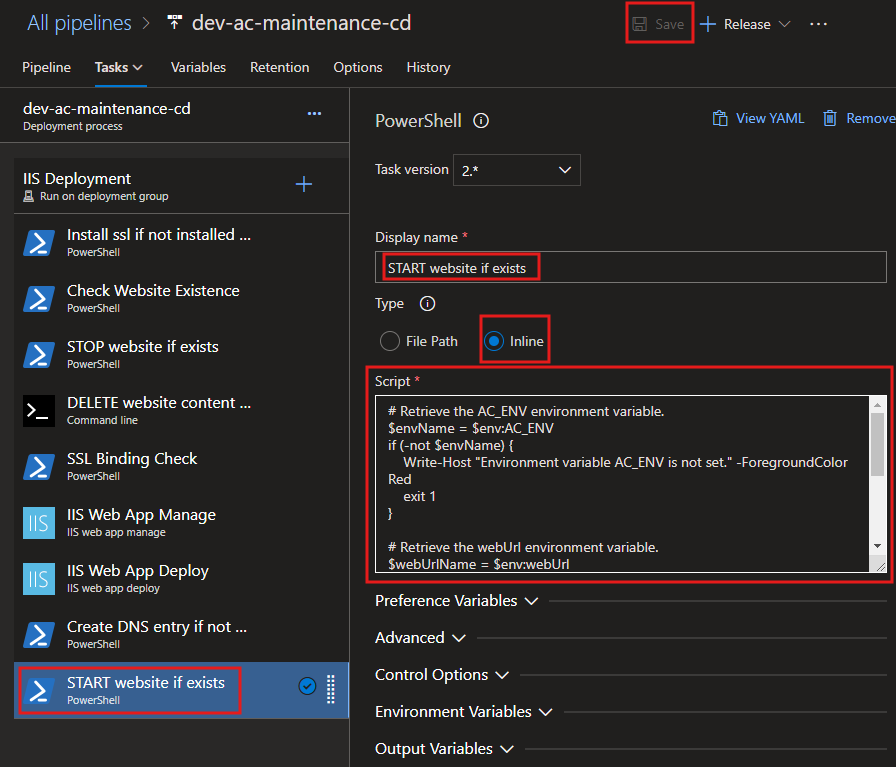
Script:
# Retrieve the AC_ENV environment variable.
$envName = $env:AC_ENV
if (-not $envName) {
    Write-Host "=================================================================" -ForegroundColor Red
    Write-Host "ERROR: Environment variable 'AC_ENV' is not set." -ForegroundColor Red
    Write-Host "Please ensure 'AC_ENV' is defined before running this script." -ForegroundColor Red
    Write-Host "================================================================="
    exit 1
}

# Retrieve the webUrl environment variable.
$webUrlName = $env:webUrl
if (-not $webUrlName) {
    Write-Host "=================================================================" -ForegroundColor Red
    Write-Host "ERROR: Environment variable 'webUrl' is not set." -ForegroundColor Red
    Write-Host "Please ensure 'webUrl' is defined before running this script." -ForegroundColor Red
    Write-Host "================================================================="
    exit 1
}

# Name of the IIS website to check
$websiteName = $envName + $webUrlName

Write-Host "=================================================================" -ForegroundColor Yellow
Write-Host "Step 1: Preparing to start IIS website..." -ForegroundColor Cyan
Write-Host "================================================================="
Write-Host "INFO: Constructed website name: $websiteName" -ForegroundColor Green

# Import the WebAdministration module
Write-Host "INFO: Importing the WebAdministration module..." -ForegroundColor Cyan
try {
    Import-Module WebAdministration -ErrorAction Stop
    Write-Host "SUCCESS: WebAdministration module imported successfully." -ForegroundColor Green
} catch {
    Write-Host "ERROR: Failed to import the WebAdministration module. Details:" -ForegroundColor Red
    Write-Host $_ -ForegroundColor Red
    exit 1
}

Write-Host "=================================================================" -ForegroundColor Yellow
Write-Host "Step 2: Checking website status..." -ForegroundColor Cyan
Write-Host "================================================================="

# Check if the website exists
$website = Get-Website | Where-Object { $_.Name -eq $websiteName }

if ($null -eq $website) {
    Write-Host "ERROR: The website '$websiteName' does not exist in IIS." -ForegroundColor Red
    Write-Host "Please verify the website name and ensure it is configured in IIS." -ForegroundColor Red
    exit 1
} else {
    Write-Host "INFO: The website '$websiteName' exists in IIS." -ForegroundColor Green
}

# Check the current state of the website
$currentState = $website.State
Write-Host "INFO: Current state of '$websiteName': $currentState" -ForegroundColor Cyan

# Start the website if it is not already started
if ($currentState -eq "Started") {
    Write-Host "SUCCESS: The website '$websiteName' is already running." -ForegroundColor Green
} else {
    Write-Host "INFO: The website '$websiteName' is not running. Attempting to start..." -ForegroundColor Yellow
    try {
        Start-Website -Name $websiteName
        Write-Host "SUCCESS: The website '$websiteName' has been started successfully." -ForegroundColor Green
    } catch {
        Write-Host "ERROR: Failed to start the website '$websiteName'. Details:" -ForegroundColor Red
        Write-Host $_ -ForegroundColor Red
        exit 1
    }
}

Write-Host "=================================================================" -ForegroundColor Yellow
Write-Host "Step 3: IIS website check and start process completed successfully." -ForegroundColor Green
Write-Host "================================================================="