BK Web API/App CD | dev-lb-01
BK Web API/App CD : dev-lb-01
DO NOT USE. UPDATE DOCUMENT BASED ON EXISTING DEV-BK-WEB-CD PIPELINE
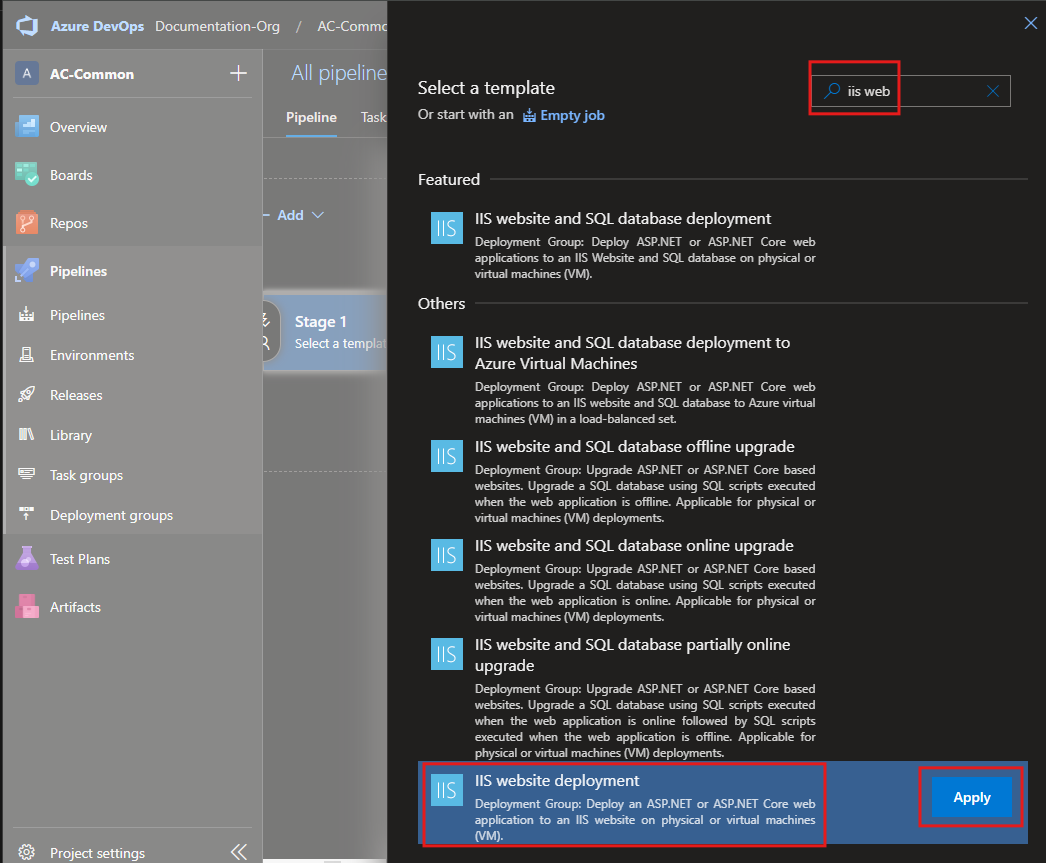
Unlock IP Security section in web.config
In the server go to:
C:\Windows\System32\inetsrv\config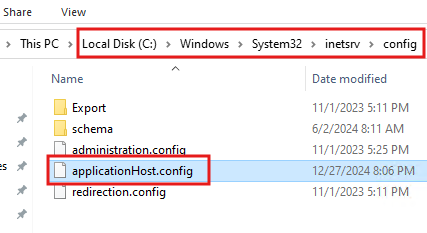
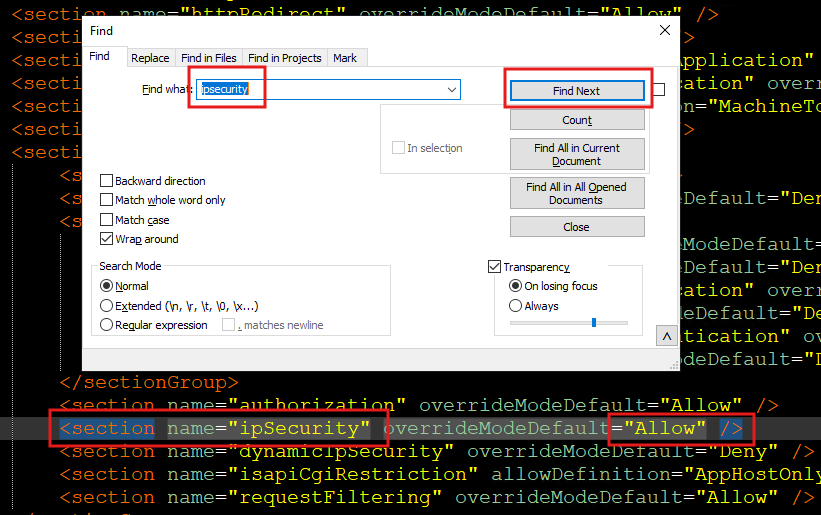
Add new Stage
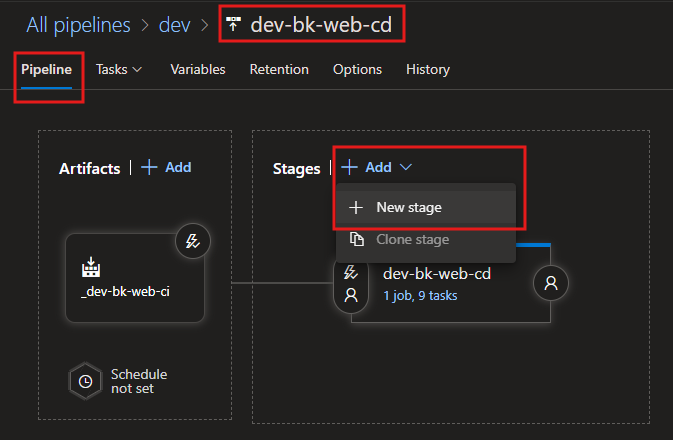
CD Template Selection
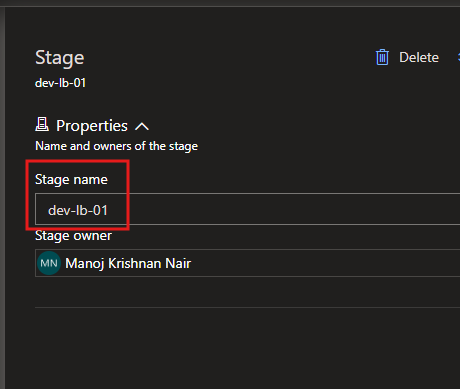
Naming the Stage
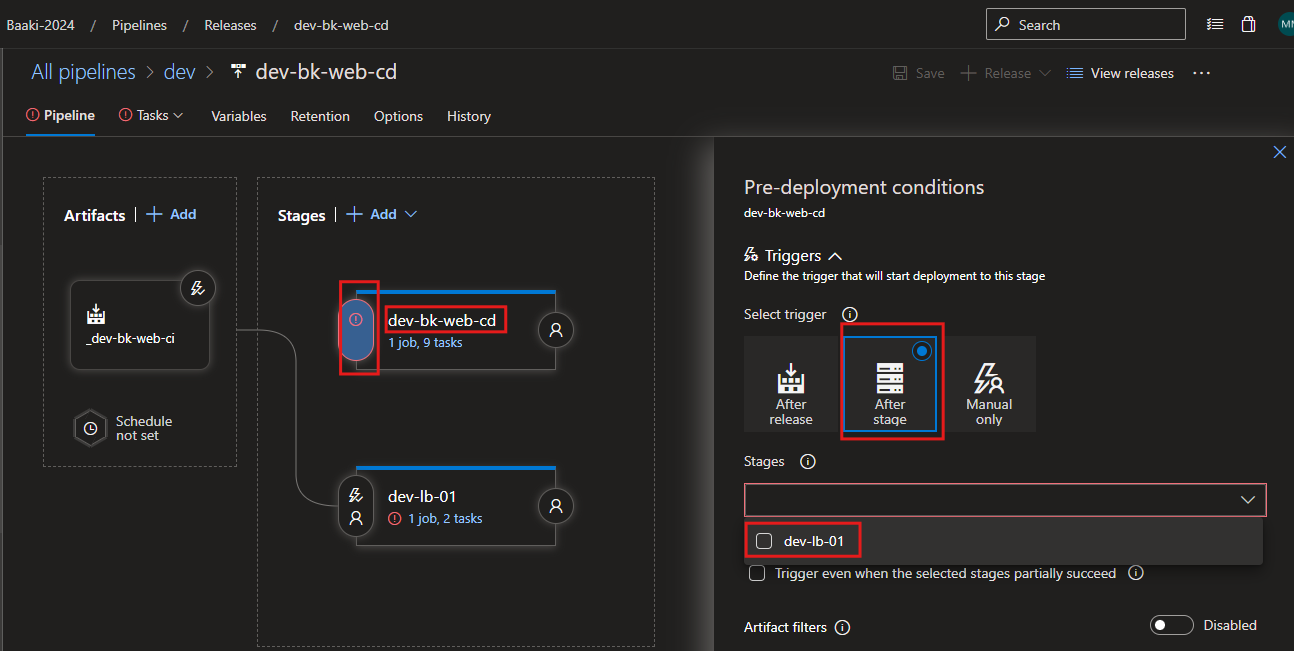
Sequencing the Stages
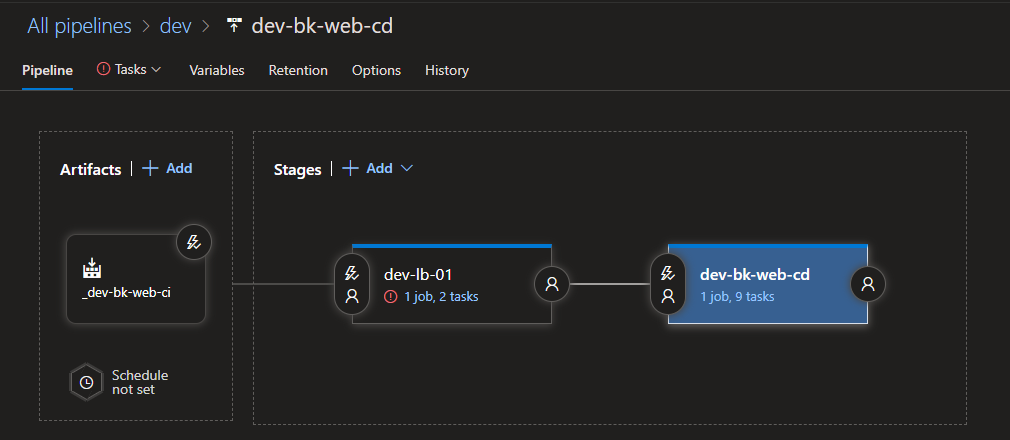
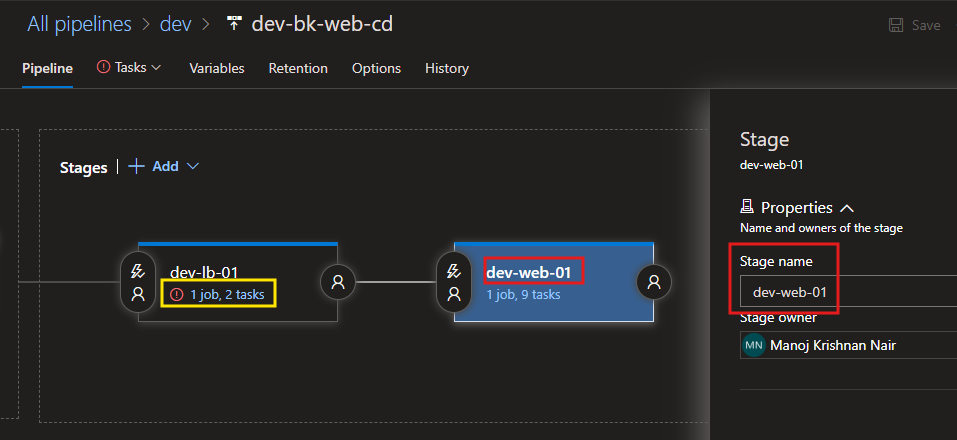
Renaming the Web Deployment Stage
Local Pipeline Variables
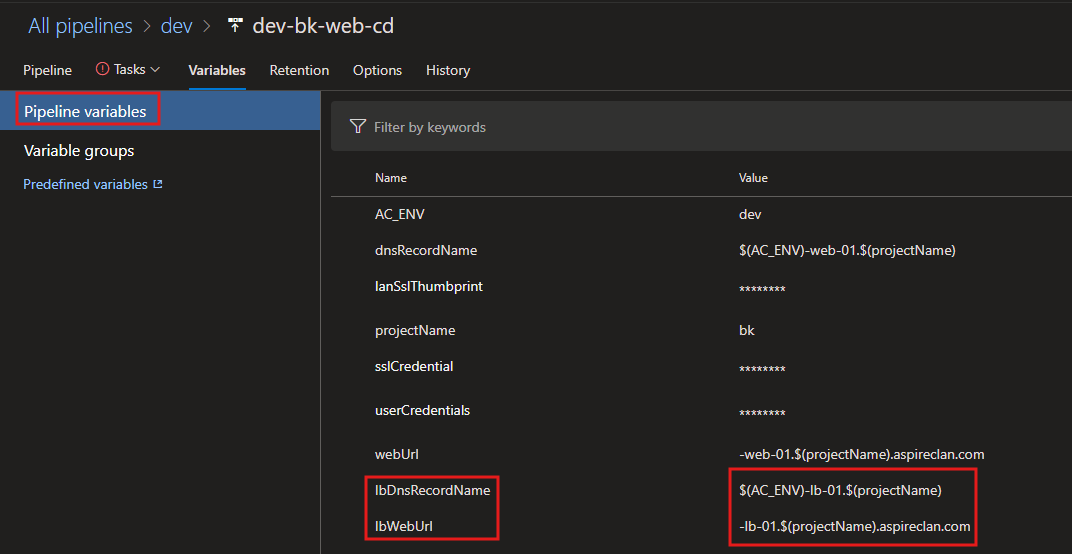
lbDnsRecordName|$(AC_ENV)-lb-01.$(projectName)lbWebUrl|-lb-01.$(projectName).aspireclan.comPipeline Tasks
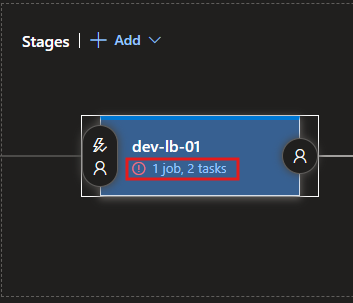
Deployment Process
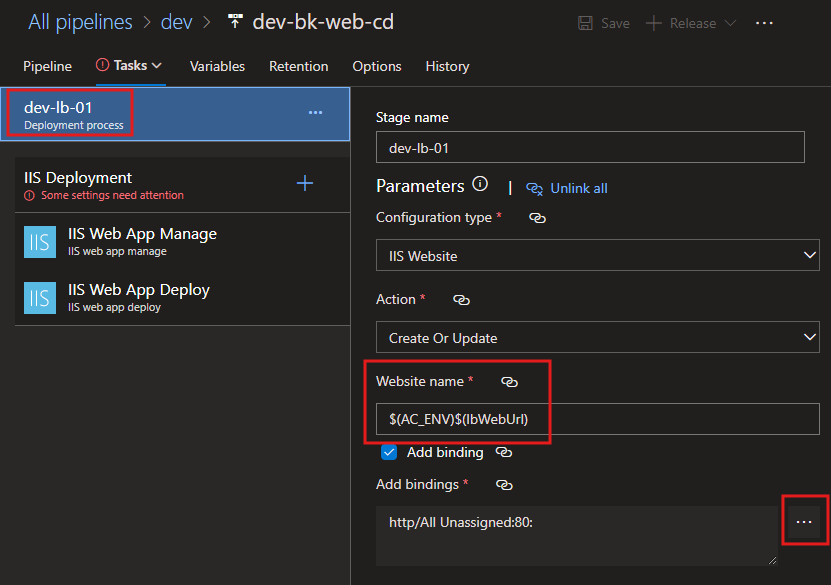
Website name:
$(AC_ENV)$(lbWebUrl)Add Bindings
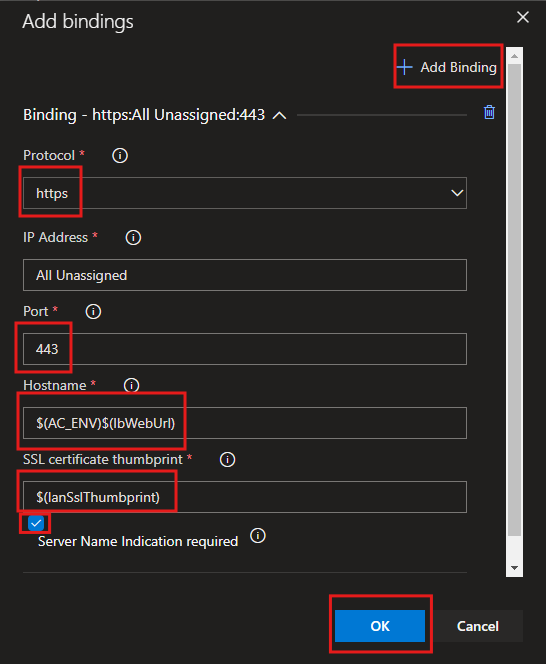
Hostname:
$(AC_ENV)$(lbWebUrl)SSl Certificate Thumbprint:
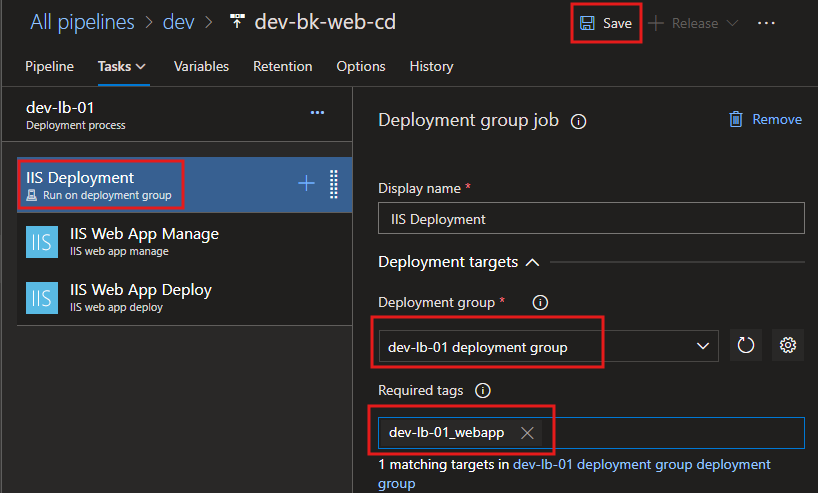
$(lanSslThumbprint)IIS Deployment
Install ssl if not installed already - Task
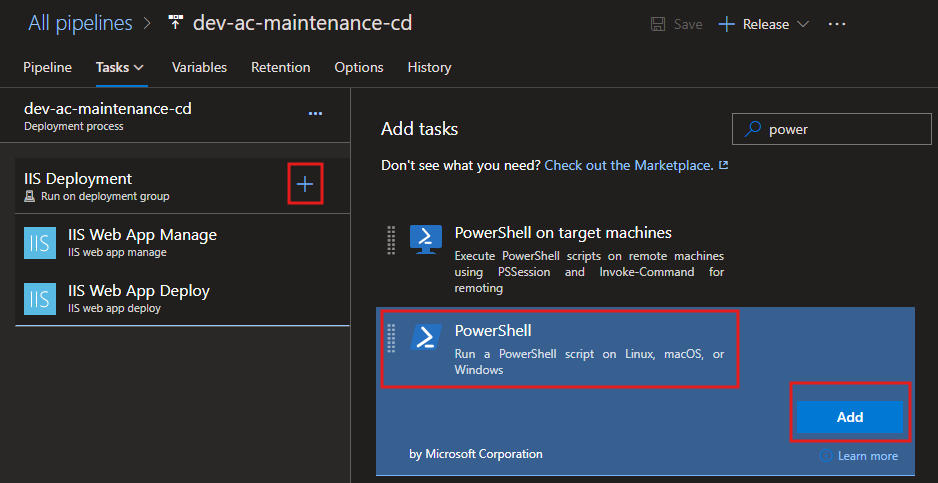
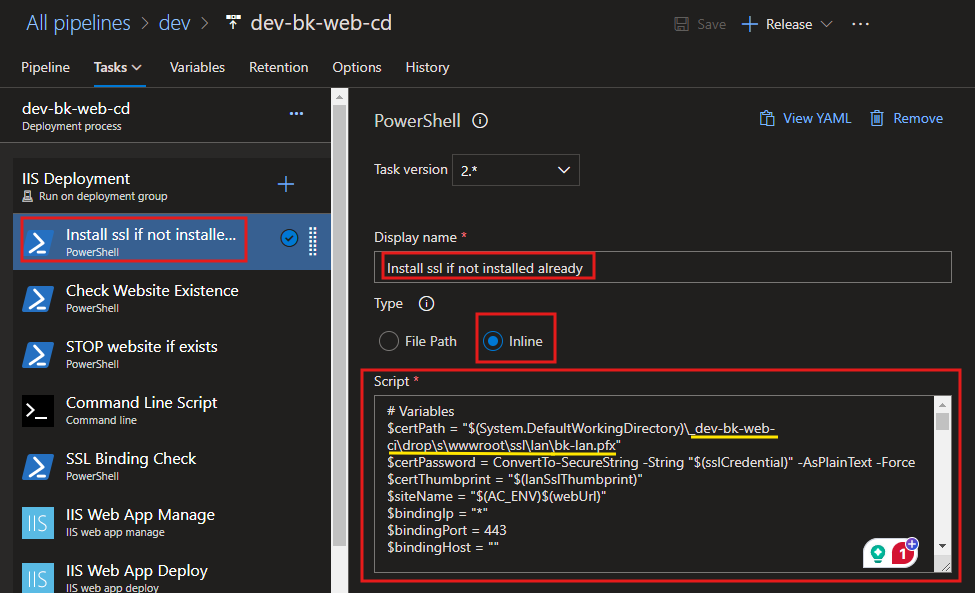
Script:
# Variables
$certPath = "$(System.DefaultWorkingDirectory)\_dev-bk-web-ci\drop\s\wwwroot\ssl\lan\bk-lan.pfx"
$certPassword = ConvertTo-SecureString -String "$(sslCredential)" -AsPlainText -Force
$certThumbprint = "$(lanSslThumbprint)"
$siteName = "$(AC_ENV)$(lbWebUrl)"
$bindingIp = "*"
$bindingPort = 443
$bindingHost = ""

Write-Host "======================== STARTING SSL CERTIFICATE INSTALLATION ========================" -ForegroundColor Yellow

# Check if the certificate is installed
Write-Host "Checking if the certificate with thumbprint [$certThumbprint] is already installed..." -ForegroundColor Cyan
$cert = Get-ChildItem -Path Cert:\LocalMachine\My | Where-Object { $_.Thumbprint -eq $certThumbprint }

if (-not $cert) {
    Write-Host "Certificate not found. Proceeding to installation..." -ForegroundColor Red

    try {
        # Import the SSL certificate
        Write-Host "Importing the SSL certificate from path: $certPath" -ForegroundColor Yellow
        Import-PfxCertificate -FilePath $certPath -CertStoreLocation Cert:\LocalMachine\My -Password $certPassword
        Write-Host "Certificate successfully imported into the LocalMachine store." -ForegroundColor Green
    } catch {
        Write-Host "ERROR: Failed to import the certificate. Details:" -ForegroundColor Red
        Write-Error "$_"
        exit 1
    }

    # Retrieve the imported certificate with a retry mechanism
    Write-Host "Verifying the imported certificate in the LocalMachine store..." -ForegroundColor Cyan
    $retryCount = 0
    $maxRetries = 5
    $retryInterval = 2  # seconds

    while ($retryCount -lt $maxRetries) {
        $cert = Get-ChildItem -Path Cert:\LocalMachine\My | Where-Object { $_.Thumbprint -eq $certThumbprint }

        if ($cert) {
            Write-Host "SUCCESS: Certificate with thumbprint [$certThumbprint] found in the store." -ForegroundColor Green
            break
        }

        Write-Host "WARNING: Certificate not found. Retrying in $retryInterval seconds... ($($retryCount + 1)/$maxRetries)" -ForegroundColor Yellow
        Start-Sleep -Seconds $retryInterval
        $retryCount++
    }

    if (-not $cert) {
        Write-Host "ERROR: Failed to verify the imported certificate after [$maxRetries] attempts." -ForegroundColor Red
        exit 1
    }
} else {
    Write-Host "SUCCESS: Certificate with thumbprint [$certThumbprint] is already installed." -ForegroundColor Green
}

Write-Host "====================== SSL CERTIFICATE INSTALLATION COMPLETED ======================" -ForegroundColor Yellow
Write-Host "SSL Certificate check and installation process completed successfully." -ForegroundColor Green
Check Website Existence - Task
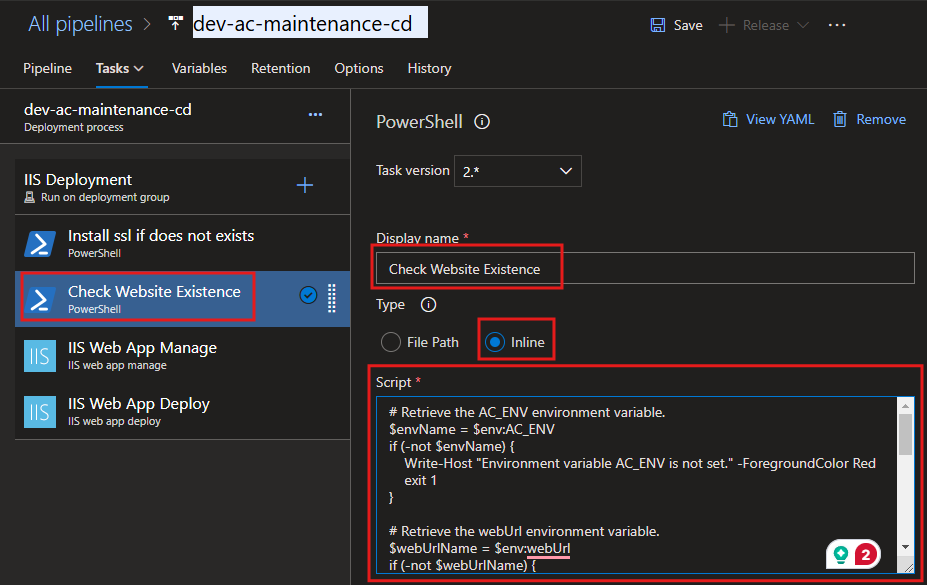
Script:
# Retrieve the AC_ENV environment variable.
$envName = $env:AC_ENV
if (-not $envName) {
    Write-Host "ERROR: Environment variable 'AC_ENV' is not set. Please ensure it is defined." -ForegroundColor Red
    exit 1
}

# Retrieve the webUrl environment variable.
$webUrlName = $env:lbWebUrl
if (-not $webUrlName) {
    Write-Host "ERROR: Environment variable 'webUrl' is not set. Please ensure it is defined." -ForegroundColor Red
    exit 1
}

# Name of the IIS website to check
$websiteName = $envName + $webUrlName
Write-Host "Checking for IIS website: $websiteName" -ForegroundColor Cyan

# Initialize the websiteExists variable
$websiteExists = $false
Import-Module WebAdministration

try {
    # Check if the IIS website exists
    $website = Get-Website | Where-Object { $_.Name -eq $websiteName }

    if ($website -ne $null) {
        Write-Host "SUCCESS: Website '$websiteName' exists." -ForegroundColor Green
        $websiteExists = $true
    } else {
        Write-Host "WARNING: Website '$websiteName' does not exist." -ForegroundColor Yellow
    }
} catch {
    Write-Host "ERROR: Failed to check the website status. Details: $_" -ForegroundColor Red
    exit 1
}

# Set a pipeline variable to indicate whether the website exists
Write-Host "Setting pipeline variable 'websiteExists' to: $websiteExists" -ForegroundColor Cyan
"##vso[task.setvariable variable=websiteExists]$websiteExists"

Write-Host "Script execution completed." -ForegroundColor Green
STOP website if exists - Task
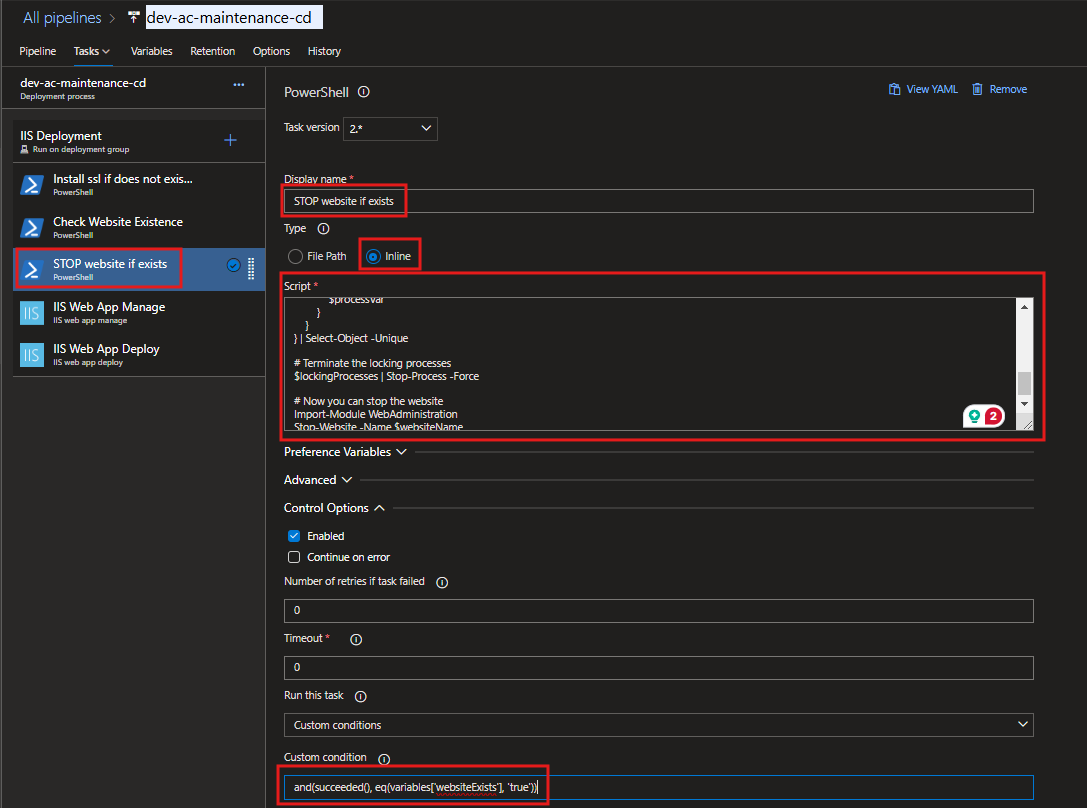
Script:
Write-Host "Checking for website: $websiteName..." -ForegroundColor Yellow

# Retrieve the AC_ENV environment variable.
$envName = $env:AC_ENV
if (-not $envName) {
    Write-Host "ERROR: Environment variable 'AC_ENV' is not set. Please ensure it is defined." -ForegroundColor Red
    exit 1
}

# Retrieve the webUrl environment variable.
$webUrlName = $env:lbWebUrl
if (-not $webUrlName) {
    Write-Host "ERROR: Environment variable 'webUrl' is not set. Please ensure it is defined." -ForegroundColor Red
    exit 1
}

# Name of the IIS website to check
$websiteName = $envName + $webUrlName
Write-Host "Website name constructed: $websiteName" -ForegroundColor Cyan

# Define the path of the IIS website root directory based on the website name
# Update this path according to your website's directory structure
$websiteRootPath = "C:\inetpub\$(projectName)\$websiteName"
Write-Host "Website root directory path: $websiteRootPath" -ForegroundColor Cyan

# Find processes locking files in the website directory
Write-Host "Scanning for processes locking files in: $websiteRootPath..." -ForegroundColor Yellow
$lockingProcesses = Get-Process | foreach {
    $processVar = $_
    $_.Modules | foreach {
        if ($_.FileName -and $_.FileName.StartsWith($websiteRootPath)) {
            $processVar
        }
    }
} | Select-Object -Unique

if ($lockingProcesses) {
    Write-Host "The following processes are locking files in the directory:" -ForegroundColor Red
    $lockingProcesses | ForEach-Object { Write-Host " - $_.Name (PID: $($_.Id))" -ForegroundColor DarkRed }
    Write-Host "Terminating locking processes..." -ForegroundColor Yellow
    $lockingProcesses | Stop-Process -Force
    Write-Host "All locking processes terminated successfully." -ForegroundColor Green
} else {
    Write-Host "No processes are locking files in the directory. Proceeding..." -ForegroundColor Green
}

# Stop the website
Write-Host "Stopping the IIS website: $websiteName..." -ForegroundColor Yellow
Import-Module WebAdministration
try {
    Stop-Website -Name $websiteName
    Write-Host "Website '$websiteName' has been stopped successfully." -ForegroundColor Green
} catch {
    Write-Host "ERROR: Failed to stop the website '$websiteName'. Details: $_" -ForegroundColor Red
    exit 1
}

Write-Host "Script execution completed successfully." -ForegroundColor Green
Custom condition:
and(succeeded(), eq(variables['websiteExists'], 'true'))
SSL Binding Check - Task
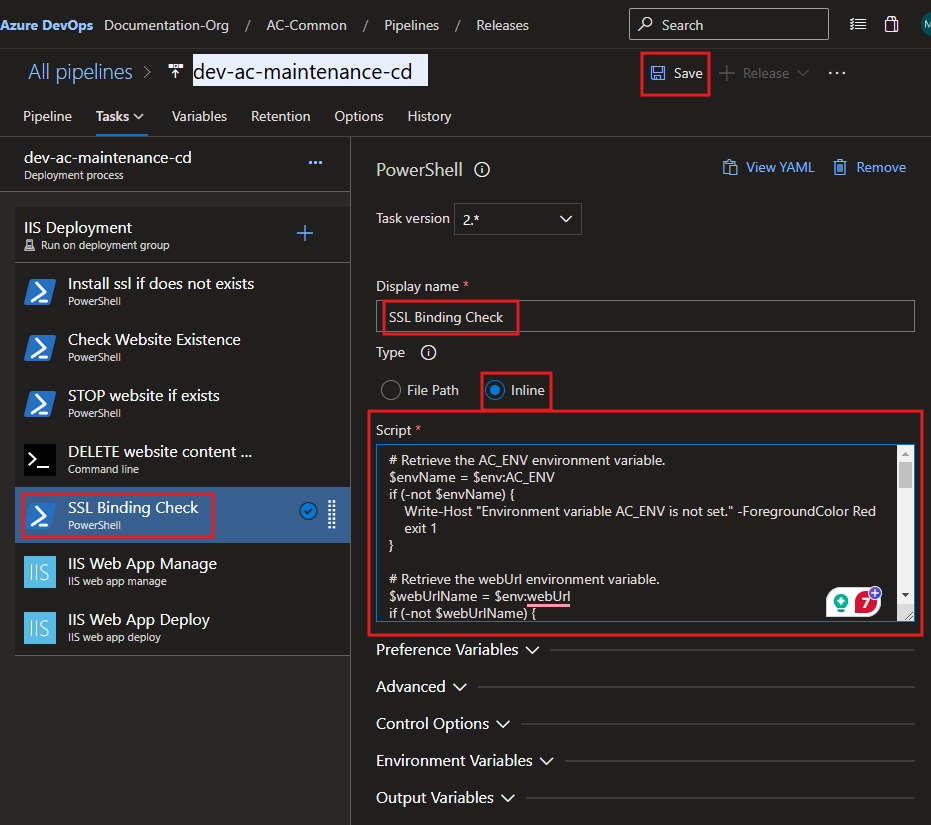
Script:
# Retrieve the AC_ENV environment variable.
$envName = $env:AC_ENV
if (-not $envName) {
    Write-Host "=================================================================" -ForegroundColor Red
    Write-Host "ERROR: Environment variable 'AC_ENV' is not set." -ForegroundColor Red
    Write-Host "Please ensure 'AC_ENV' is defined before running this script." -ForegroundColor Red
    Write-Host "================================================================="
    exit 1
}

# Retrieve the webUrl environment variable.
$webUrlName = $env:lbWebUrl
if (-not $webUrlName) {
    Write-Host "=================================================================" -ForegroundColor Red
    Write-Host "ERROR: Environment variable 'webUrl' is not set." -ForegroundColor Red
    Write-Host "Please ensure 'webUrl' is defined before running this script." -ForegroundColor Red
    Write-Host "================================================================="
    exit 1
}

# Name of the IIS website to check
$hostname = $envName + $webUrlName
$port = "443"
$hostnamePort = "${hostname}:${port}"

Write-Host "=================================================================" -ForegroundColor Yellow
Write-Host "Checking SSL binding for hostname: $hostname and port: $port" -ForegroundColor Cyan
Write-Host "Target hostname and port combination: $hostnamePort" -ForegroundColor Cyan
Write-Host "================================================================="

# Attempt to retrieve the current SSL certificate binding
try {
    $bindingExists = & netsh http show sslcert hostnameport=$hostnamePort
    Write-Host "Checking for SSL certificate binding. Command Output:" -ForegroundColor Green
    Write-Host "-------------------------------------------------------------" -ForegroundColor Green
    Write-Host $bindingExists
    Write-Host "-------------------------------------------------------------" -ForegroundColor Green
} catch {
    Write-Host "ERROR: Failed to check SSL binding. Details:" -ForegroundColor Red
    Write-Host $_ -ForegroundColor Red
    exit 1
}

# Proceed only if the binding exists
if ($bindingExists -match "Certificate Hash") {
    Write-Host "=================================================================" -ForegroundColor Yellow
    Write-Host "SSL binding exists for $hostnamePort. Proceeding to remove it..." -ForegroundColor Green
    Write-Host "================================================================="
    try {
        # Remove the existing SSL certificate binding
        & netsh http delete sslcert hostnameport=$hostnamePort
        Write-Host "SUCCESS: SSL binding removed successfully for $hostnamePort." -ForegroundColor Green
    } catch {
        Write-Host "ERROR: Failed to remove SSL binding. Details:" -ForegroundColor Red
        Write-Host $_ -ForegroundColor Red
        exit 1
    }
} else {
    Write-Host "=================================================================" -ForegroundColor Yellow
    Write-Host "INFO: No SSL binding exists for $hostnamePort. Skipping removal." -ForegroundColor Blue
    Write-Host "================================================================="
}

# Continue with further commands or cleanup as needed
Write-Host "=================================================================" -ForegroundColor Yellow
Write-Host "SSL binding check and removal process completed." -ForegroundColor Green
Write-Host "================================================================="

# Set an explicit success exit code
exit 0
IIS Web App Manage - Task
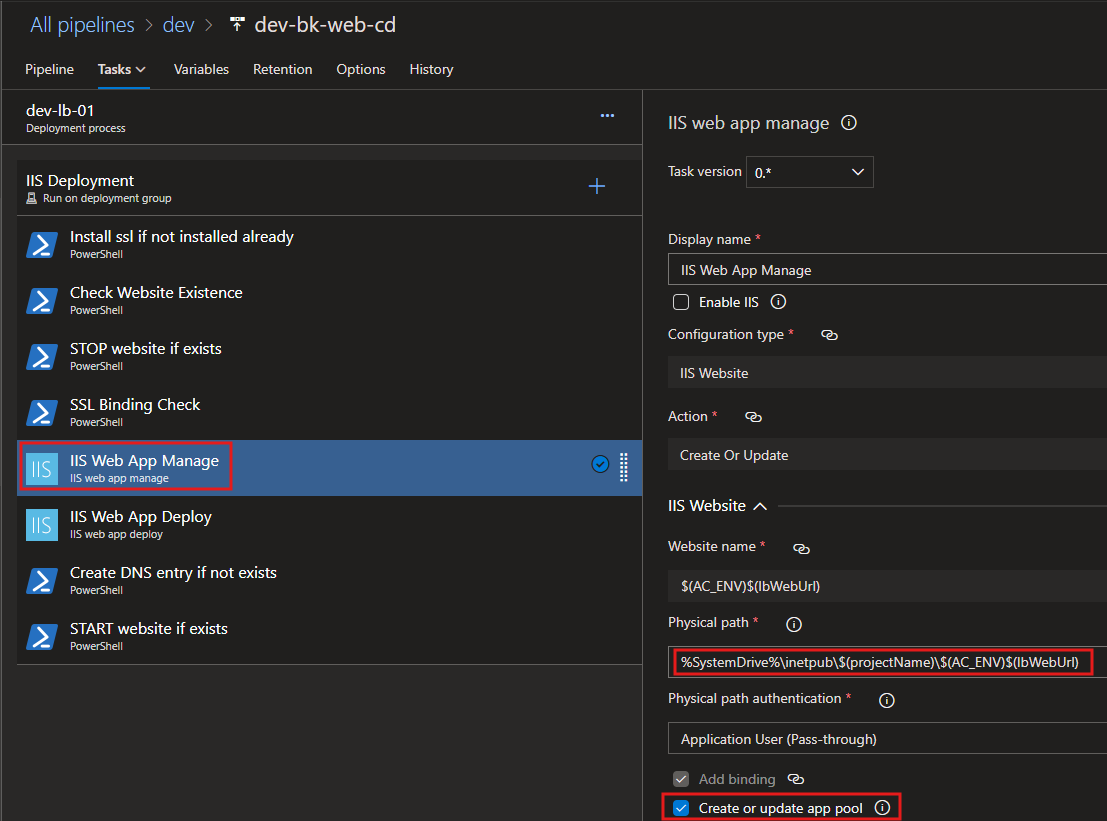
Physical path:
%SystemDrive%\inetpub\$(projectName)\$(AC_ENV)$(lbWebUrl)
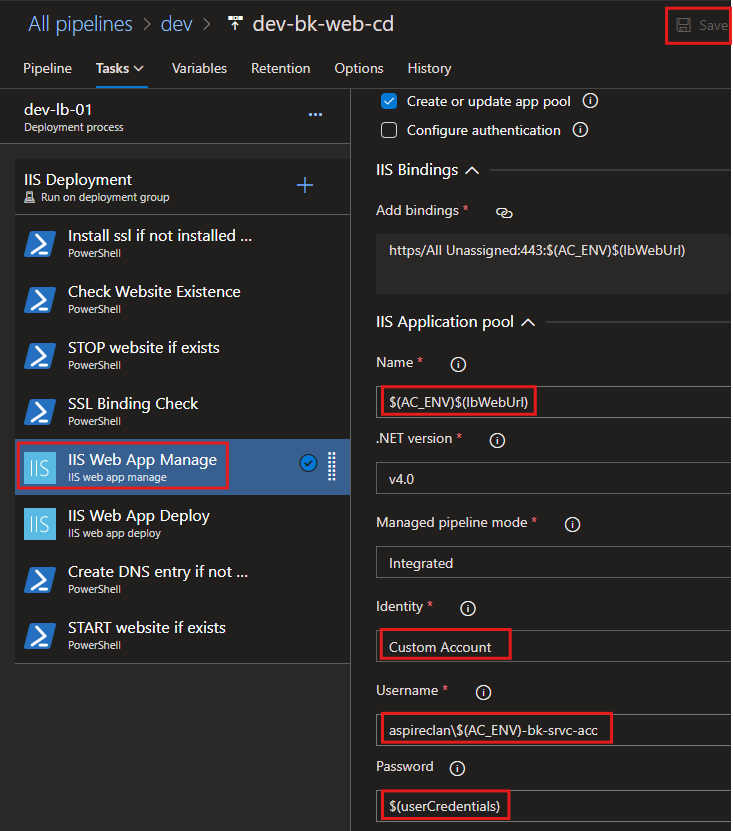
Name:
$(AC_ENV)$(lbWebUrl)
Username:
aspireclan\$(AC_ENV)-bk-srvc-acc
Password:
$(userCredentials)
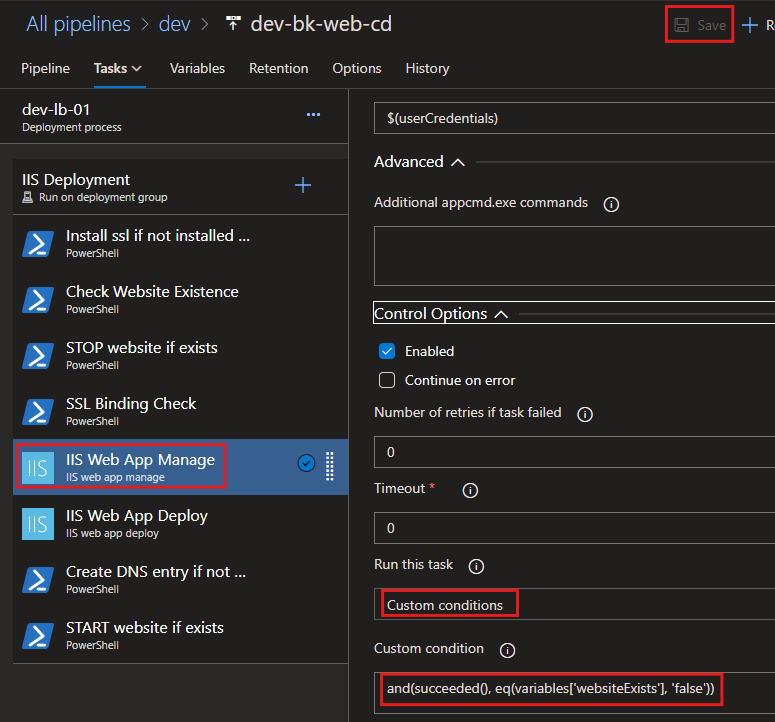
Custom condition:
and(succeeded(), eq(variables['websiteExists'], 'false'))
IIS Web App Deploy - Task
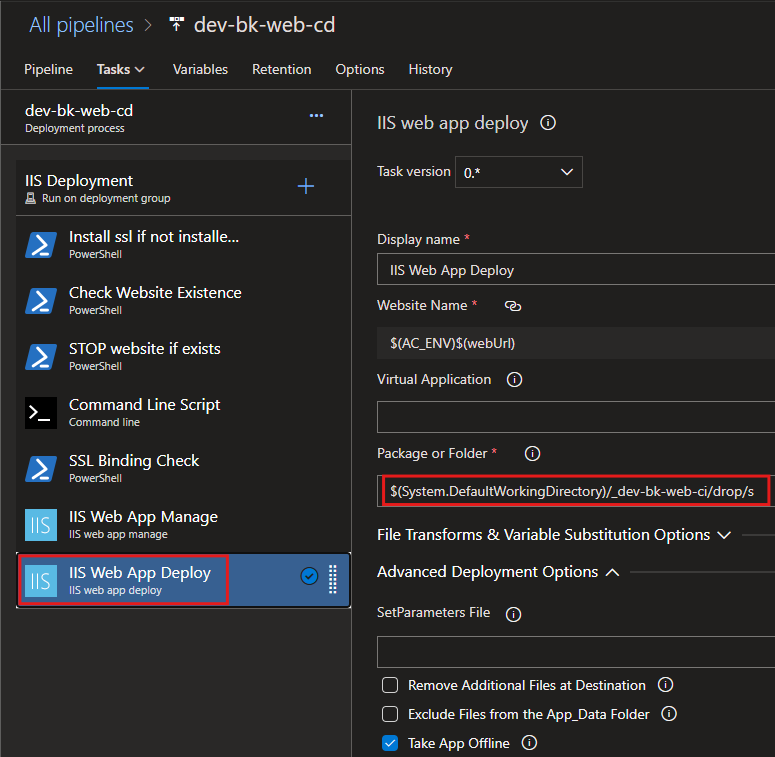
Custom condition:
and(succeeded(), eq(variables['websiteExists'], 'false'))
WebConfig Script - IP Restriction and Maintenance URL Redirect - Task
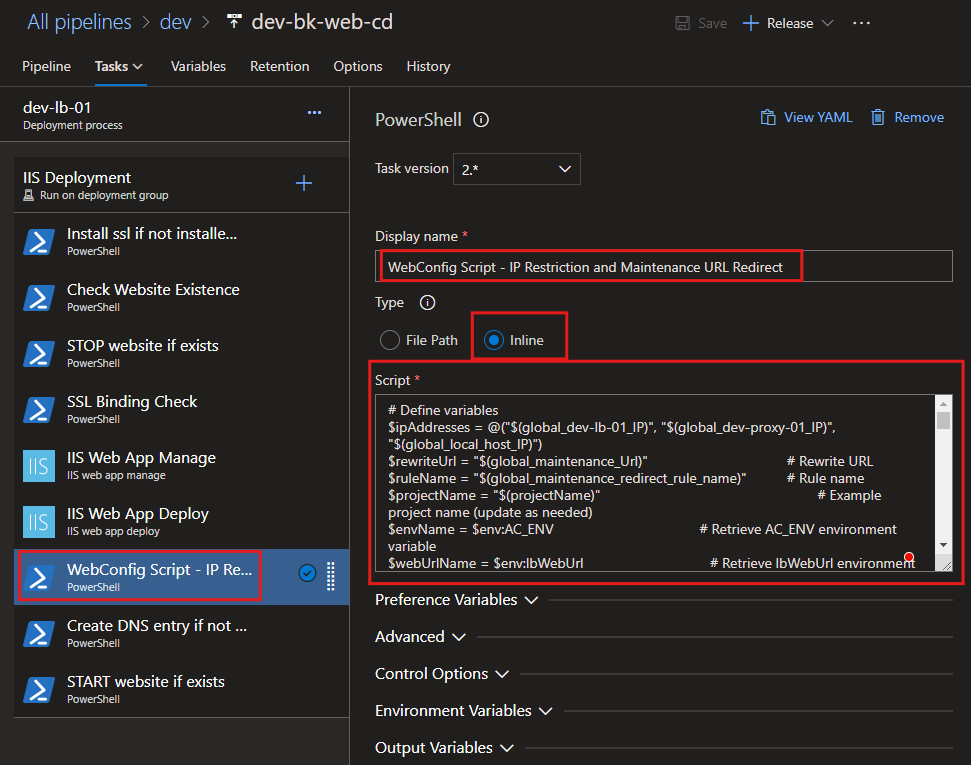
Script:
# Define variables
$ipAddresses = @("$(global_dev-lb-01_IP)", "$(global_dev-proxy-01_IP)", "$(global_local_host_IP)")
$rewriteUrl = "$(webUrl)"                   # Rewrite URL
$ruleName = "$(global_dev-lb-01_redirect_rule_name)"        # Rule name from the global variable
$projectName = "$(projectName)"                             # Project name (update as needed)
$envName = $env:AC_ENV                                      # Retrieve AC_ENV environment variable
$webUrlName = $env:lbWebUrl                                 # Retrieve lbWebUrl environment variable

# Validate environment variables
if (-not $envName) {
    Write-Host "Environment variable AC_ENV is not set. Exiting script." -ForegroundColor Red
    exit 1
} else {
    Write-Host "💚 Environment variable AC_ENV is set to '$envName'." -ForegroundColor Green
}

if (-not $webUrlName) {
    Write-Host "Environment variable lbWebUrl is not set. Exiting script." -ForegroundColor Red
    exit 1
} else {
    Write-Host "💚 Environment variable lbWebUrl is set to '$webUrlName'." -ForegroundColor Green
}

if (-not $ruleName) {
    Write-Host "Environment variable for rule name is not set. Exiting script." -ForegroundColor Red
    exit 1
} else {
    Write-Host "💚 Rule name is set to '$ruleName'." -ForegroundColor Green
}

# Define the IIS website name and web.config path
$websiteName = "$envName$webUrlName"
$webConfigPath = "C:\inetpub\${projectName}\${websiteName}\web.config"
Write-Host "💡 Target website name: '$websiteName'." -ForegroundColor Cyan
Write-Host "📄 Target web.config path: '$webConfigPath'." -ForegroundColor Cyan

try {
    # Ensure IIS Administration Module is available
    if (-not (Get-Module -ListAvailable -Name WebAdministration)) {
        Write-Host "❌ IIS Administration Module is not installed. Exiting script." -ForegroundColor Red
        exit
    } else {
        Write-Host "✔ IIS Administration Module is installed." -ForegroundColor Green
    }

    # Import the WebAdministration module
    Write-Host "🔄 Importing IIS WebAdministration module..." -ForegroundColor Yellow
    Import-Module WebAdministration
    Write-Host "✔ WebAdministration module imported successfully." -ForegroundColor Green

    # Unlock necessary sections at the server level
    Write-Host "🔓 Ensuring necessary configuration sections are unlocked..." -ForegroundColor Yellow
    $sectionsToUnlock = @(
        "system.webServer/security/ipSecurity",
        "system.webServer/rewrite"
    )
    foreach ($section in $sectionsToUnlock) {
        Write-Host "Checking section: $section" -ForegroundColor Cyan
        Set-WebConfigurationProperty -Filter $section -PSPath "MACHINE/WEBROOT/APPHOST" -Name "overrideMode" -Value "Allow" -ErrorAction Stop
        Write-Host "✔ Section $section unlocked successfully." -ForegroundColor Green
    }

    # Load or create the web.config file
    Write-Host "🔍 Checking if web.config file exists..." -ForegroundColor Yellow
    if (-not (Test-Path $webConfigPath)) {
        Write-Host "⚠ web.config does not exist. Creating a new web.config file." -ForegroundColor Yellow
        $webConfig = [xml]@"
<?xml version="1.0" encoding="UTF-8"?>
<configuration>
    <system.webServer>
        <security>
            <ipSecurity allowUnlisted="false" />
        </security>
        <rewrite>
            <rules />
        </rewrite>
    </system.webServer>
</configuration>
"@
        $webConfig.Save($webConfigPath)
        Write-Host "✔ web.config file created successfully at $webConfigPath" -ForegroundColor Green
    } else {
        Write-Host "✔ web.config file found. Loading file..." -ForegroundColor Green
        [xml]$webConfig = Get-Content $webConfigPath -ErrorAction Stop
    }

    # Ensure the system.webServer node exists
    $webServerNode = $webConfig.SelectSingleNode("//system.webServer")
    if (-not $webServerNode) {
        Write-Host "⚠ system.webServer node not found. Creating a new node..." -ForegroundColor Yellow
        $webServerNode = $webConfig.CreateElement("system.webServer")
        $webConfig.DocumentElement.AppendChild($webServerNode)
        Write-Host "✔ system.webServer node created." -ForegroundColor Green
    } else {
        Write-Host "✔ system.webServer node exists." -ForegroundColor Green
    }

    # Add Rewrite Rule (Always Write the Rule)
    Write-Host "🔄 Configuring URL rewrite rule..." -ForegroundColor Yellow
    $rewriteNode = $webServerNode.SelectSingleNode("rewrite")
    if (-not $rewriteNode) {
        Write-Host "⚠ rewrite node not found. Creating a new node..." -ForegroundColor Yellow
        $rewriteNode = $webConfig.CreateElement("rewrite")
        $webServerNode.AppendChild($rewriteNode)
        Write-Host "✔ rewrite node created." -ForegroundColor Green
    }

    $rulesNode = $rewriteNode.SelectSingleNode("rules")
    if (-not $rulesNode) {
        Write-Host "⚠ rules node not found. Creating a new node..." -ForegroundColor Yellow
        $rulesNode = $webConfig.CreateElement("rules")
        $rewriteNode.AppendChild($rulesNode)
        Write-Host "✔ rules node created." -ForegroundColor Green
    }

    # Remove the existing rule if it exists
    $existingRule = $rulesNode.SelectSingleNode("rule[@name='$ruleName']")
    if ($existingRule) {
        Write-Host "⚠ Rewrite rule '$ruleName' already exists. Removing it to rewrite..." -ForegroundColor Yellow
        $rulesNode.RemoveChild($existingRule) | Out-Null
        Write-Host "✔ Existing rule '$ruleName' removed successfully." -ForegroundColor Green
    }

    # Add the rewrite rule
    Write-Host "➕ Adding the rewrite rule '$ruleName'..." -ForegroundColor Cyan
    $ruleNode = $webConfig.CreateElement("rule")
    $ruleNode.SetAttribute("name", $ruleName)
    $ruleNode.SetAttribute("stopProcessing", "true")

    $matchNode = $webConfig.CreateElement("match")
    $matchNode.SetAttribute("url", "(.*)")
    $ruleNode.AppendChild($matchNode)

    $actionNode = $webConfig.CreateElement("action")
    $actionNode.SetAttribute("type", "Rewrite")
    $actionNode.SetAttribute("url", $rewriteUrl)
    $ruleNode.AppendChild($actionNode)

    $rulesNode.AppendChild($ruleNode)
    Write-Host "✔ Rewrite rule '$ruleName' added successfully." -ForegroundColor Green

    # Save the updated web.config
    Write-Host "💾 Saving updates to web.config file..." -ForegroundColor Yellow
    $webConfig.Save($webConfigPath)
    Write-Host "✔ web.config file updated and saved successfully!" -ForegroundColor Green

} catch {
    Write-Host "❌ An error occurred: $_" -ForegroundColor Red
}
Create DNS entry if not exists - Task
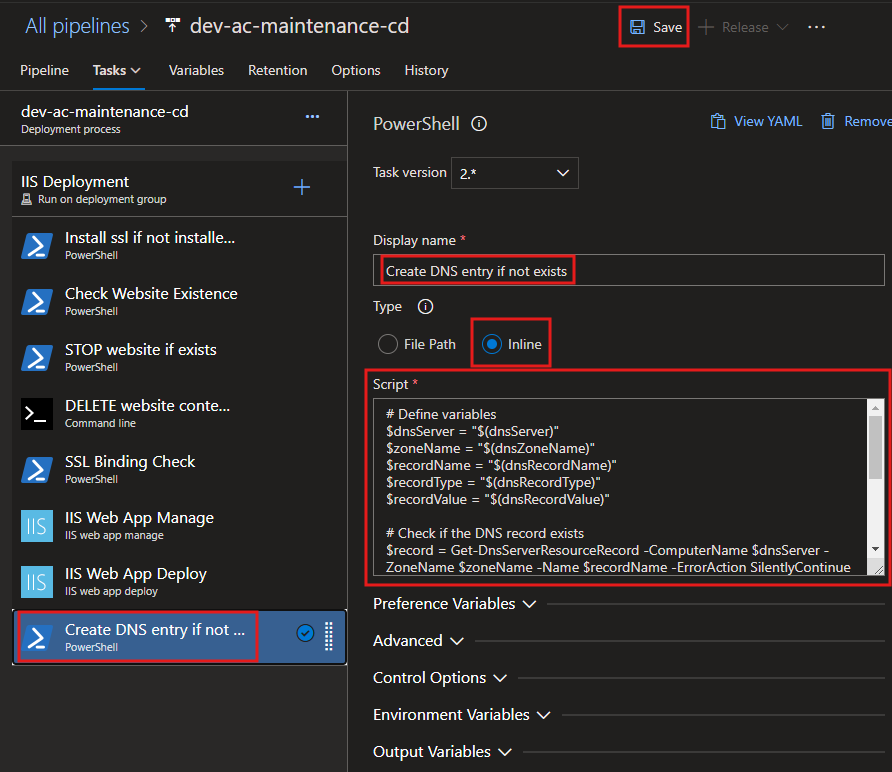
Script:
# Check if the DnsServer module is available
Write-Host "=================================================================" -ForegroundColor Yellow
Write-Host "Step 1: Checking for DnsServer module availability..." -ForegroundColor Cyan
Write-Host "================================================================="

if (-not (Get-Module -ListAvailable -Name DnsServer)) {
    Write-Host "INFO: The DnsServer module is not installed. Attempting to install..." -ForegroundColor Yellow

    # Check if the current system is a Windows Server or client OS
    if (Get-WindowsFeature -Name RSAT-DNS-Server -ErrorAction SilentlyContinue) {
        try {
            Write-Host "INFO: Installing DNS Server Tools on Windows Server..." -ForegroundColor Yellow
            Install-WindowsFeature -Name RSAT-DNS-Server -IncludeManagementTools -ErrorAction Stop
            Write-Host "SUCCESS: DNS Server Tools installed successfully on Windows Server." -ForegroundColor Green
        } catch {
            Write-Host "ERROR: Failed to install DNS Server Tools on Windows Server." -ForegroundColor Red
            Write-Error $_
            exit 1
        }
    } elseif ((Get-WindowsCapability -Name Rsat.Dns.Tools~~~~0.0.1.0 -Online).State -ne "Installed") {
        try {
            Write-Host "INFO: Installing RSAT DNS Tools on Windows 10/11..." -ForegroundColor Yellow
            Add-WindowsCapability -Online -Name Rsat.Dns.Tools~~~~0.0.1.0 -ErrorAction Stop
            Write-Host "SUCCESS: RSAT DNS Tools installed successfully on Windows 10/11." -ForegroundColor Green
        } catch {
            Write-Host "ERROR: Failed to install RSAT DNS Tools on Windows 10/11." -ForegroundColor Red
            Write-Error $_
            exit 1
        }
    } else {
        Write-Host "ERROR: Unable to detect the installation method for the DnsServer module on this system." -ForegroundColor Red
        exit 1
    }
} else {
    Write-Host "SUCCESS: The DnsServer module is already available." -ForegroundColor Green
}

Write-Host "=================================================================" -ForegroundColor Yellow
Write-Host "Step 2: Preparing to manage DNS records..." -ForegroundColor Cyan
Write-Host "================================================================="

# Define variables
$dnsServer = "$(global_prod-dns-01_IP)"
$zoneName = "$(global_dns_zone_name)"
$recordName = "$(lbDnsRecordName)"
$recordType = "$(global_dns_record_type)"
$recordValue = "$(global_dev-web-01_IP)"

Write-Host "INFO: Using the following DNS details:" -ForegroundColor Cyan
Write-Host "-----------------------------------------------------------------" -ForegroundColor Cyan
Write-Host "  DNS Server: $dnsServer" -ForegroundColor Green
Write-Host "  DNS Zone Name: $zoneName" -ForegroundColor Green
Write-Host "  Record Name: $recordName" -ForegroundColor Green
Write-Host "  Record Type: $recordType" -ForegroundColor Green
Write-Host "  Record Value: $recordValue" -ForegroundColor Green
Write-Host "-----------------------------------------------------------------" -ForegroundColor Cyan

# Check if the DNS record exists
Write-Host "INFO: Checking if the DNS record already exists..." -ForegroundColor Yellow
$record = Get-DnsServerResourceRecord -ComputerName $dnsServer -ZoneName $zoneName -Name $recordName -ErrorAction SilentlyContinue

if ($null -eq $record) {
    Write-Host "INFO: DNS record does not exist. Preparing to create a new record..." -ForegroundColor Yellow

    try {
        # Add the DNS record
        Write-Host "INFO: Creating DNS record..." -ForegroundColor Yellow
        Add-DnsServerResourceRecordA -ComputerName $dnsServer -ZoneName $zoneName -Name $recordName -IPv4Address $recordValue
        Write-Host "SUCCESS: DNS record created successfully." -ForegroundColor Green
        Write-Host "  - Record Name: $recordName" -ForegroundColor Green
        Write-Host "  - Record Type: $recordType" -ForegroundColor Green
        Write-Host "  - Record Value: $recordValue" -ForegroundColor Green
    } catch {
        Write-Host "ERROR: Failed to create DNS record. Details:" -ForegroundColor Red
        Write-Error $_
        exit 1
    }
} else {
    Write-Host "INFO: DNS record already exists." -ForegroundColor Cyan
    Write-Host "  - Record Name: $recordName" -ForegroundColor Cyan
    Write-Host "  - Record Type: $recordType" -ForegroundColor Cyan
    Write-Host "  - Existing Record Value: $($record.RecordData.IPv4Address)" -ForegroundColor Cyan
}

Write-Host "=================================================================" -ForegroundColor Yellow
Write-Host "Step 3: DNS record management completed successfully." -ForegroundColor Green
Write-Host "================================================================="
START website if exists - Task
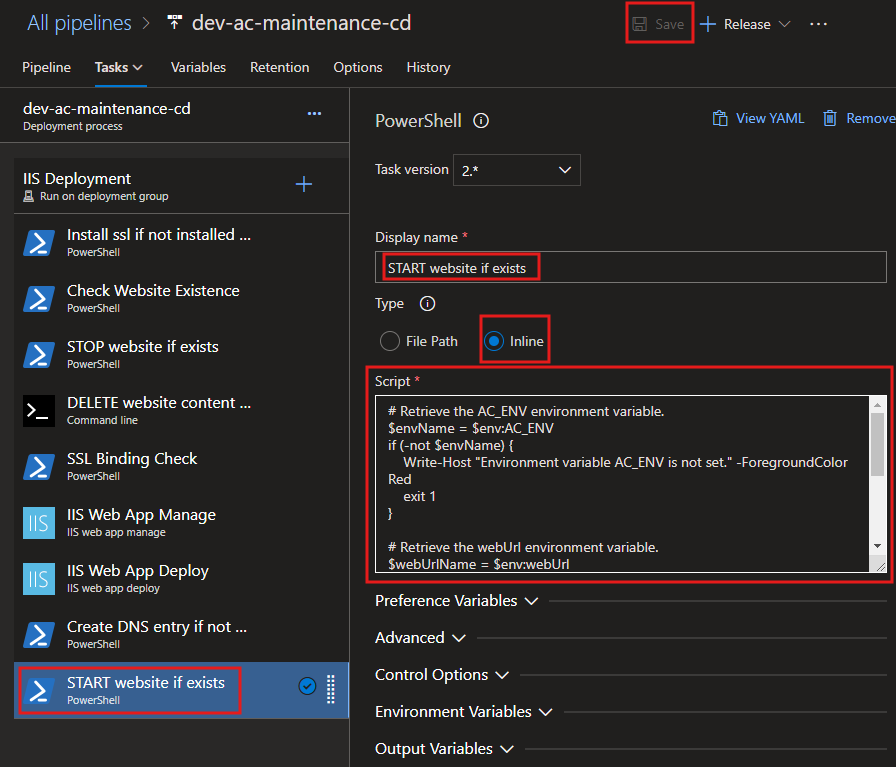
Script:
# Retrieve the AC_ENV environment variable.
$envName = $env:AC_ENV
if (-not $envName) {
    Write-Host "=================================================================" -ForegroundColor Red
    Write-Host "ERROR: Environment variable 'AC_ENV' is not set." -ForegroundColor Red
    Write-Host "Please ensure 'AC_ENV' is defined before running this script." -ForegroundColor Red
    Write-Host "================================================================="
    exit 1
}

# Retrieve the webUrl environment variable.
$webUrlName = $env:lbWebUrl
if (-not $webUrlName) {
    Write-Host "=================================================================" -ForegroundColor Red
    Write-Host "ERROR: Environment variable 'webUrl' is not set." -ForegroundColor Red
    Write-Host "Please ensure 'webUrl' is defined before running this script." -ForegroundColor Red
    Write-Host "================================================================="
    exit 1
}

# Name of the IIS website to check
$websiteName = $envName + $webUrlName

Write-Host "=================================================================" -ForegroundColor Yellow
Write-Host "Step 1: Preparing to start IIS website..." -ForegroundColor Cyan
Write-Host "================================================================="
Write-Host "INFO: Constructed website name: $websiteName" -ForegroundColor Green

# Import the WebAdministration module
Write-Host "INFO: Importing the WebAdministration module..." -ForegroundColor Cyan
try {
    Import-Module WebAdministration -ErrorAction Stop
    Write-Host "SUCCESS: WebAdministration module imported successfully." -ForegroundColor Green
} catch {
    Write-Host "ERROR: Failed to import the WebAdministration module. Details:" -ForegroundColor Red
    Write-Host $_ -ForegroundColor Red
    exit 1
}

Write-Host "=================================================================" -ForegroundColor Yellow
Write-Host "Step 2: Checking website status..." -ForegroundColor Cyan
Write-Host "================================================================="

# Check if the website exists
$website = Get-Website | Where-Object { $_.Name -eq $websiteName }

if ($null -eq $website) {
    Write-Host "ERROR: The website '$websiteName' does not exist in IIS." -ForegroundColor Red
    Write-Host "Please verify the website name and ensure it is configured in IIS." -ForegroundColor Red
    exit 1
} else {
    Write-Host "INFO: The website '$websiteName' exists in IIS." -ForegroundColor Green
}

# Check the current state of the website
$currentState = $website.State
Write-Host "INFO: Current state of '$websiteName': $currentState" -ForegroundColor Cyan

# Start the website if it is not already started
if ($currentState -eq "Started") {
    Write-Host "SUCCESS: The website '$websiteName' is already running." -ForegroundColor Green
} else {
    Write-Host "INFO: The website '$websiteName' is not running. Attempting to start..." -ForegroundColor Yellow
    try {
        Start-Website -Name $websiteName
        Write-Host "SUCCESS: The website '$websiteName' has been started successfully." -ForegroundColor Green
    } catch {
        Write-Host "ERROR: Failed to start the website '$websiteName'. Details:" -ForegroundColor Red
        Write-Host $_ -ForegroundColor Red
        exit 1
    }
}

Write-Host "=================================================================" -ForegroundColor Yellow
Write-Host "Step 3: IIS website check and start process completed successfully." -ForegroundColor Green
Write-Host "================================================================="