AC Maintenance
AC Maintenance CI
Create new CI Pipeline
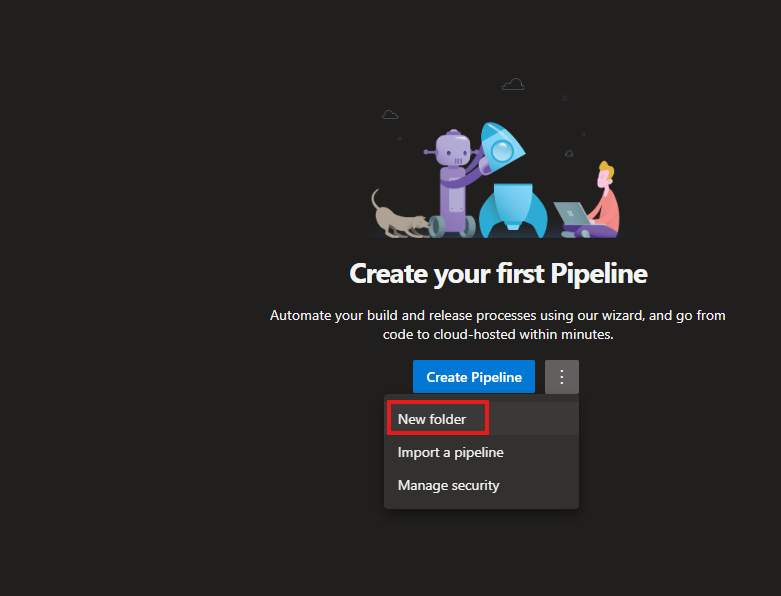
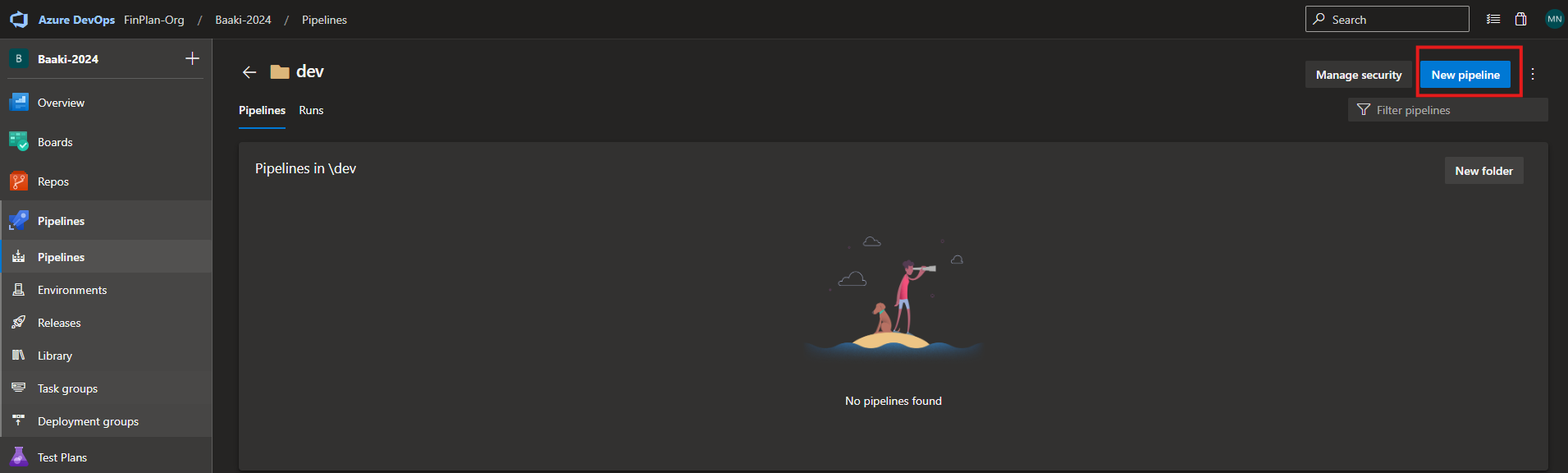
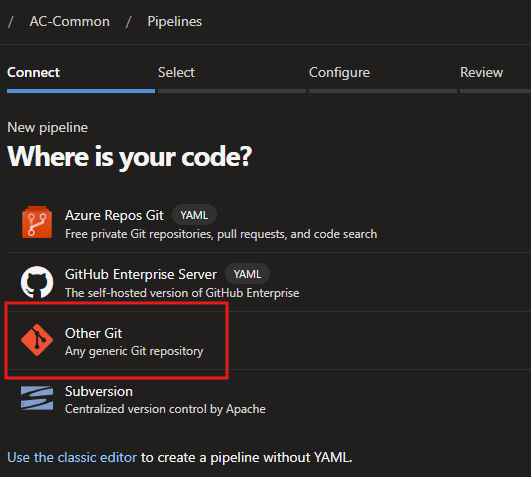
Select Repository Type
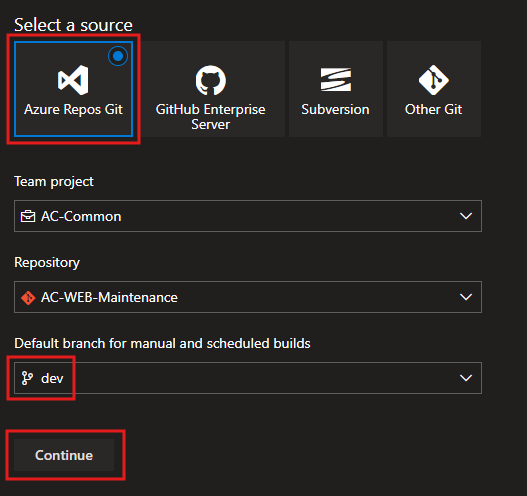
Select Repository and Branch
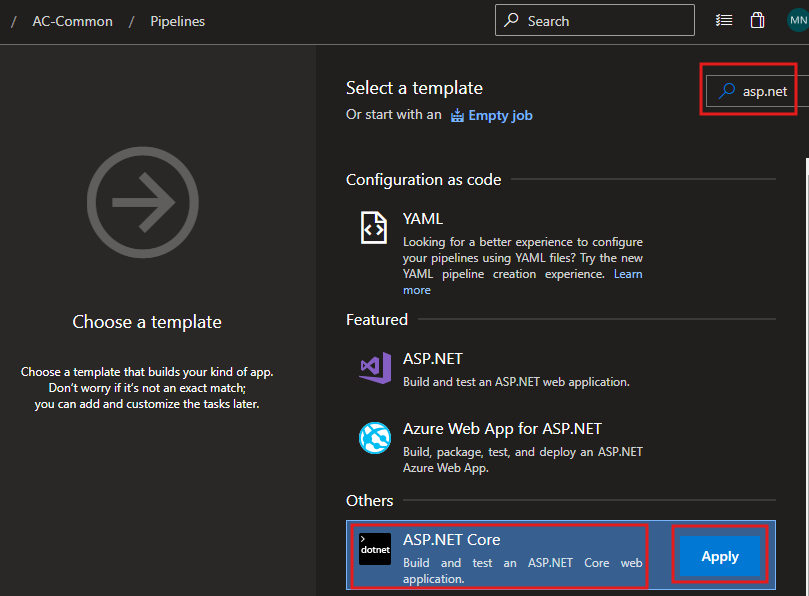
Select CI Template
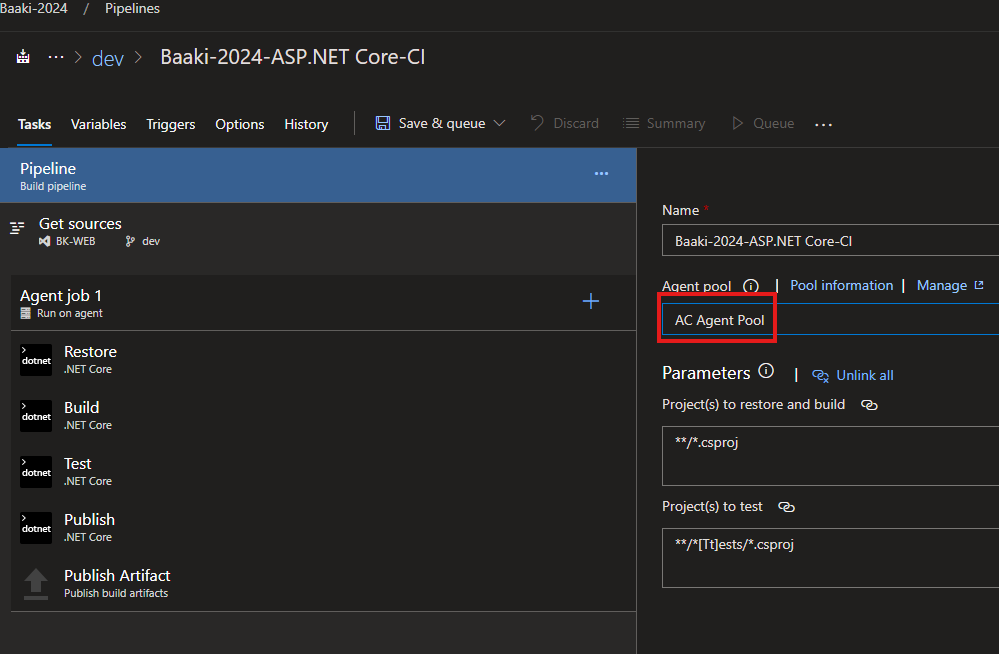
Agent Pool Settings
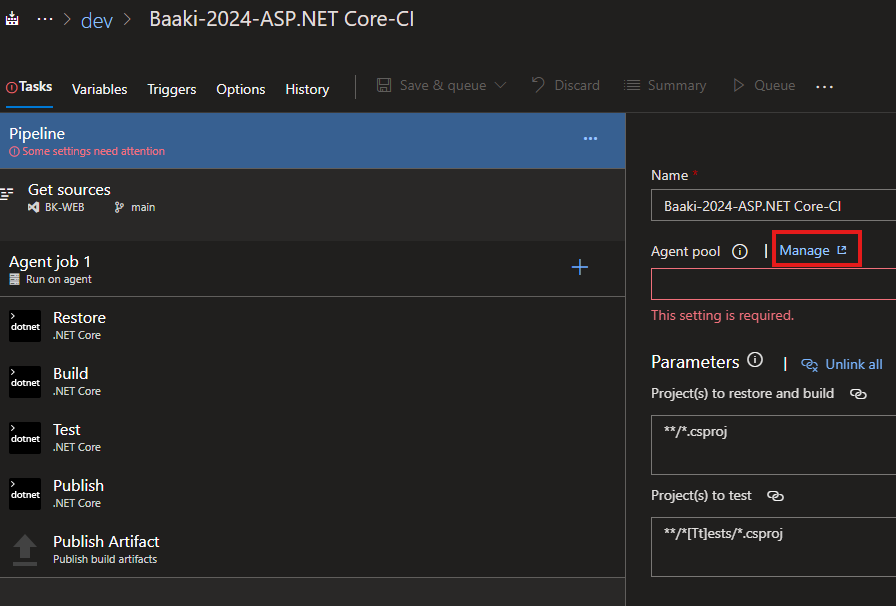
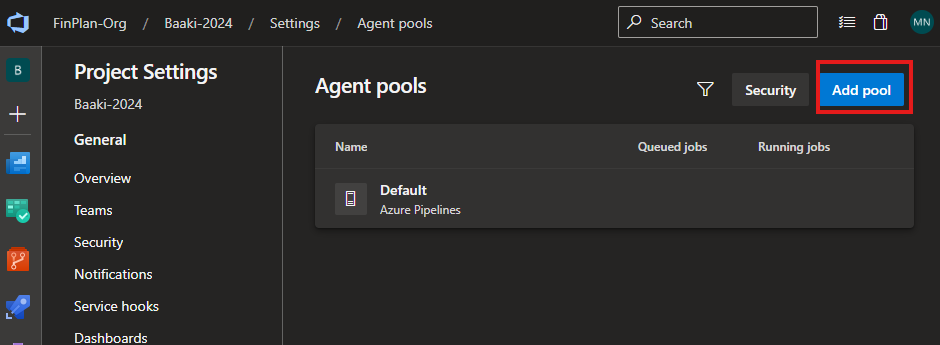
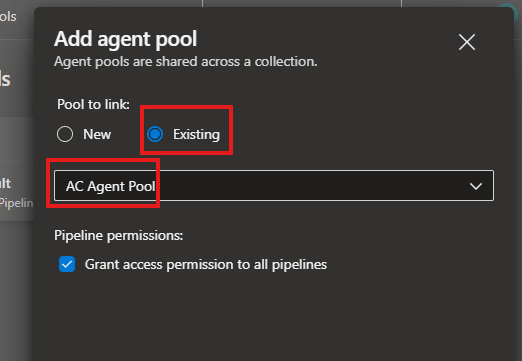
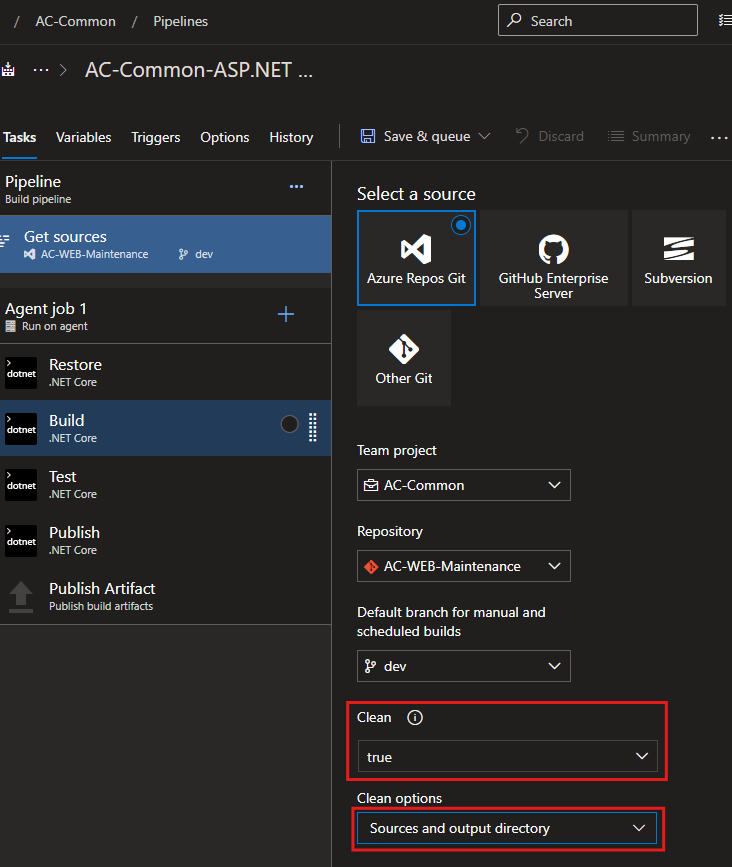
Select Source, Repository, and Branch
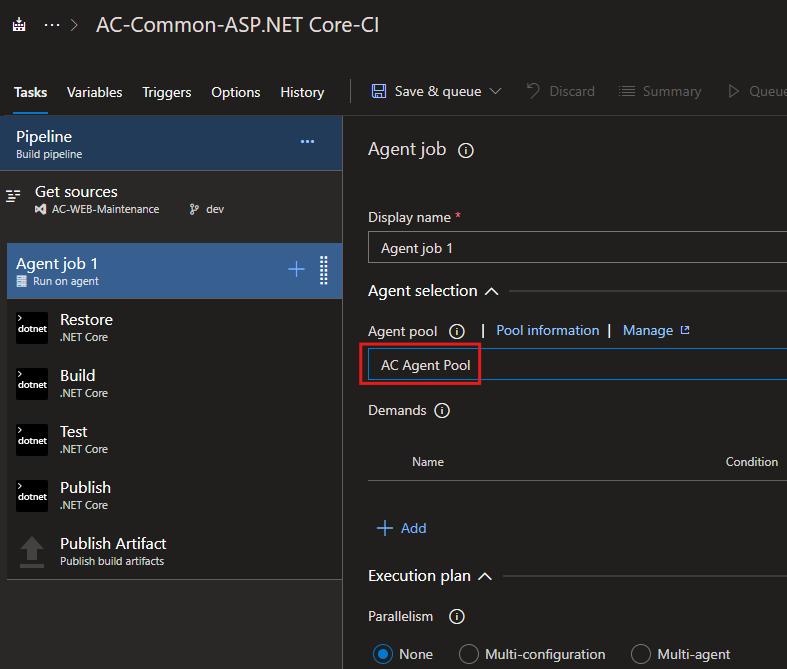
Select Agent job parameters
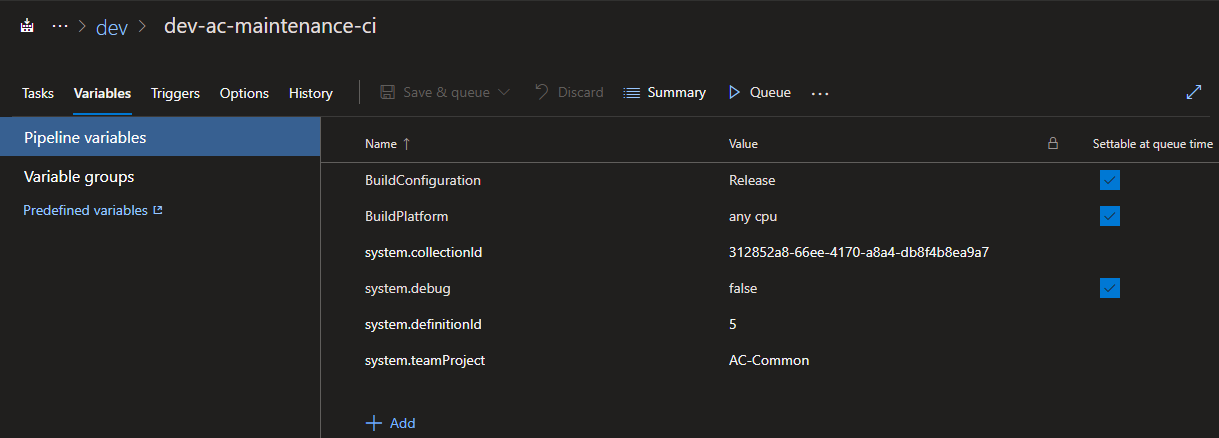
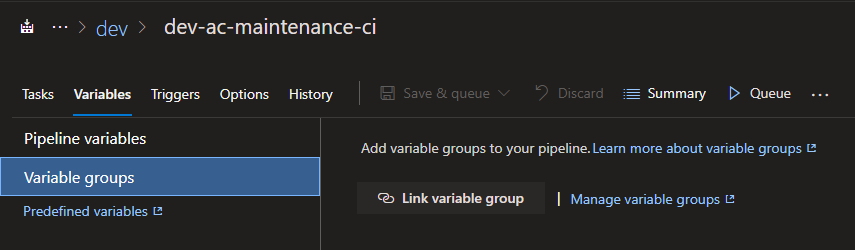
Local Pipeline Variables
Global Pipeline Variables
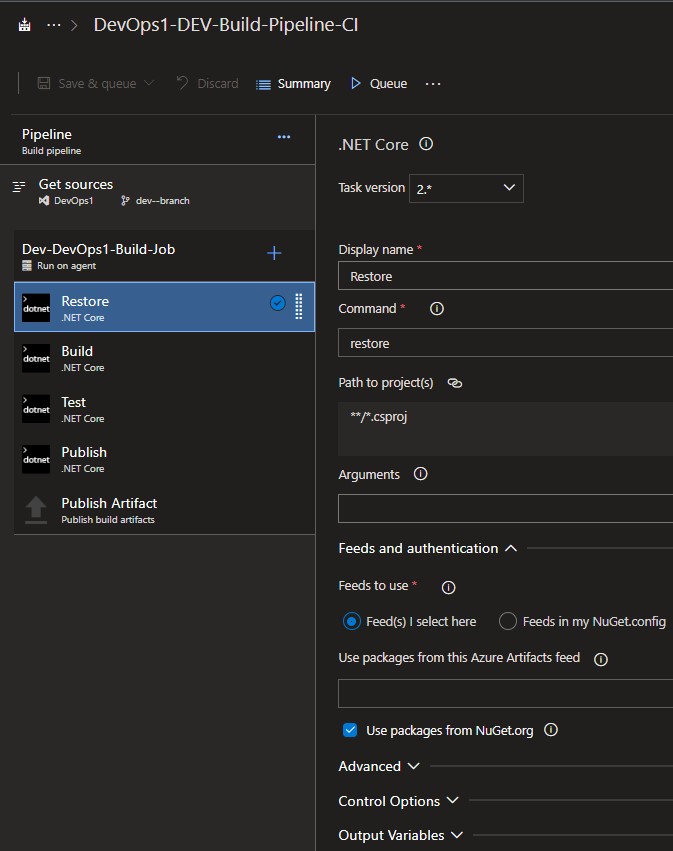
Restore - Task
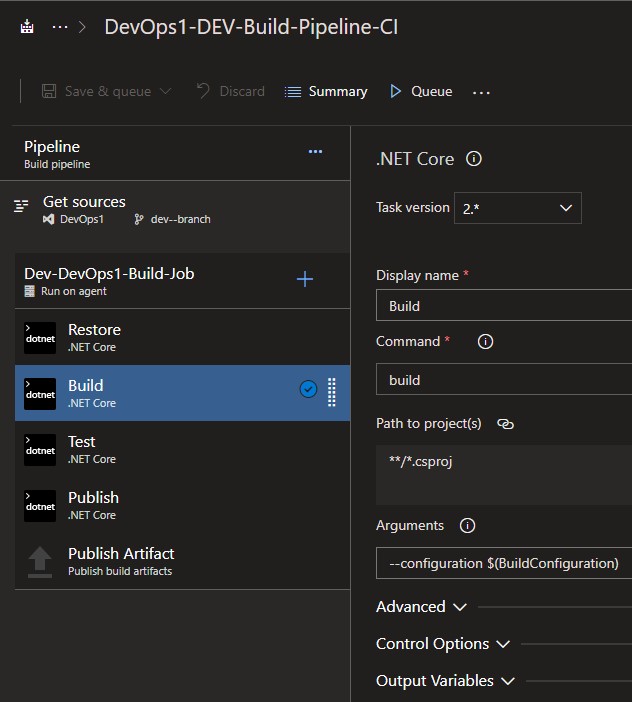
Build - Task
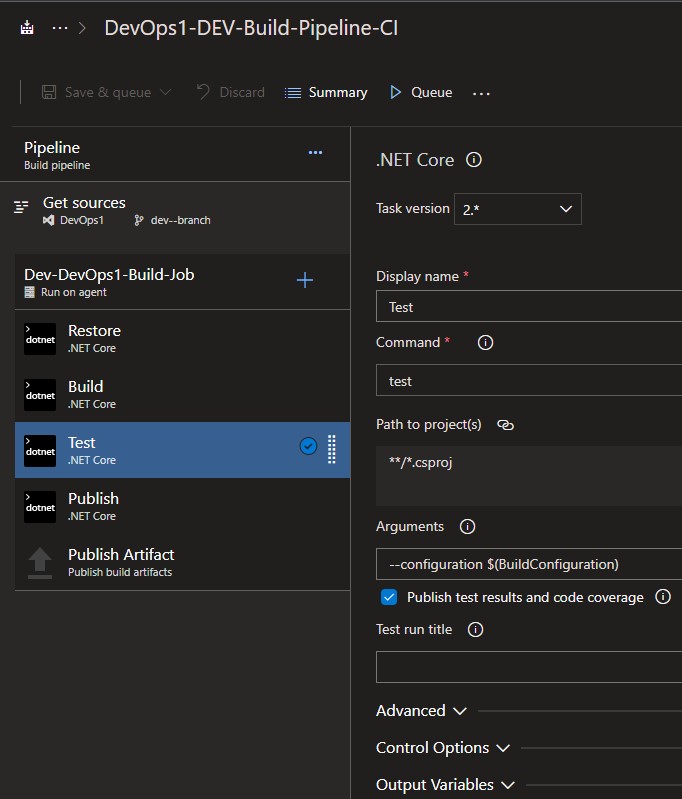
Test - Task
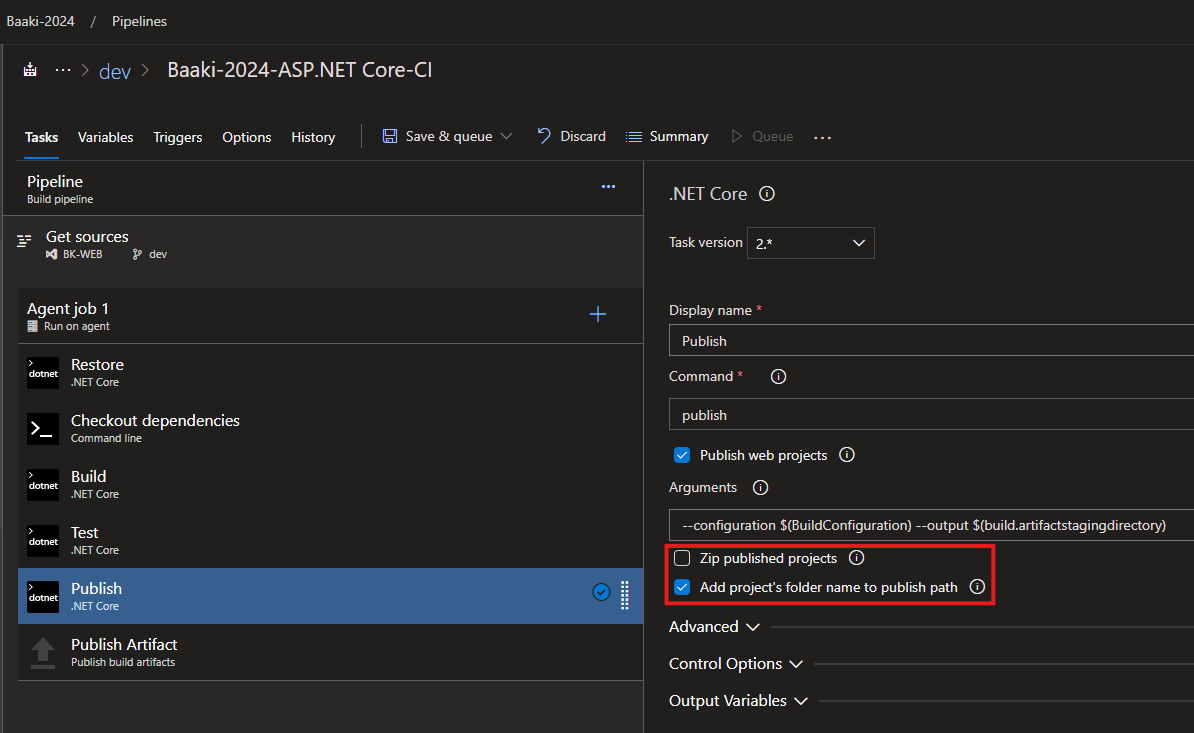
Publish - Task
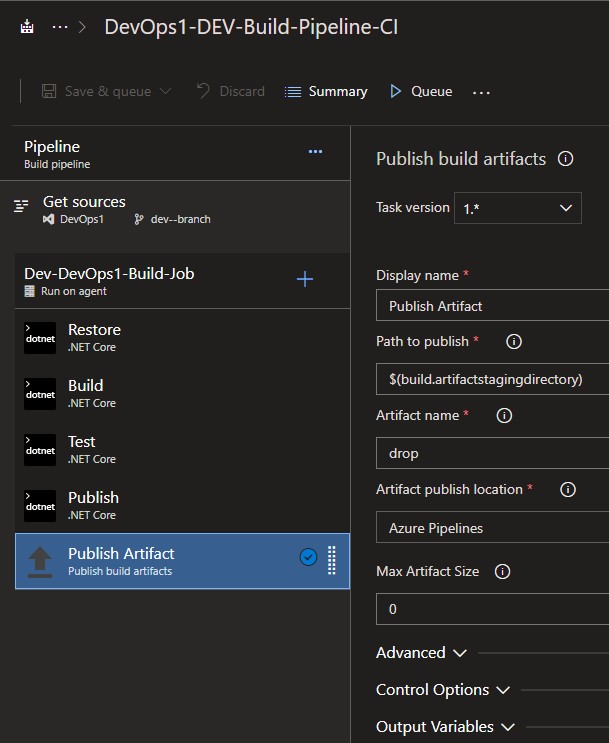
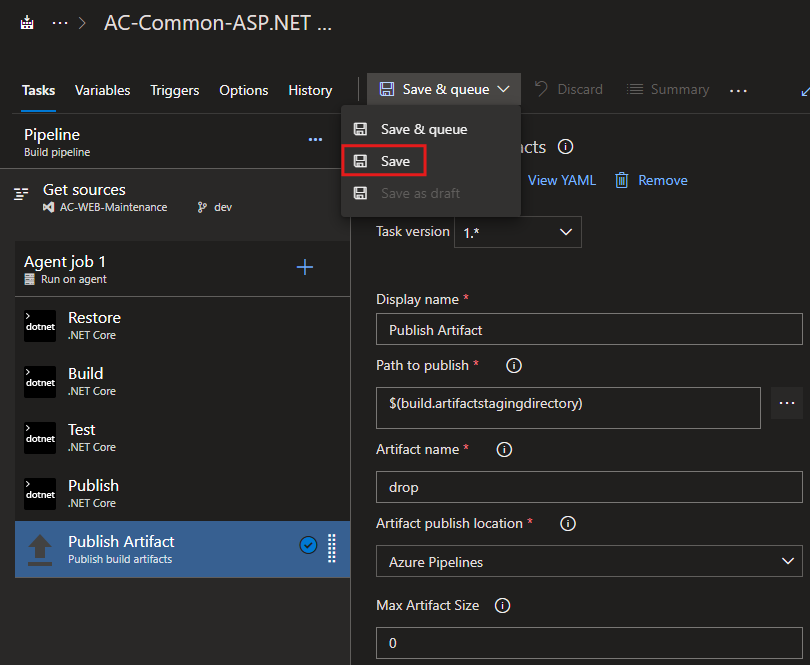
Publish Artifact - Task
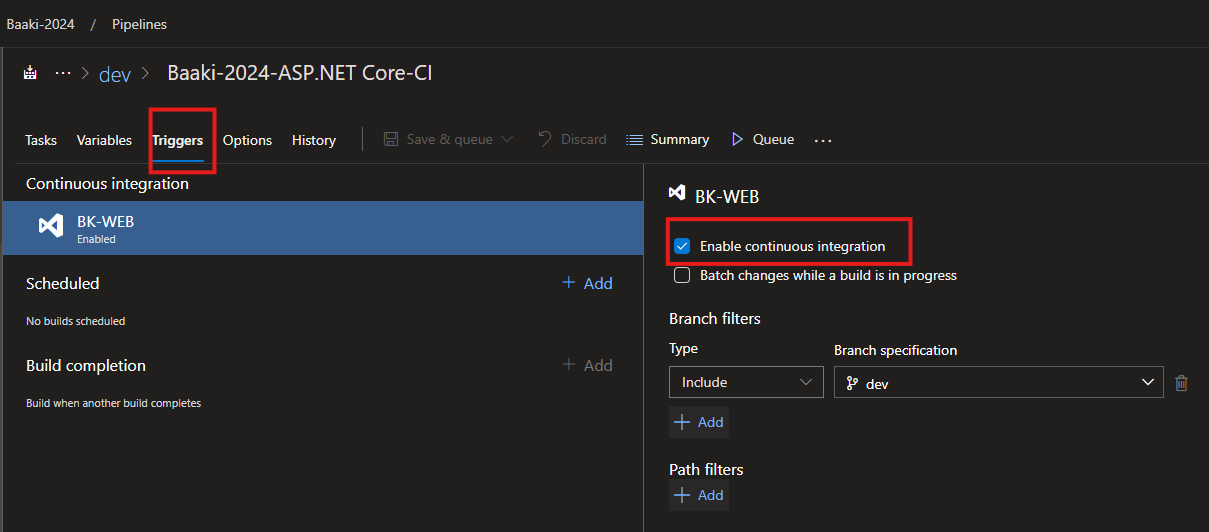
CI Trigger
AC Maintenance CD : dev-web-01
Create new CD Pipeline
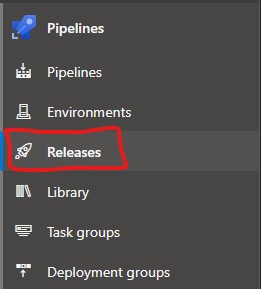
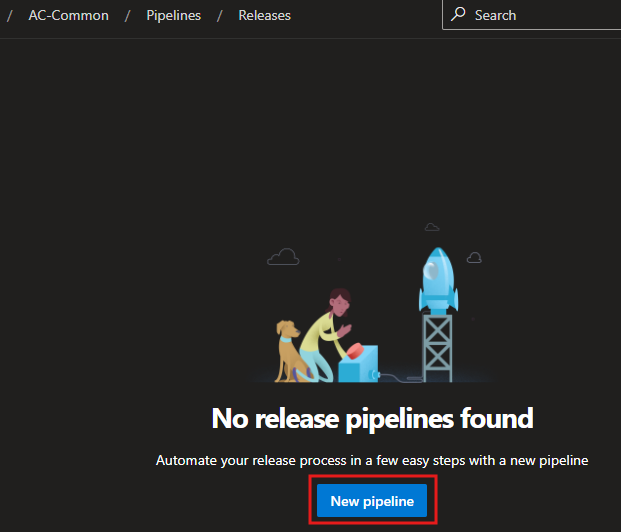
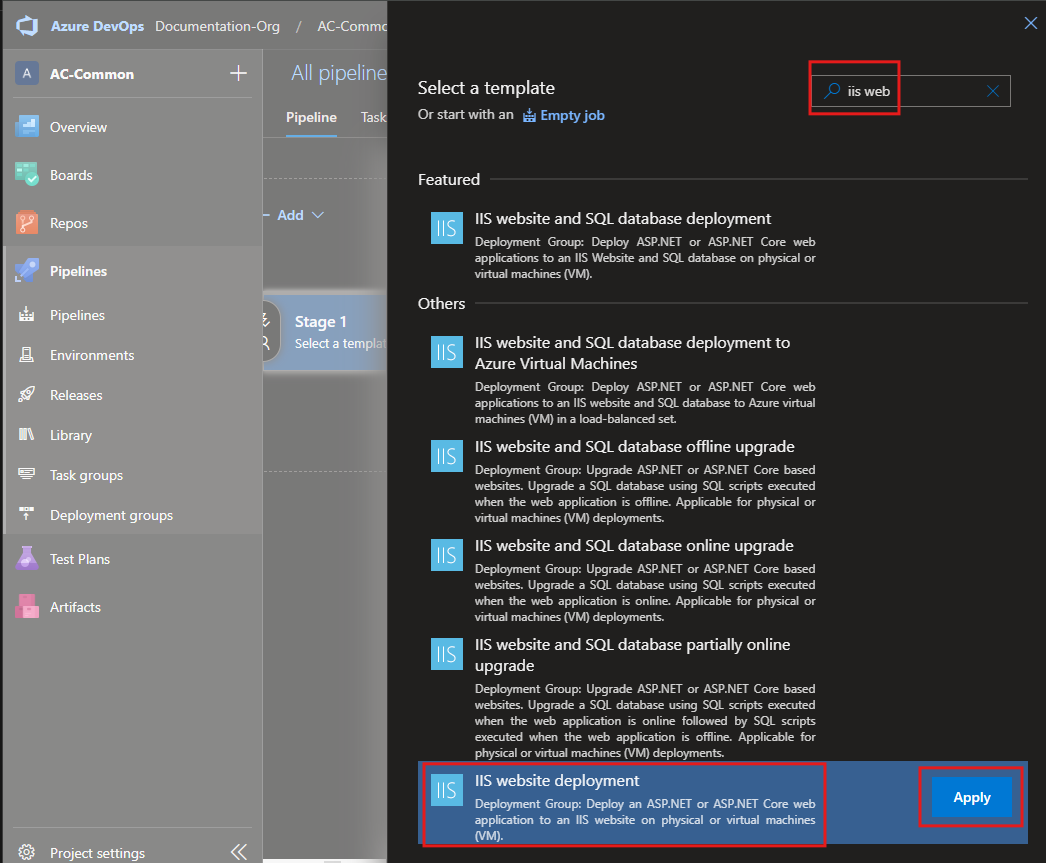
CD Template Selection
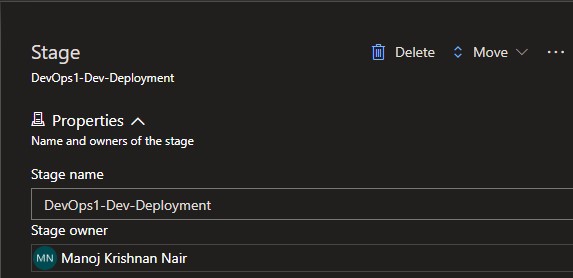
Naming the Stage
Linking the CI Pipeline

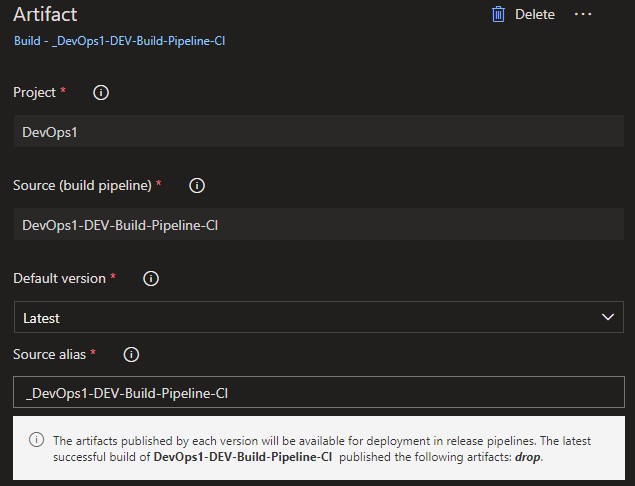
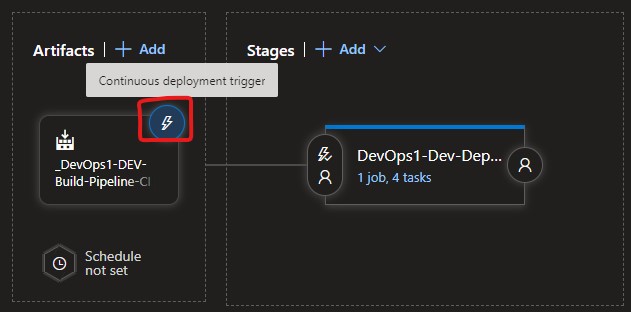
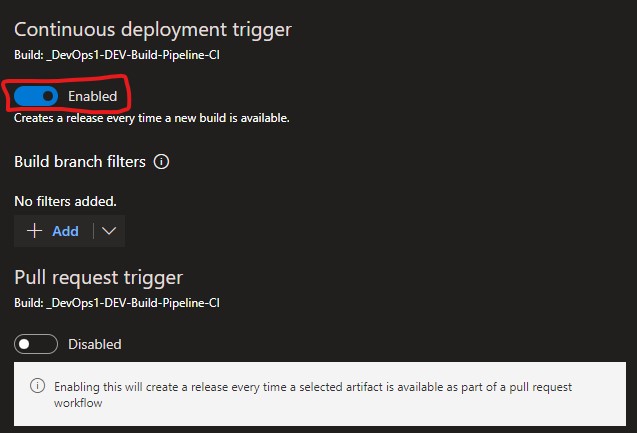
CD Trigger
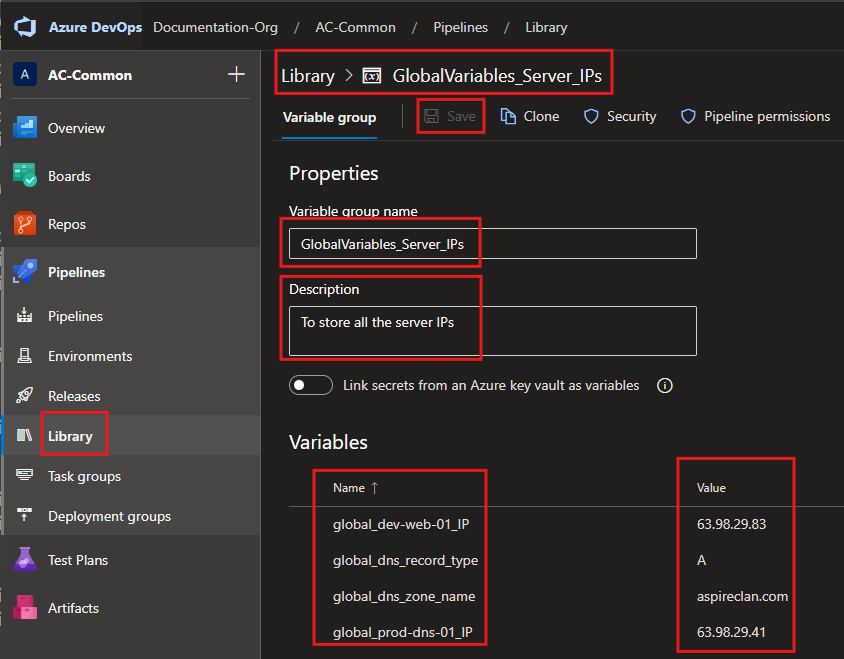
Gloval Pipeline Variables
Local Pipeline Variables
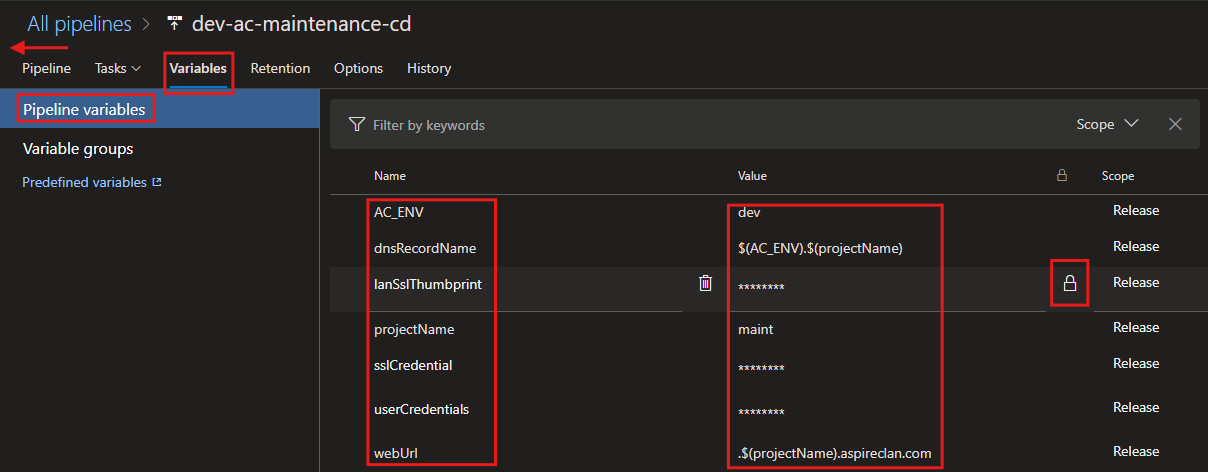
AC_ENV|devdnsRecordName|$(AC_ENV).$(projectName)lanSslThumbprint|<ssl thumbprint> {secrete variable}projectName|maintsslCredential|cert@aspireclan123#userCredentials|ved_srvcacc@Bk123#webUrl|.$(projectName).aspireclan.com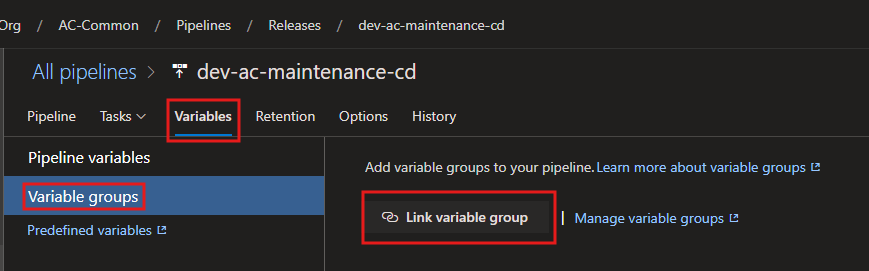
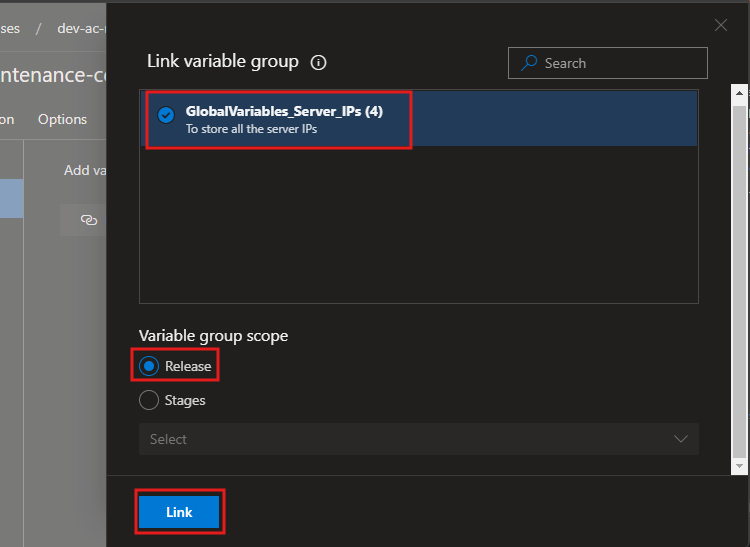
SSL Certificate Thumbprint
Pipeline Tasks
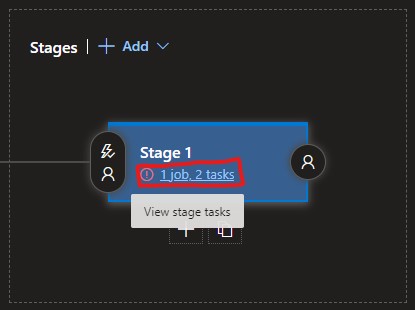
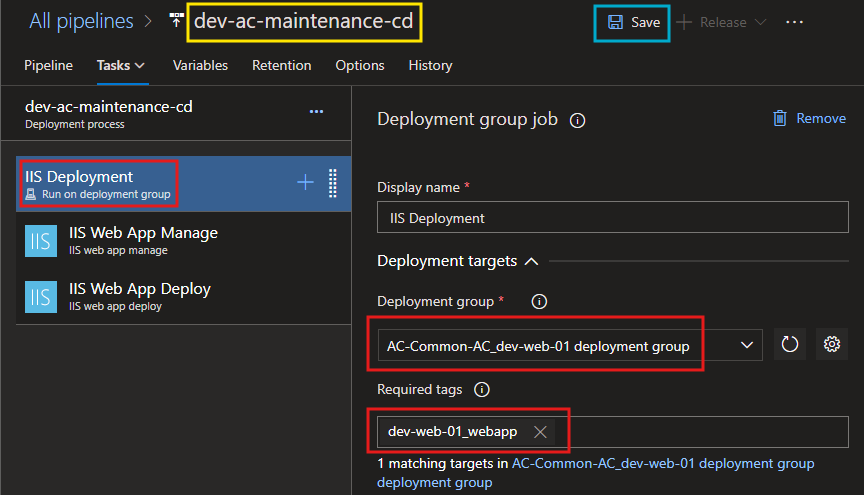
Deployment Process
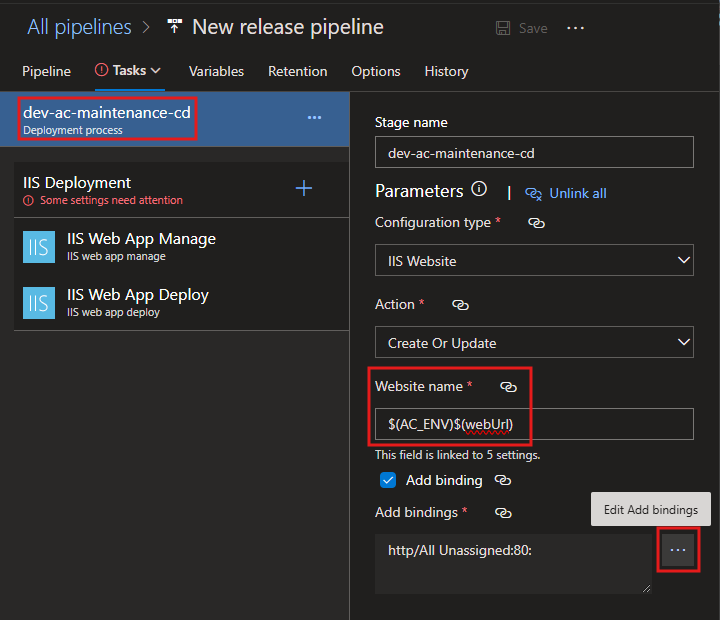
Website name:
$(AC_ENV)$(webUrl)Add Bindings
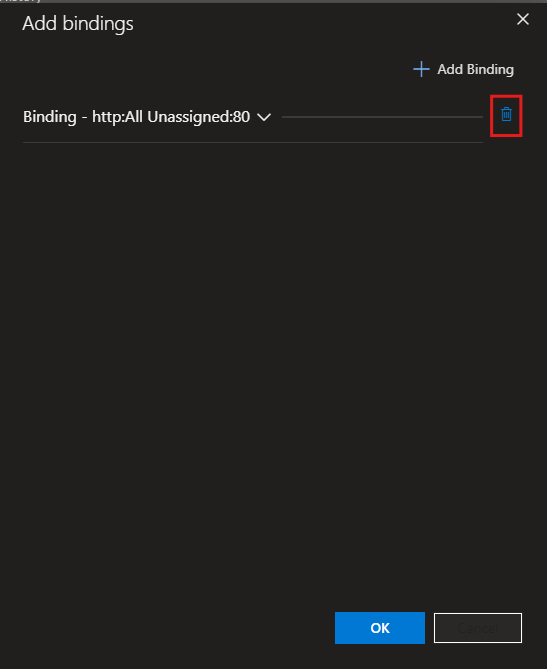
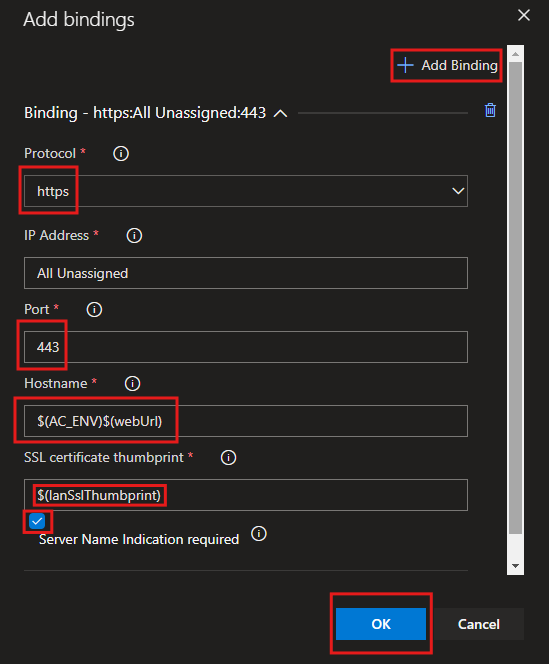
Hostname:
$(AC_ENV)$(webUrl)SSl Certificate Thumbprint:
$(lanSslThumbprint)IIS Deployment
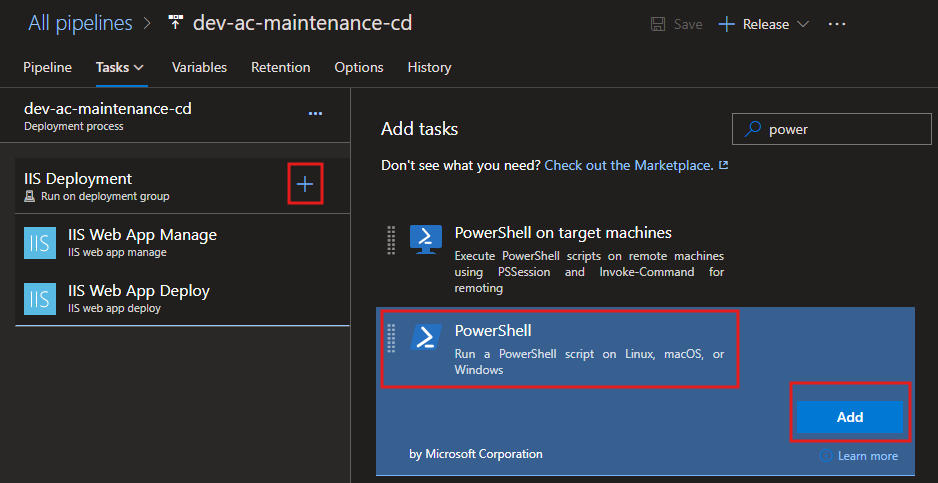
Install ssl if not installed already - Task
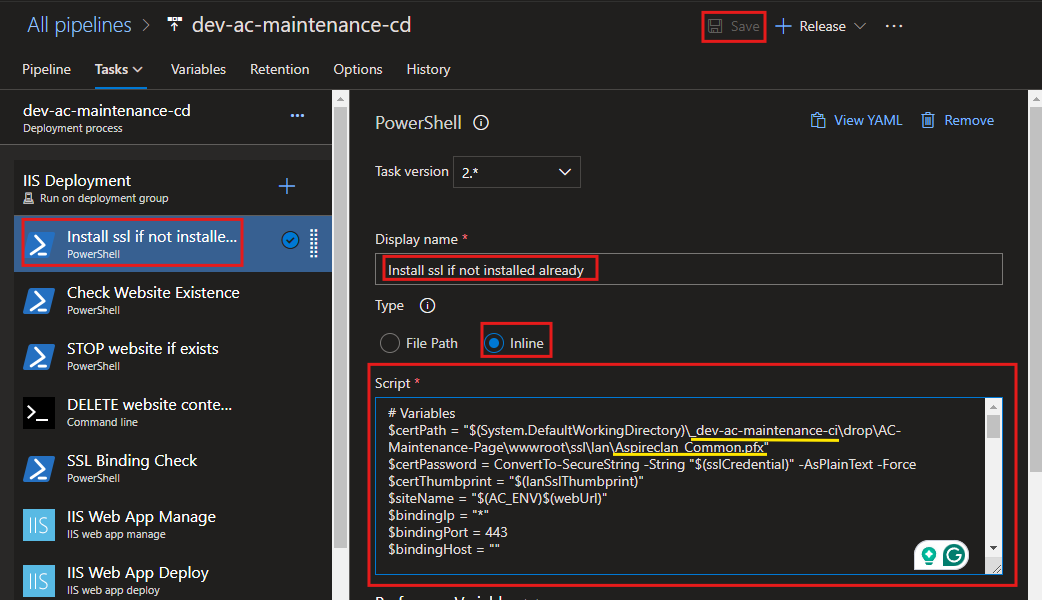
Script:
# Variables
$certPath = "$(System.DefaultWorkingDirectory)\_dev-ac-maintenance-ci\drop\AC-Maintenance-Page\wwwroot\ssl\lan\Aspireclan_Common.pfx"
$certPassword = ConvertTo-SecureString -String "$(sslCredential)" -AsPlainText -Force
$certThumbprint = "$(lanSslThumbprint)"
$siteName = "$(AC_ENV)$(webUrl)"
$bindingIp = "*"
$bindingPort = 443
$bindingHost = ""

Write-Host "======================== STARTING SSL CERTIFICATE INSTALLATION ========================" -ForegroundColor Yellow

# Check if the certificate is installed
Write-Host "Checking if the certificate with thumbprint [$certThumbprint] is already installed..." -ForegroundColor Cyan
$cert = Get-ChildItem -Path Cert:\LocalMachine\My | Where-Object { $_.Thumbprint -eq $certThumbprint }

if (-not $cert) {
    Write-Host "Certificate not found. Proceeding to installation..." -ForegroundColor Red

    try {
        # Import the SSL certificate
        Write-Host "Importing the SSL certificate from path: $certPath" -ForegroundColor Yellow
        Import-PfxCertificate -FilePath $certPath -CertStoreLocation Cert:\LocalMachine\My -Password $certPassword
        Write-Host "Certificate successfully imported into the LocalMachine store." -ForegroundColor Green
    } catch {
        Write-Host "ERROR: Failed to import the certificate. Details:" -ForegroundColor Red
        Write-Error "$_"
        exit 1
    }

    # Retrieve the imported certificate with a retry mechanism
    Write-Host "Verifying the imported certificate in the LocalMachine store..." -ForegroundColor Cyan
    $retryCount = 0
    $maxRetries = 5
    $retryInterval = 2  # seconds

    while ($retryCount -lt $maxRetries) {
        $cert = Get-ChildItem -Path Cert:\LocalMachine\My | Where-Object { $_.Thumbprint -eq $certThumbprint }

        if ($cert) {
            Write-Host "SUCCESS: Certificate with thumbprint [$certThumbprint] found in the store." -ForegroundColor Green
            break
        }

        Write-Host "WARNING: Certificate not found. Retrying in $retryInterval seconds... ($($retryCount + 1)/$maxRetries)" -ForegroundColor Yellow
        Start-Sleep -Seconds $retryInterval
        $retryCount++
    }

    if (-not $cert) {
        Write-Host "ERROR: Failed to verify the imported certificate after [$maxRetries] attempts." -ForegroundColor Red
        exit 1
    }
} else {
    Write-Host "SUCCESS: Certificate with thumbprint [$certThumbprint] is already installed." -ForegroundColor Green
}

Write-Host "====================== SSL CERTIFICATE INSTALLATION COMPLETED ======================" -ForegroundColor Yellow
Write-Host "SSL Certificate check and installation process completed successfully." -ForegroundColor Green
Check Website Existence - Task
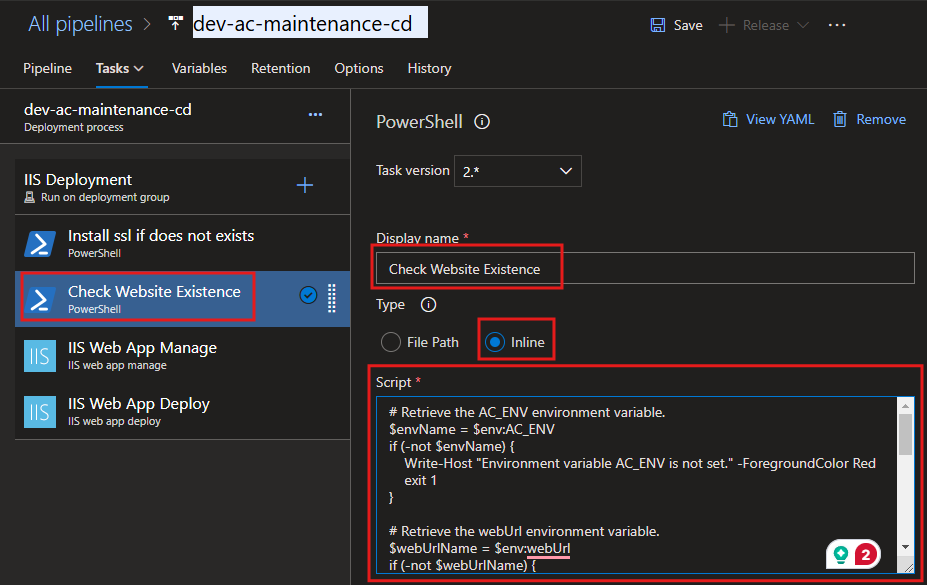
Script:
# Retrieve the AC_ENV environment variable.
$envName = $env:AC_ENV
if (-not $envName) {
    Write-Host "ERROR: Environment variable 'AC_ENV' is not set. Please ensure it is defined." -ForegroundColor Red
    exit 1
}

# Retrieve the webUrl environment variable.
$webUrlName = $env:webUrl
if (-not $webUrlName) {
    Write-Host "ERROR: Environment variable 'webUrl' is not set. Please ensure it is defined." -ForegroundColor Red
    exit 1
}

# Name of the IIS website to check
$websiteName = $envName + $webUrlName
Write-Host "Checking for IIS website: $websiteName" -ForegroundColor Cyan

# Initialize the websiteExists variable
$websiteExists = $false
Import-Module WebAdministration

try {
    # Check if the IIS website exists
    $website = Get-Website | Where-Object { $_.Name -eq $websiteName }

    if ($website -ne $null) {
        Write-Host "SUCCESS: Website '$websiteName' exists." -ForegroundColor Green
        $websiteExists = $true
    } else {
        Write-Host "WARNING: Website '$websiteName' does not exist." -ForegroundColor Yellow
    }
} catch {
    Write-Host "ERROR: Failed to check the website status. Details: $_" -ForegroundColor Red
    exit 1
}

# Set a pipeline variable to indicate whether the website exists
Write-Host "Setting pipeline variable 'websiteExists' to: $websiteExists" -ForegroundColor Cyan
"##vso[task.setvariable variable=websiteExists]$websiteExists"

Write-Host "Script execution completed." -ForegroundColor Green
STOP website if exists - Task
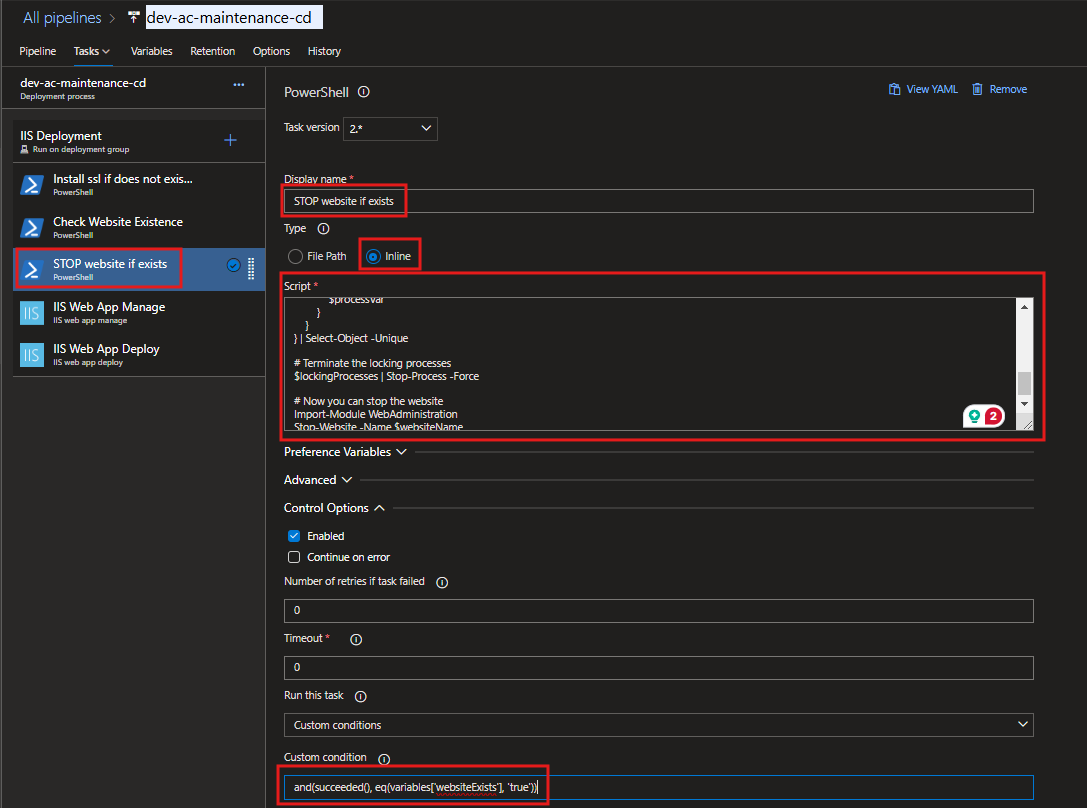
Script:
Write-Host "Checking for website: $websiteName..." -ForegroundColor Yellow

# Retrieve the AC_ENV environment variable.
$envName = $env:AC_ENV
if (-not $envName) {
    Write-Host "ERROR: Environment variable 'AC_ENV' is not set. Please ensure it is defined." -ForegroundColor Red
    exit 1
}

# Retrieve the webUrl environment variable.
$webUrlName = $env:webUrl
if (-not $webUrlName) {
    Write-Host "ERROR: Environment variable 'webUrl' is not set. Please ensure it is defined." -ForegroundColor Red
    exit 1
}

# Name of the IIS website to check
$websiteName = $envName + $webUrlName
Write-Host "Website name constructed: $websiteName" -ForegroundColor Cyan

# Define the path of the IIS website root directory based on the website name
# Update this path according to your website's directory structure
$websiteRootPath = "C:\inetpub\$(projectName)\$websiteName"
Write-Host "Website root directory path: $websiteRootPath" -ForegroundColor Cyan

# Find processes locking files in the website directory
Write-Host "Scanning for processes locking files in: $websiteRootPath..." -ForegroundColor Yellow
$lockingProcesses = Get-Process | foreach {
    $processVar = $_
    $_.Modules | foreach {
        if ($_.FileName -and $_.FileName.StartsWith($websiteRootPath)) {
            $processVar
        }
    }
} | Select-Object -Unique

if ($lockingProcesses) {
    Write-Host "The following processes are locking files in the directory:" -ForegroundColor Red
    $lockingProcesses | ForEach-Object { Write-Host " - $_.Name (PID: $($_.Id))" -ForegroundColor DarkRed }
    Write-Host "Terminating locking processes..." -ForegroundColor Yellow
    $lockingProcesses | Stop-Process -Force
    Write-Host "All locking processes terminated successfully." -ForegroundColor Green
} else {
    Write-Host "No processes are locking files in the directory. Proceeding..." -ForegroundColor Green
}

# Stop the website
Write-Host "Stopping the IIS website: $websiteName..." -ForegroundColor Yellow
Import-Module WebAdministration
try {
    Stop-Website -Name $websiteName
    Write-Host "Website '$websiteName' has been stopped successfully." -ForegroundColor Green
} catch {
    Write-Host "ERROR: Failed to stop the website '$websiteName'. Details: $_" -ForegroundColor Red
    exit 1
}

Write-Host "Script execution completed successfully." -ForegroundColor Green
Custom condition:
and(succeeded(), eq(variables['websiteExists'], 'true'))
DELETE website content if exists - Task
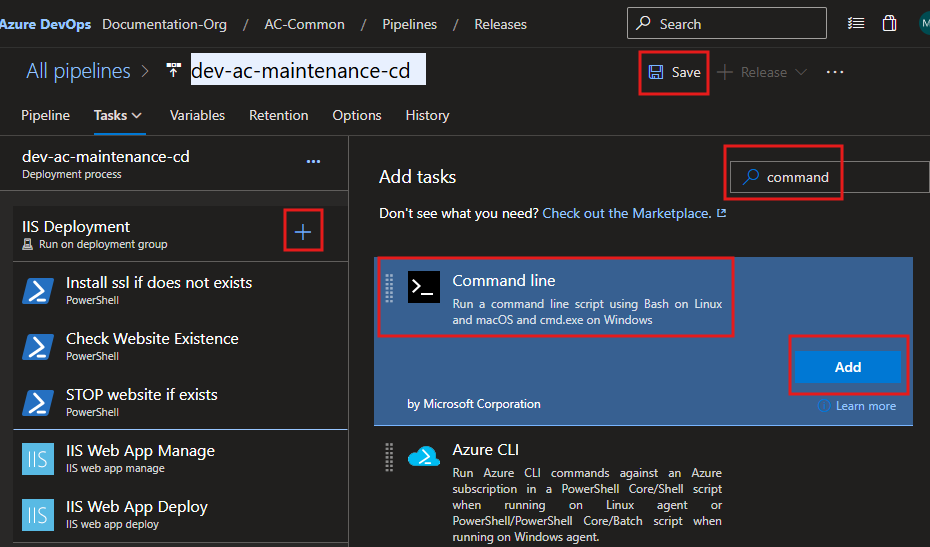
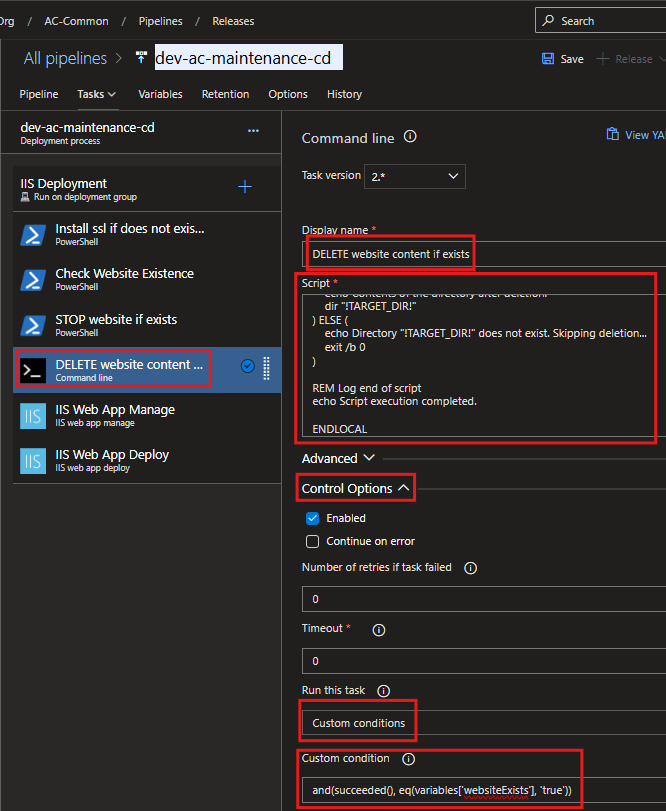
Script:
@echo off
SETLOCAL ENABLEDELAYEDEXPANSION

REM Retrieve the projectName variable
SET "PROJ_NAME=%projectName%"

REM Check if the projectName variable is set
IF "%PROJ_NAME%"=="" (
    echo ===========================================================
    echo ERROR: Environment variable "projectName" is not set.
    echo Please define "projectName" before running this script.
    echo Exiting script...
    echo ===========================================================
    exit /b 1
)

REM Retrieve the AC_ENV variable
SET "ENVIRONMENT=%AC_ENV%"

REM Check if the AC_ENV variable is set
IF "%ENVIRONMENT%"=="" (
    echo ===========================================================
    echo ERROR: Environment variable "AC_ENV" is not set.
    echo Please define "AC_ENV" before running this script.
    echo Exiting script...
    echo ===========================================================
    exit /b 1
)

REM Retrieve the webUrl variable
SET "WEB_URL=%webUrl%"

REM Check if the webUrl variable is set
IF "%WEB_URL%"=="" (
    echo ===========================================================
    echo ERROR: Environment variable "webUrl" is not set.
    echo Please define "webUrl" before running this script.
    echo Exiting script...
    echo ===========================================================
    exit /b 1
)

REM Set the directory path based on the AC_ENV and webUrl variables
SET "TARGET_DIR=C:\inetpub\%PROJ_NAME%\%ENVIRONMENT%%WEB_URL%"

REM Log start of script
echo ===========================================================
echo Starting script execution...
echo ===========================================================

REM Log the current date and time
echo Current Time: %date% %time%
echo ===========================================================

REM Check if the directory exists
IF EXIST "!TARGET_DIR!" (
    echo ===========================================================
    echo Directory "!TARGET_DIR!" found. Preparing for cleanup...
    echo ===========================================================

    REM Log the directory contents before deletion
    echo Contents of the directory before deletion:
    dir "!TARGET_DIR!"
    echo ===========================================================

    REM Attempt to remove all files and subdirectories, but not the root folder itself
    echo Attempting to remove items from "!TARGET_DIR!"...
    FOR /D %%p IN ("!TARGET_DIR!\*.*") DO rmdir "%%p" /S /Q
    del /F /Q "!TARGET_DIR!\*.*"

    REM Check if the delete command was successful
    IF !ERRORLEVEL! EQU 0 (
        echo ===========================================================
        echo SUCCESS: All items in "!TARGET_DIR!" have been deleted.
        echo ===========================================================
    ) ELSE (
        echo ===========================================================
        echo ERROR: Encountered an issue during deletion. Error code: !ERRORLEVEL!
        echo ===========================================================
    )

    REM Log the directory contents after deletion
    echo Contents of the directory after deletion:
    dir "!TARGET_DIR!"
) ELSE (
    echo ===========================================================
    echo WARNING: Directory "!TARGET_DIR!" does not exist. Skipping cleanup...
    echo ===========================================================
    exit /b 0
)

REM Log end of script
echo ===========================================================
echo Script execution completed successfully.
echo ===========================================================

ENDLOCAL
Custom condition:
and(succeeded(), eq(variables['websiteExists'], 'true'))
SSL Binding Check - Task
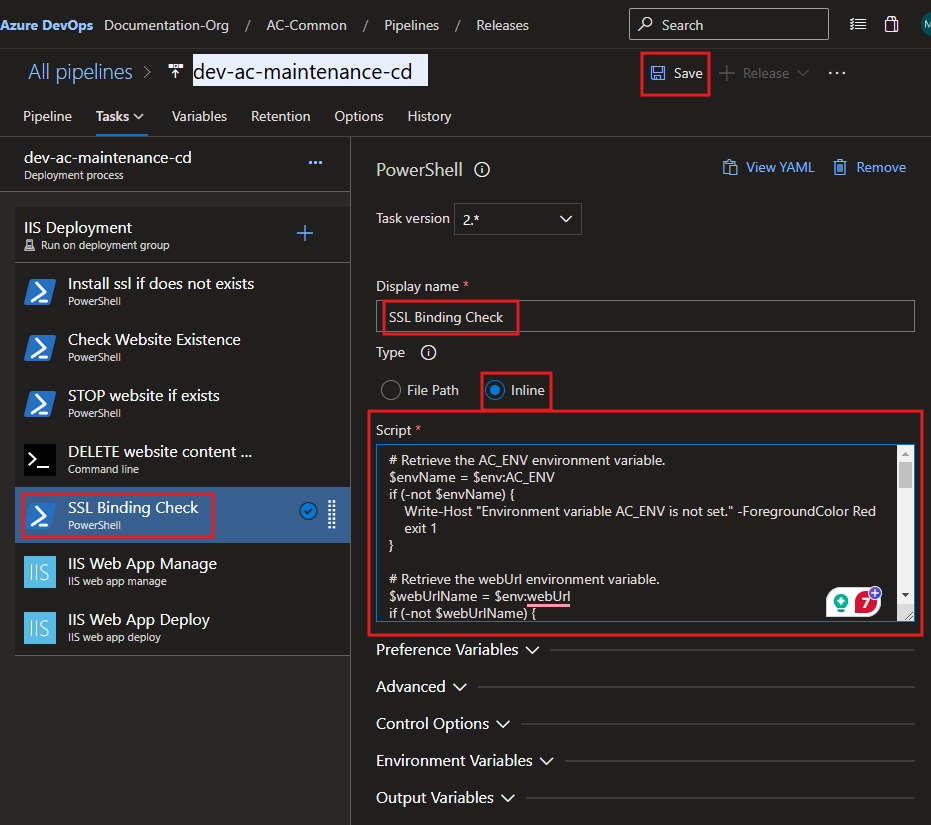
Script:
# Retrieve the AC_ENV environment variable.
$envName = $env:AC_ENV
if (-not $envName) {
    Write-Host "=================================================================" -ForegroundColor Red
    Write-Host "ERROR: Environment variable 'AC_ENV' is not set." -ForegroundColor Red
    Write-Host "Please ensure 'AC_ENV' is defined before running this script." -ForegroundColor Red
    Write-Host "================================================================="
    exit 1
}

# Retrieve the webUrl environment variable.
$webUrlName = $env:webUrl
if (-not $webUrlName) {
    Write-Host "=================================================================" -ForegroundColor Red
    Write-Host "ERROR: Environment variable 'webUrl' is not set." -ForegroundColor Red
    Write-Host "Please ensure 'webUrl' is defined before running this script." -ForegroundColor Red
    Write-Host "================================================================="
    exit 1
}

# Name of the IIS website to check
$hostname = $envName + $webUrlName
$port = "443"
$hostnamePort = "${hostname}:${port}"

Write-Host "=================================================================" -ForegroundColor Yellow
Write-Host "Checking SSL binding for hostname: $hostname and port: $port" -ForegroundColor Cyan
Write-Host "Target hostname and port combination: $hostnamePort" -ForegroundColor Cyan
Write-Host "================================================================="

# Attempt to retrieve the current SSL certificate binding
try {
    $bindingExists = & netsh http show sslcert hostnameport=$hostnamePort
    Write-Host "Checking for SSL certificate binding. Command Output:" -ForegroundColor Green
    Write-Host "-------------------------------------------------------------" -ForegroundColor Green
    Write-Host $bindingExists
    Write-Host "-------------------------------------------------------------" -ForegroundColor Green
} catch {
    Write-Host "ERROR: Failed to check SSL binding. Details:" -ForegroundColor Red
    Write-Host $_ -ForegroundColor Red
    exit 1
}

# Proceed only if the binding exists
if ($bindingExists -match "Certificate Hash") {
    Write-Host "=================================================================" -ForegroundColor Yellow
    Write-Host "SSL binding exists for $hostnamePort. Proceeding to remove it..." -ForegroundColor Green
    Write-Host "================================================================="
    try {
        # Remove the existing SSL certificate binding
        & netsh http delete sslcert hostnameport=$hostnamePort
        Write-Host "SUCCESS: SSL binding removed successfully for $hostnamePort." -ForegroundColor Green
    } catch {
        Write-Host "ERROR: Failed to remove SSL binding. Details:" -ForegroundColor Red
        Write-Host $_ -ForegroundColor Red
        exit 1
    }
} else {
    Write-Host "=================================================================" -ForegroundColor Yellow
    Write-Host "INFO: No SSL binding exists for $hostnamePort. Skipping removal." -ForegroundColor Blue
    Write-Host "================================================================="
}

# Continue with further commands or cleanup as needed
Write-Host "=================================================================" -ForegroundColor Yellow
Write-Host "SSL binding check and removal process completed." -ForegroundColor Green
Write-Host "================================================================="

# Set an explicit success exit code
exit 0
IIS Web App Manage - Task
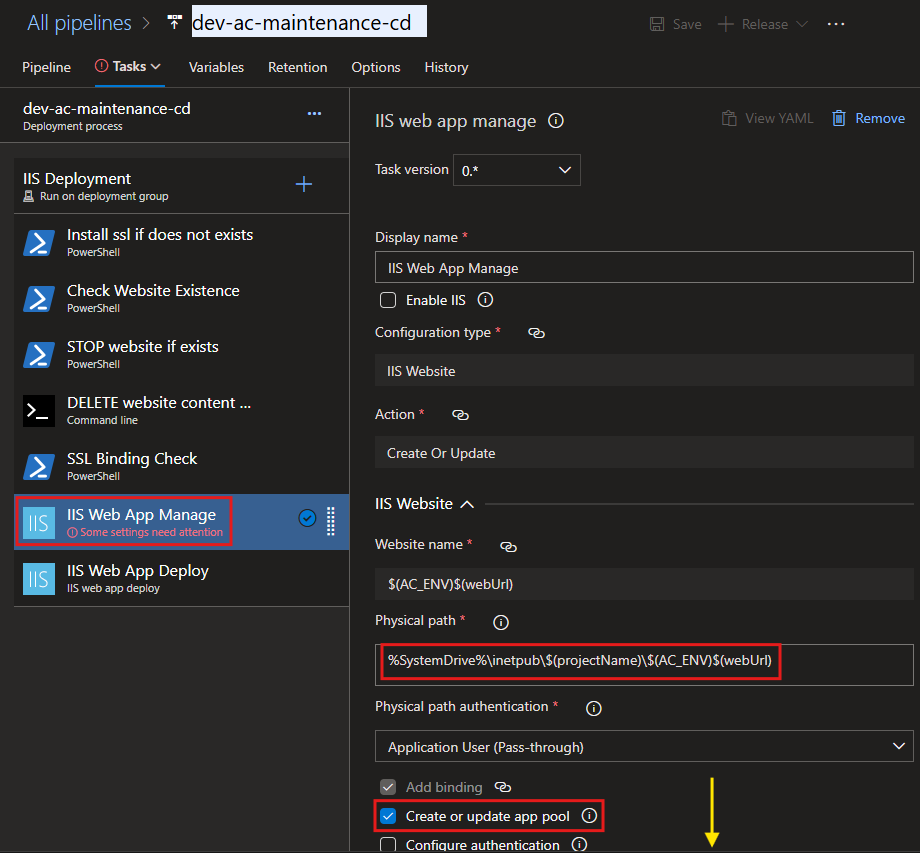
Physical path:
%SystemDrive%\inetpub\$(projectName)\$(AC_ENV)$(webUrl)
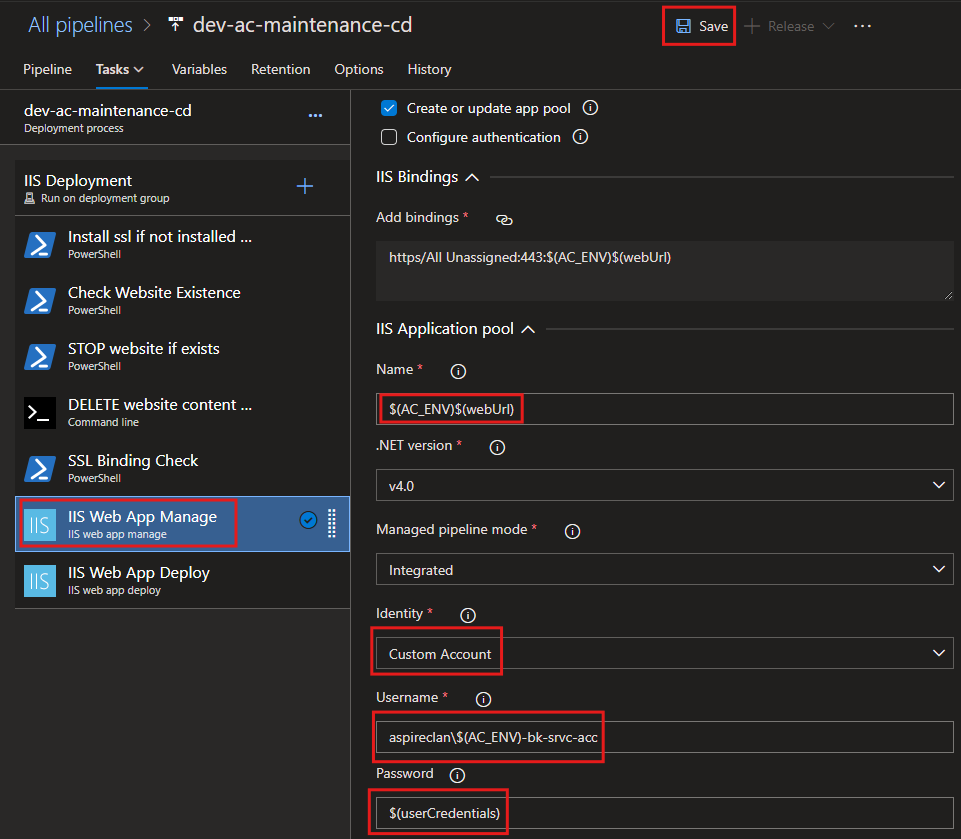
Name:
$(AC_ENV)$(webUrl)
Username:
aspireclan\$(AC_ENV)-bk-srvc-acc
Password:
$(userCredentials)
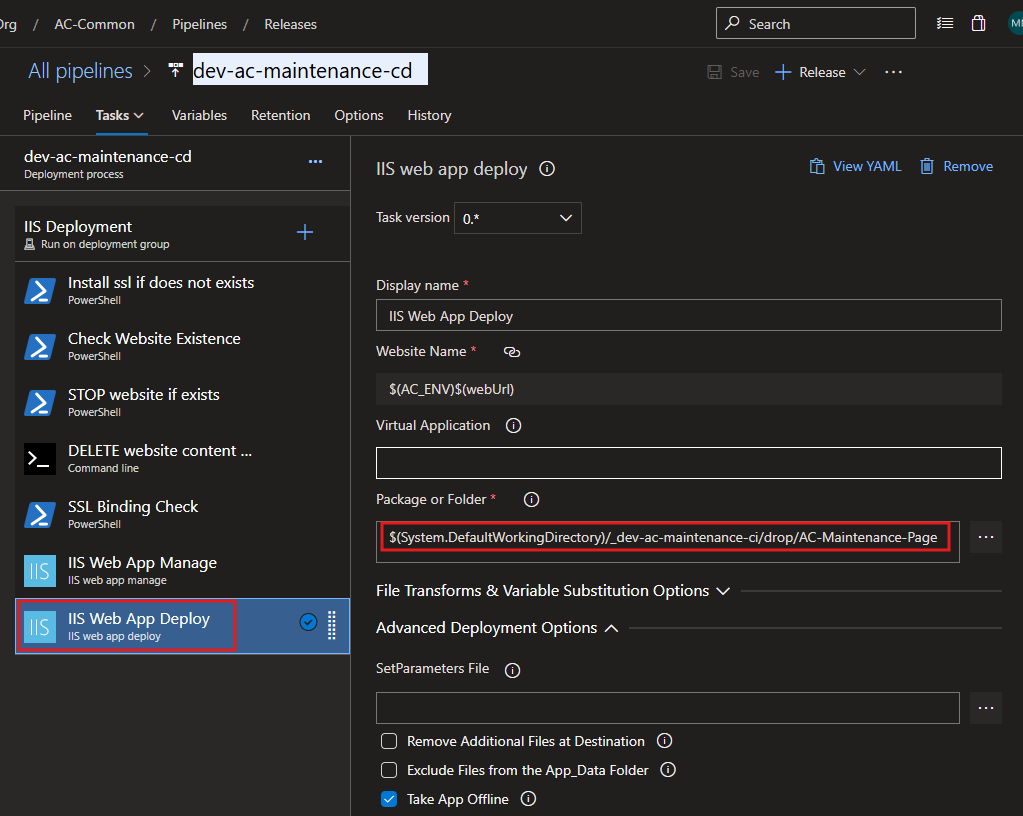
IIS Web App Deploy - Task
Create DNS entry if not exists - Task
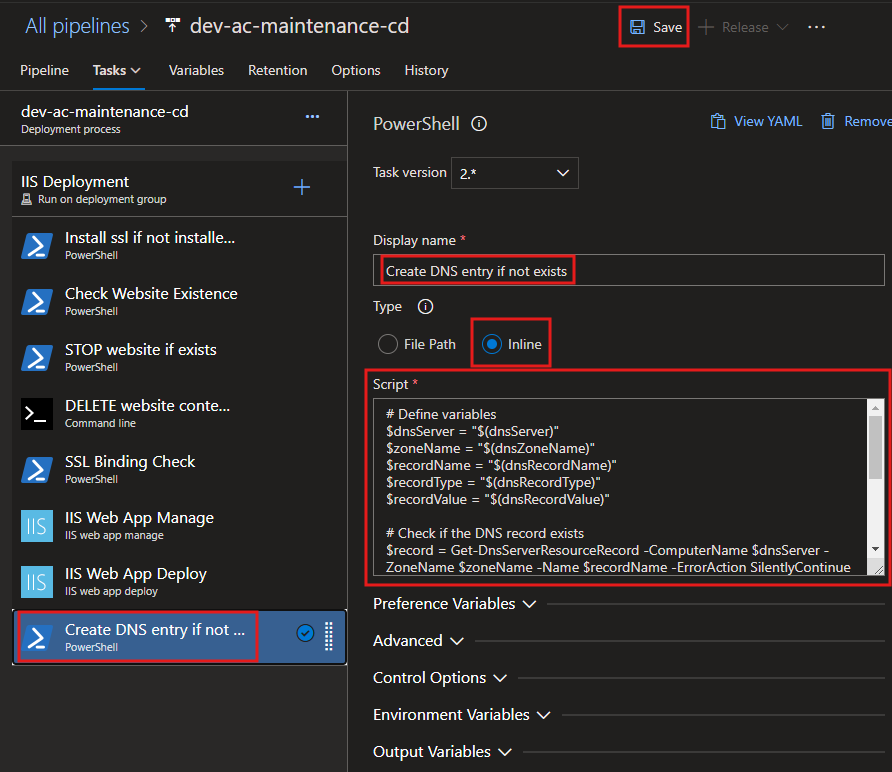
Script:
# Check if the DnsServer module is available
Write-Host "=================================================================" -ForegroundColor Yellow
Write-Host "Step 1: Checking for DnsServer module availability..." -ForegroundColor Cyan
Write-Host "================================================================="

if (-not (Get-Module -ListAvailable -Name DnsServer)) {
    Write-Host "INFO: The DnsServer module is not installed. Attempting to install..." -ForegroundColor Yellow

    # Check if the current system is a Windows Server or client OS
    if (Get-WindowsFeature -Name RSAT-DNS-Server -ErrorAction SilentlyContinue) {
        try {
            Write-Host "INFO: Installing DNS Server Tools on Windows Server..." -ForegroundColor Yellow
            Install-WindowsFeature -Name RSAT-DNS-Server -IncludeManagementTools -ErrorAction Stop
            Write-Host "SUCCESS: DNS Server Tools installed successfully on Windows Server." -ForegroundColor Green
        } catch {
            Write-Host "ERROR: Failed to install DNS Server Tools on Windows Server." -ForegroundColor Red
            Write-Error $_
            exit 1
        }
    } elseif ((Get-WindowsCapability -Name Rsat.Dns.Tools~~~~0.0.1.0 -Online).State -ne "Installed") {
        try {
            Write-Host "INFO: Installing RSAT DNS Tools on Windows 10/11..." -ForegroundColor Yellow
            Add-WindowsCapability -Online -Name Rsat.Dns.Tools~~~~0.0.1.0 -ErrorAction Stop
            Write-Host "SUCCESS: RSAT DNS Tools installed successfully on Windows 10/11." -ForegroundColor Green
        } catch {
            Write-Host "ERROR: Failed to install RSAT DNS Tools on Windows 10/11." -ForegroundColor Red
            Write-Error $_
            exit 1
        }
    } else {
        Write-Host "ERROR: Unable to detect the installation method for the DnsServer module on this system." -ForegroundColor Red
        exit 1
    }
} else {
    Write-Host "SUCCESS: The DnsServer module is already available." -ForegroundColor Green
}

Write-Host "=================================================================" -ForegroundColor Yellow
Write-Host "Step 2: Preparing to manage DNS records..." -ForegroundColor Cyan
Write-Host "================================================================="

# Define variables
$dnsServer = "$(global_prod-dns-01_IP)"
$zoneName = "$(global_dns_zone_name)"
$recordName = "$(dnsRecordName)"
$recordType = "$(global_dns_record_type)"
$recordValue = "$(global_dev-web-01_IP)"

Write-Host "INFO: Using the following DNS details:" -ForegroundColor Cyan
Write-Host "-----------------------------------------------------------------" -ForegroundColor Cyan
Write-Host "  DNS Server: $dnsServer" -ForegroundColor Green
Write-Host "  DNS Zone Name: $zoneName" -ForegroundColor Green
Write-Host "  Record Name: $recordName" -ForegroundColor Green
Write-Host "  Record Type: $recordType" -ForegroundColor Green
Write-Host "  Record Value: $recordValue" -ForegroundColor Green
Write-Host "-----------------------------------------------------------------" -ForegroundColor Cyan

# Check if the DNS record exists
Write-Host "INFO: Checking if the DNS record already exists..." -ForegroundColor Yellow
$record = Get-DnsServerResourceRecord -ComputerName $dnsServer -ZoneName $zoneName -Name $recordName -ErrorAction SilentlyContinue

if ($null -eq $record) {
    Write-Host "INFO: DNS record does not exist. Preparing to create a new record..." -ForegroundColor Yellow

    try {
        # Add the DNS record
        Write-Host "INFO: Creating DNS record..." -ForegroundColor Yellow
        Add-DnsServerResourceRecordA -ComputerName $dnsServer -ZoneName $zoneName -Name $recordName -IPv4Address $recordValue
        Write-Host "SUCCESS: DNS record created successfully." -ForegroundColor Green
        Write-Host "  - Record Name: $recordName" -ForegroundColor Green
        Write-Host "  - Record Type: $recordType" -ForegroundColor Green
        Write-Host "  - Record Value: $recordValue" -ForegroundColor Green
    } catch {
        Write-Host "ERROR: Failed to create DNS record. Details:" -ForegroundColor Red
        Write-Error $_
        exit 1
    }
} else {
    Write-Host "INFO: DNS record already exists." -ForegroundColor Cyan
    Write-Host "  - Record Name: $recordName" -ForegroundColor Cyan
    Write-Host "  - Record Type: $recordType" -ForegroundColor Cyan
    Write-Host "  - Existing Record Value: $($record.RecordData.IPv4Address)" -ForegroundColor Cyan
}

Write-Host "=================================================================" -ForegroundColor Yellow
Write-Host "Step 3: DNS record management completed successfully." -ForegroundColor Green
Write-Host "================================================================="
START website if exists - Task
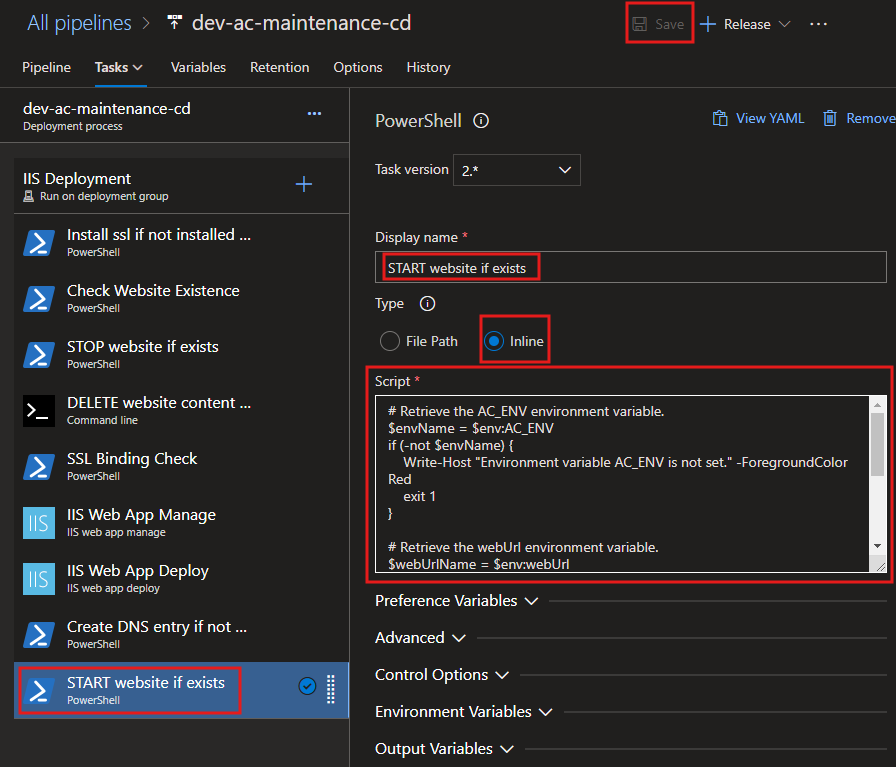
Script:
# Retrieve the AC_ENV environment variable.
$envName = $env:AC_ENV
if (-not $envName) {
    Write-Host "=================================================================" -ForegroundColor Red
    Write-Host "ERROR: Environment variable 'AC_ENV' is not set." -ForegroundColor Red
    Write-Host "Please ensure 'AC_ENV' is defined before running this script." -ForegroundColor Red
    Write-Host "================================================================="
    exit 1
}

# Retrieve the webUrl environment variable.
$webUrlName = $env:webUrl
if (-not $webUrlName) {
    Write-Host "=================================================================" -ForegroundColor Red
    Write-Host "ERROR: Environment variable 'webUrl' is not set." -ForegroundColor Red
    Write-Host "Please ensure 'webUrl' is defined before running this script." -ForegroundColor Red
    Write-Host "================================================================="
    exit 1
}

# Name of the IIS website to check
$websiteName = $envName + $webUrlName

Write-Host "=================================================================" -ForegroundColor Yellow
Write-Host "Step 1: Preparing to start IIS website..." -ForegroundColor Cyan
Write-Host "================================================================="
Write-Host "INFO: Constructed website name: $websiteName" -ForegroundColor Green

# Import the WebAdministration module
Write-Host "INFO: Importing the WebAdministration module..." -ForegroundColor Cyan
try {
    Import-Module WebAdministration -ErrorAction Stop
    Write-Host "SUCCESS: WebAdministration module imported successfully." -ForegroundColor Green
} catch {
    Write-Host "ERROR: Failed to import the WebAdministration module. Details:" -ForegroundColor Red
    Write-Host $_ -ForegroundColor Red
    exit 1
}

Write-Host "=================================================================" -ForegroundColor Yellow
Write-Host "Step 2: Checking website status..." -ForegroundColor Cyan
Write-Host "================================================================="

# Check if the website exists
$website = Get-Website | Where-Object { $_.Name -eq $websiteName }

if ($null -eq $website) {
    Write-Host "ERROR: The website '$websiteName' does not exist in IIS." -ForegroundColor Red
    Write-Host "Please verify the website name and ensure it is configured in IIS." -ForegroundColor Red
    exit 1
} else {
    Write-Host "INFO: The website '$websiteName' exists in IIS." -ForegroundColor Green
}

# Check the current state of the website
$currentState = $website.State
Write-Host "INFO: Current state of '$websiteName': $currentState" -ForegroundColor Cyan

# Start the website if it is not already started
if ($currentState -eq "Started") {
    Write-Host "SUCCESS: The website '$websiteName' is already running." -ForegroundColor Green
} else {
    Write-Host "INFO: The website '$websiteName' is not running. Attempting to start..." -ForegroundColor Yellow
    try {
        Start-Website -Name $websiteName
        Write-Host "SUCCESS: The website '$websiteName' has been started successfully." -ForegroundColor Green
    } catch {
        Write-Host "ERROR: Failed to start the website '$websiteName'. Details:" -ForegroundColor Red
        Write-Host $_ -ForegroundColor Red
        exit 1
    }
}

Write-Host "=================================================================" -ForegroundColor Yellow
Write-Host "Step 3: IIS website check and start process completed successfully." -ForegroundColor Green
Write-Host "================================================================="