| LE64 Command | le64 --key udmse-account.key --email "aspireclan1208@gmail.com" --csr udmse-domain.csr --csr-key udmse-domain.key --crt udmse-domain.crt --generate-missing --domains "udmse.aspireclan.com" --export-pfx cert@aspireclan123# --handle-as dns --live
|
DNS Challenge
| Public DNS Entries: |
| Created Date | |
| Expiry Date | |
| Certification creation steps | How to use Let's Encrypt... |
| Certificate installation Steps |
- Enable SSH in UDM SE if not enabled already
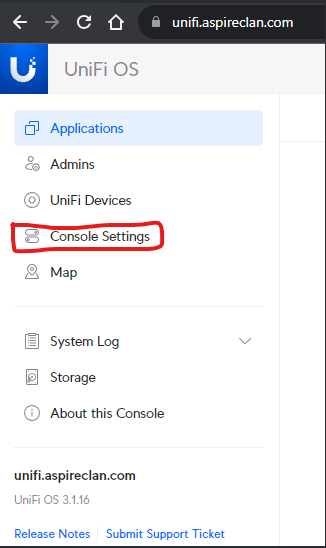
- Login to unifi.aspireclan.com or using direct IP address
- Go to Console Settings
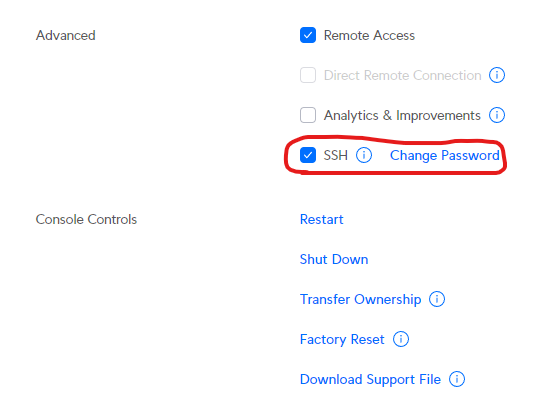
- Scroll down to SSH check box and ensure it is checked
- Click on change password and change it if you do not remember the SSH password
- Current password:
- Install KeyStore Explorer.exe and Open it
- Click on Create a new keystore
- Select keystore type as JKS
- Click OK
- Click on Tools Menu
- Click Import Key Pair
- Select PKCS#8 type
- Click OK
- Uncheck Encrypted Private Key
- Browse the domain.key file generated by Let's Encrypt
- Browse the .cert file generated by Let's Encrypt
- Click Import
- Enter Alias: unifi
- Enter and confirm New Password
- Click OK
- Key Pair Import should succeed
- Now, click on the Save button to save the imported key pair as a keystone file
- Enter and confirm "the same password" entered above
- Click OK
- Save the keystone file to a windows folder location. Filename: "keystore"
- Open WINSCP
- Select File Protocol as SCP
- Host name: UDMSE_IP Address. (Enter the IP Address as xx.xx.xx.1 not xx.xx.xx.01)
- Port 22
- User name: root
- Password: SSH Password
- Go to the root folder
- Then go to /data/unifi/data/
- Backup the existing keystore file
- Copy the newly created keystore file to this location and overwrite the old
- After the above step, go to /data/unifi-core/config/
- Backup the existing unifi-core.crt and unifi-core.key files
- Rename the .crt and .key files generated by Let's Encrypt to unifi-core.crt and unifi-core.key
- Now copy the .crt and domain.key created by Let's Encrypt [IMPORTANT: must copy the domain.key not the account.key]
- Reboot the UDM SE
- SSH into UDM SE using PuTTY
- Execute the command reboot
- Close KeyStore Explorer.exe
- Close WINSCP
- Close Putty
|
| Tools | |
| Video reference | |